
NEI Features for JEI
Modby Iambda
GTNH-NEI Features for JEI
Description
NEI Features for JEI
Brings the best parts of GTNH's NotEnoughItems to Just Enough Items: a bookmark panel that plans and crafts whole recipe chains, favorite recipes, a crafting tree, autocrafting, cheat mode, subsets and much more. JEI stays your recipe viewer; this adds NEI's tools on top.
Features
From NEI
Ported from GTNH NotEnoughItems:
- Bookmark panel on the left, with groups, todo-list and crafting-chain views, collapsed recipes, tag slots, multiple lists and drag and drop
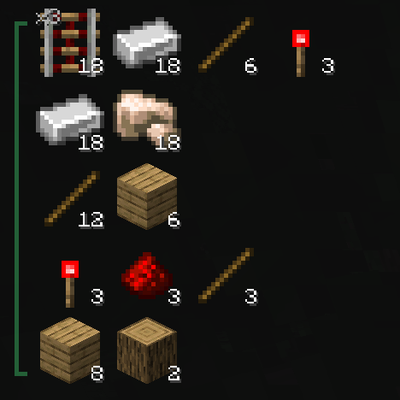
- Crafting chains: every sub-recipe and how often it runs; crafting tools counted by the durability they need
- Favorite recipes and recipe trees: a heart on every recipe; save a whole tree of favorites as one group
- Crafting tree window: the whole chain as a zoomable tree with stats; pick another recipe for an item, use an inventory snapshot, search it, save it as one image
- Autocrafting (Shift + C) of a whole chain at a crafting table, pulling items from chests (V), chat links for items, recipes and groups (Ctrl + L)
- Cheat mode, utility buttons (time of day, rain, heal, game mode) and the quantity field
- Recipe search under JEI's recipe screen (
<iron >rail), and the same search syntax in the crafting tree - Recipe screen extras: all items of a tag slot in one grid (middle click), fill the crafting grid with a recipe (S), highlight of the ingredients you already have, the favorite recipe as a picture beside item tooltips, favorites generated for items with a single recipe
- JEI's item list: subsets (filter by mod or creative tab), collapsible item groups, English-name search, copy an item's name, tags or id
- Item zoom, craftables panel, highlight tips, item info pages, data dumps
- NEI's options screen and many of its settings (a few defaults differ from NEI's)
- Fluid slots of JEI recipes in bookmarks and the crafting tree (26.1.2 and 26.2)
Added by this mod
Not in NEI:
- Crafting-chain tooltip that counts your inventory: hold Shift for the missing items in red and the crafts still needed
- Crafting mode in the crafting tree: it counts your inventory live, and storage you open tints the items the tree still needs
- G in cheat mode gives everything a crafting chain is missing, tools included
- EMI support (1.20.1 and 1.21.1): the bookmark panel, favorites, recipe trees, autocrafting and the recipe search work with EMI's screens and recipes
- JEI's own bookmark button fills the bookmark panel; JEI's settings on one page in the addon's settings
- The bookmark panel moves out of the way of other mods' buttons (FTB mods, Curios and more)
- Tools in crafting chains list durability usage instead of count
Full feature guide
Every key below is the default and can be changed under Controls > NEI Features for JEI. Hold Alt over any item or bookmark group to see the keys that work on it right there.
Settings
- Open them with the N button in JEI's bottom-left button row, or the mod's Config button in the mod list.
- Ctrl + click on N cycles between Recipe Mode, Utility Mode and Cheat Mode (see Cheat mode below).
- The settings are laid out like NEI's options screen: Inventory holds most options and the sub-pages (Bookmarks Panel, Recipes GUI, History Panel, Craftables Panel, Item Zoom Panel, Favorites); World holds Highlight Tooltips; Tools holds Data Dumps. JEI Options has JEI's own settings on one page in the same style, with a title row for each JEI category (in a world only), and Report Issues opens the issue tracker.
- Settings are saved in
config/neiaddon-client.toml.
Bookmark panel
A grid of bookmarked items on the left of inventory screens and JEI's recipe screen.
Adding and removing
- A over any item (JEI's list, a recipe, your inventory, the panel) adds it, or removes it if it is already there. Ctrl + A adds it with a count (the Stack Controls amount, or the stack size).
- A over an item inside a recipe saves that recipe with it (setting: Bookmark Items With Recipe); its tooltip then shows the recipe. The same item from two different recipes is two bookmarks.
- A over a recipe's output bookmarks the recipe instead, when JEI's own "Bookmark Output as Recipe" option is on: the output item with the recipe type's icon in its corner, the recipe shown while Shift is held.
- Drag items from JEI's list onto the panel.
- Drag a bookmark onto another mod's filter or ghost slot to set that slot to it.
- JEI's own bookmark button and key fill this panel too (setting: JEI's Bookmark Button Fills This Panel).
- Fluids can be bookmarked (one bucket; Ctrl keeps the slot's amount).
- B shows or hides the panel; so does JEI's bookmark button. While you type in a search field (JEI's, AE2's, the creative inventory's...), the addon's keys do nothing, so B and the other letters just type.
Using bookmarks
- Left click / R: recipes for the item. On a bookmarked recipe, JEI opens on that recipe first.
- Right click / U: what the item is used in.
- Shift + drag: move a bookmark (a recipe moves as a whole).
- Ctrl + scroll: change the amount. Ctrl + Alt + scroll: change it in steps of the Item Quantity (one stack by default).
- Shift + scroll on an ingredient that accepts several items (a tag) switches the item.
Groups - the thin strip left of the slots:
- Drag with left click over rows to make a group or extend one; drag with right click to take rows out.
- Left click the strip: toggle todo-list view (one recipe per row). Right click: toggle crafting chain (green bracket, see Crafting chains below). Alt + left click: collapse or expand the group.
- Shift + drag the strip moves the whole group. Ctrl + scroll scales every amount in it.
- Shift + A over the strip removes the group.
- The page label at the top is the handle of the ungrouped bookmarks and takes the same clicks.
Pages
- The arrows at the top flip grid pages; the arrows at the bottom switch bookmark lists. A new empty list always follows the last one, so you can keep separate lists per project.
- Bookmarks are saved in
config/neiaddon/bookmarks.txt(setting World Specific: one list per world or server).
Look
- Bookmark Scale (50-100 %) makes the slots smaller so more fits on a page.
- Show Recipe Marker: mark recipe results with an R, the recipe type's icon (Show Handler Icon, size with Handler Icon Scale) or a tinted background.
- Panel Margin Top / Left move the panel if it overlaps something another mod draws. The panel already moves out of the way of other mods' buttons by itself.
Favorite recipes and recipe trees
- Every recipe in JEI's recipe screen gets a heart button. Click it to make that recipe the item's favorite (red heart). Hold Alt over it to see its keys. Scroll over the heart to pick which result it is for, or press Shift + F over a result.
- Shift + A over a heart saves the whole recipe tree (the recipe, the favorite recipe of each ingredient, and so on, up to the Depth setting) as a new bookmark group with the crafting chain on. Shift + A over a recipe saves just that recipe.
- T (or Shift + T) over a heart builds the tree from the current favorites and opens it in the crafting tree. If the page already has a tree group whose top recipe is this recipe, that group is refreshed in place (same place, its top recipe keeps its run count); otherwise the tree is saved as a new group.
- Over an item in JEI's list: Shift + A bookmarks its favorite recipe, Shift + F saves its favorite recipe tree.
- Generate Single-Recipe Favorites makes an item with only one recipe use it as its favorite.
- Show Recipe Tooltips in Right Panel / Recipe Gui: an item's favorite recipe as a picture beside its tooltip.
Crafting chains
Turn a group into a crafting chain with a right click on its strip. The mod then works out how often every recipe in the group has to run so the end result gets everything it needs, using what you already have first.
- The first result of each recipe shows xN: how often it runs.
- Hover the strip for the chain's tooltip: results, required crafts and ingredients. Hold Shift to count your inventory: missing ingredients turn red. Shift + Ctrl plans only what is still missing (like Ctrl + Shift + C).
- Crafting tools (GregTech hammers, files...) are listed by the durability the chain needs, in blue, and turn red when all the tools of that kind in your inventory together don't have enough. A worn tool counts as the same tool.
- Alt + click a recipe in a chain to collapse it into one block.
- Storage you open tints the items the crafting trees in crafting mode on this page still need (orange); setting Highlight Chain Items.
Crafting tree
T over a crafting chain's strip opens it as a tree (or T over a recipe's heart, see Favorite recipes).
- Scroll to zoom (setting: Tree Zoom without Ctrl), drag to pan, Alt + click an item to collapse or expand its recipe. Ctrl + scroll changes amounts, as in the panel. Hold Alt for the keys.
- Pick a recipe for an item: click the item (left click for recipes, right click for usages). JEI's recipe screen opens; click the heart of the recipe you want (with EMI on 1.20.1 and 1.21.1: EMI's "Set as default recipe" button on EMI's screen). That recipe replaces the clicked item's recipe in the tree, and the tree opens again. The recipe becomes the favorite of the item you looked up for recipes (for a usages lookup, the item of the replaced node, if any; else the heart's selected result when the recipe does not make that item). The click never turns a favorite off: it replaces that item's earlier favorite, and other items lose this recipe as their favorite, as with any favorite. With EMI, nothing is picked while EMI is still loading its recipes; the tree keeps waiting.
- The crafting table button turns on crafting mode: the tree counts your inventory live (about once a second), so the have and still-needed numbers and the greyed items follow what you carry, and storage you open is tinted for what the tree still needs.
- The toolbar can use an inventory snapshot, fit the tree to the view, collapse finished items, collapse or expand all, send the group to chat, and save the whole tree as an image in the screenshots folder.
- The stats panel lists handlers, ingredients and results; click a handler to highlight its recipes.
- The search box finds items in the tree.
Autocrafting
Open a crafting table (or your inventory for 2x2 recipes) and press Shift + C:
- over a crafting chain's strip: crafts the whole chain;
- over a recipe's result in the panel: crafts that recipe;
- over an item with a favorite recipe: crafts it once.
Ctrl + Shift + C only crafts what your inventory is missing. Plain Shift + C crafts the full amount again.
- It moves the ingredients with JEI's recipe transfer and crafts as many sets at once as fit. JEI must be installed on the server in multiplayer.
- It works at any crafting table JEI can fill, such as Tinkers' Crafting Station and Sophisticated Storage's crafting upgrade (not while the upgrade refills its own grid). Leftover ingredients go back into the table's own storage (a crafting station's side chest, the Sophisticated storage) when they came from there, and so do the items made on the way. The crafted items and your own tools end up in your inventory.
- It works in an AE2 crafting terminal too (not tested on 26.1.2 and 26.2 yet): the network's items count as yours, the grid is filled from the network, and what is left in the grid goes back into the network at the end (chat says so when it couldn't). A recipe whose ingredients are not all in your inventory, the network or the grid is skipped before anything is moved; a recipe whose result comes out as another item is skipped too, its ingredients go back into the network, and the end of the run says what did not reach the grid. What the chain makes on the way goes into the network (AE2 refills the grid from there; if the network refuses it, it comes to your inventory), and the items you asked for come to your inventory; anything that doesn't fit there goes into the network too. A recipe whose tool isn't made yet waits for it.
- Recipes with a tool are filled up around the tool and crafted in one go; a broken tool is replaced from your inventory.
- When it stops, or finishes without making something, chat says why.
- Settings: Faster Autocrafting (crafts the exact amount from a full grid), Restore Inventory Layout (puts your items back in their old slots afterwards).
- Recipes JEI can't move into a crafting grid (furnaces, machines) are skipped.
Cheat mode
Turn it on in Settings > Inventory (Cheat Mode), with Ctrl + click on the N button, or use JEI's own cheat mode. Giving goes through JEI on the server, so the server still decides whether you may cheat.
- Left click an item in JEI's list: gives the Stack Controls amount (0 = one stack). Right click: gives one. Shift + click still shows recipes.
- Left click a bookmark: gives its own amount (or the Stack Controls amount). Right click: gives one. Fluid bookmarks give filled buckets.
- With an item on the cursor over JEI's list or the bookmark panel: left click deletes it, right click removes one.
- G over a crafting chain's strip gives everything the chain is missing (the red ingredients of its Shift tooltip), including enough tools to cover the durability it needs. Also works in creative mode.
- Utility buttons above the panel: time of day, rain, heal and feed, game mode. Utility Mode shows the ones you pick under Utilities; Cheat Mode shows all. The same actions can be bound to keys (unbound by default).
Stack Controls
The number box with + / - above JEI's search box. It sets the amount for Ctrl + A, cheat-mode clicks and the Ctrl + Alt + scroll step. Type a number, click + / -, or scroll over it (Shift: 10, Ctrl: 64).
JEI's item list
- Subsets: the S button next to N lists every mod (with item counts) and every creative tab. Picking one filters JEI's list; it combines with whatever you type.
- Collapsible item groups (off by default, Settings > Inventory): families of items like wool, concrete, dyes, spawn eggs and potions show as one entry with a green +. Alt + click opens or closes a group; groups open while you search. Edit or add groups in
config/neiaddon/collapsibleitems.cfgwith item tags (#minecraft:wool), mods (@ae2) or item ids with*(*:*_spawn_egg). - Item Untranslator: when the game is not in English, JEI's search also finds items by their English name.
- Ctrl + C / Ctrl + D / Ctrl + X over an item copy its name, tags or id.
- Ctrl + L sends the item to chat as a link others can click to bookmark it; Ctrl + Shift + L sends a recipe, and over a group strip the whole group. Needs the mod on the server.
JEI's recipe screen
- Middle click a slot that cycles through several items (like "any planks") to see all of them in a grid. Left click or R shows an item's recipes, right click or U its uses.
- S over a recipe moves its ingredients into the open crafting grid (Shift + S: as many as fit).
- Recipe Search Field (Recipes GUI): a search box under the recipe screen that filters the recipes shown.
<ironhas iron as an ingredient,>railmakes a rail,^crafting station,|or,-not,@mod,#tooltip,$tag,&id. - Highlight Present Item: tints the ingredients you already have.
Storage and chests
- Storage counts: with an AE2 terminal or a Refined Storage grid open, bookmarks show how many the network holds (cyan, top left) and item tooltips get an "In storage" line.
- T over an item while an AE2 terminal is open types its name into the terminal's search.
- Pull items (chest open): V over a group's strip pulls its items (a crafting chain pulls the raw materials it needs), over a bookmark pulls it at its amount, over any other item pulls the Stack Controls amount. Shift + V only pulls what you are missing. The P button next to the bookmark page arrows pulls all ungrouped bookmarks.
Other panels and tools
- Item zoom: the hovered item drawn large beside the inventory. Shift + Z toggles it; zoom in, zoom out and hold-to-show keys can be bound. Options in Settings > Item Zoom Panel.
- Craftables panel (off by default): what the open container can craft from your inventory, above the Stack Controls. Shift + C over an entry crafts it.
- Highlight tips: the block under your crosshair in a tooltip-style box. Numpad 0 toggles it; bind "Move Highlight Tooltips" to drag it into place.
- Item info pages: write extra info pages for items in
config/neiaddon/informationpages.cfg(filter = text; filters are item ids with*,$tagor@mod). They show up in JEI on the item's recipe page. - Data dumps (Settings > Tools): items, blocks, potion effects, potions, entities, enchantments, biomes and JEI's item list as CSV files in
neiaddon/dumps.
Compatibility notes
- The bookmark panel moves around buttons and panels other mods put on the inventory screen (FTB mods, Curios, Apothic Attributes and more). If something still overlaps, use Panel Margin Top / Left.
- EMI (1.20.1 and 1.21.1): the bookmark panel takes the left side, so EMI shows nothing there (its favorites, by default) while the panel is shown. Press B to hide the panel, or move EMI's favorites to another sidebar in EMI's settings. The quantity field sits at the bottom of EMI's item list, and the N and S buttons next to EMI's buttons in the bottom left corner. On joining a world a chat message asks you to report anything missing or off on GitHub; its [Turn off this message] link turns it off (or EMI Note in Chat under NEI Features Options > Inventory). While the bookmark panel is shown, A over EMI's item list or your inventory adds a bookmark (EMI keeps no favorite of it); with the panel hidden (B), A there is EMI's favorite key again. Ctrl + A adds a bookmark with a count, and on EMI's recipe screen A bookmarks the recipe. EMI's cheat mode counts as cheat mode. Favorite recipes, recipe trees and autocrafting use EMI's recipes too. A default recipe you set in EMI (its "Set as default recipe" button) is the item's favorite. On a recipe where EMI shows that button, the button is the favorite button and no heart is drawn there (its tooltip is the heart's, with the keys under Alt); other recipes keep their heart. EMI's "View recipe tree" button opens the addon's crafting tree. EMI's own built-in defaults are not favorites. A favorite set with the heart or Shift + F is stored in EMI when the recipe is an EMI recipe, and removing it removes that default, so they agree. Picking a recipe for the crafting tree, S and the keys over recipes work there as well. The recipe search is the magnifier in EMI's page bar and filters every recipe tab of the lookup. Clicks on EMI's item list are EMI's: in cheat mode the bookmark panel still gives, and EMI's list gives through EMI's own cheat mode and keys. Subsets lists mods only (EMI's search has no creative tab filter), collapsible item groups are off (EMI shows its own item list), and the Item Untranslator works in EMI's search.
- On older JEI versions (1.20.1 and 1.21.1: ATM9, ATM10, Monifactory) the heart sits to the right of each recipe, and features that need newer JEI turn themselves off.
- NTM - Continuum fluids show once in JEI's list.
- JEI++ changes the same things this mod does; a chat message warns when it is installed.
Requirements
| Minecraft | Loaders | JEI |
|---|---|---|
| 1.20.1 | Forge 47, or Fabric (loader 0.16+ and Fabric API) | 15.20 or newer (15.x) |
| 1.21.1 | NeoForge 21.1, or Fabric (loader 0.16+ and Fabric API) | 19.x |
| 26.1.2 | NeoForge 26.1.2.x, or Fabric (loader 0.19+ and Fabric API 0.155+) | 29.x |
| 26.2 | NeoForge 26.2.0.90 or newer, or Fabric (loader 0.19+ and Fabric API 0.158+) | 30.42 or newer |
EMI is optional but not recommended (1.20.1 and 1.21.1). Works client side; chat links need the mod on the server too, and autocrafting and cheat mode need JEI on the server.
Reporting issues
Use Settings > Report Issues in game, or the issue tracker.
Credits and license
LGPL-3.0-or-later. Large parts are ports of GTNH NotEnoughItems by Chicken-Bones, GTNewHorizons and the NotEnoughItems contributors. Not affiliated with them or with JEI.
Compatibility
Mod Loaders
Game Versions
Recommended Gear
AffiliateHardware and extras that pair well with this mod.

As an Amazon Associate I earn from qualifying purchases.
Screenshots
Similar Mods

Aerial Hell
Sky Dimension & Dungeons, Bosses - from 1.16.5 to 26.1.x

Tea the Story
The mod adds Chinese tea and rice crops to Minecraft.

Project Table Refabricated
Adds the project table you've been so nostalgic about.

swem-addendum
Additional breeds and dynamic textures for SWEM horses
Sophisticated Backpacks Container Blacklist
Adds a container blacklist option that prevents Sophisticated Backpack to interact with listed containers.

ChimericLib
Shared library for chimericdream's mods