

Easy Magic
Modby Fuzs
Enchanting tables as they always should have been! Items stay after closing, and easy re-rolls.
Type
Mod
CurseForge Downloads
77,603,286
CurseForge ID
Modrinth Downloads
14,421,915
Modrinth ID
Last Updated
Nov 7, 2026
Description









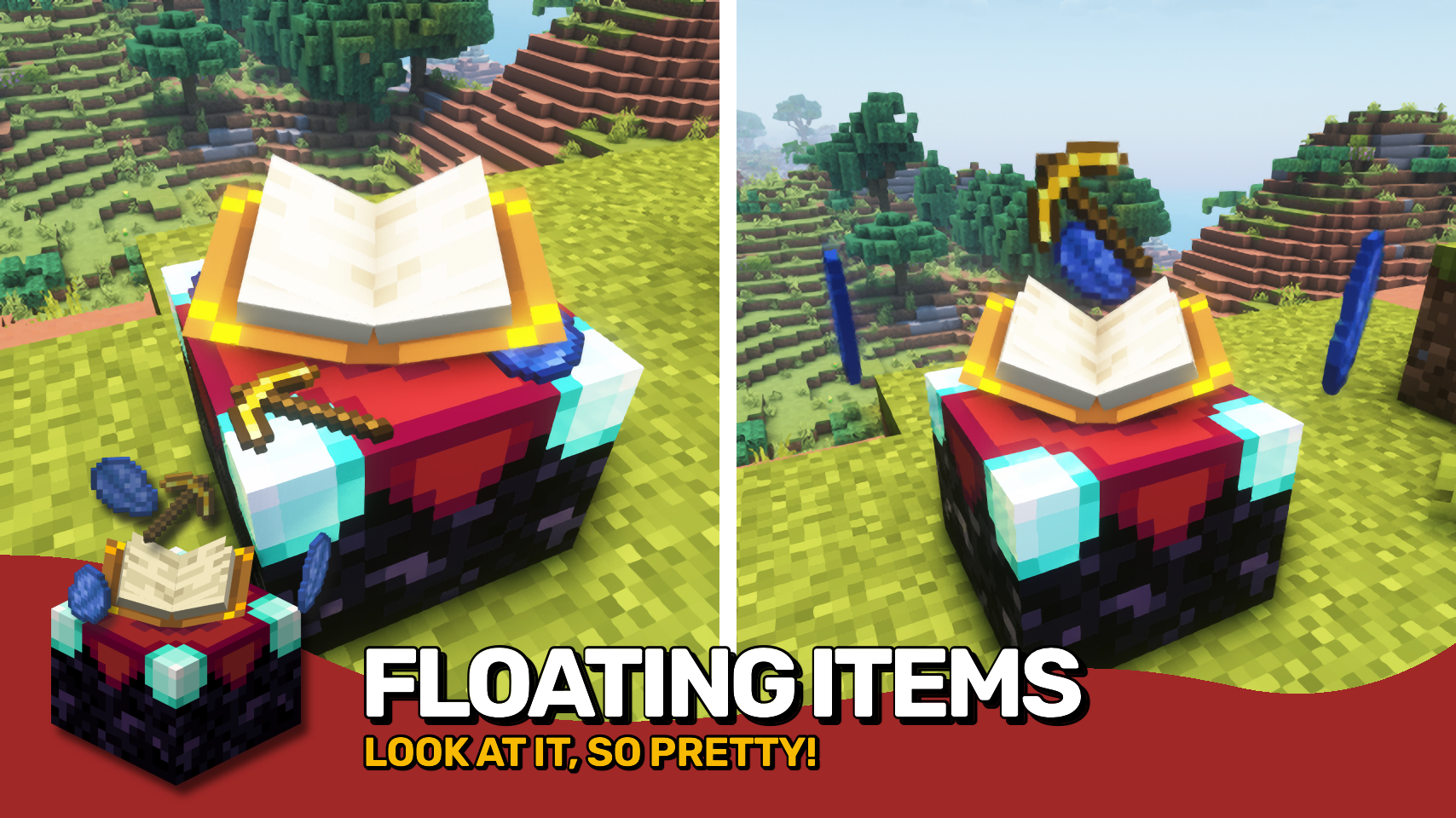
Easy Magic makes it so that items stay in an enchanting table after you close the interface. The items are also rendered floating around the table block. Additionally the enchanting interface includes a button for rerolling the currently offered enchantments for a very low cost.

- Leave both lapis and your to-be-enchanted item simply in the enchanting interface: It'll be beautifully rendered floating around the block!
- Reroll currently offered enchantments for the cost of just a bit of lapis and a few experience points (not levels!).
- Choose how many enchantments you will receive on an item should be preview in the enchanting interface. By default this remains at one.
- Blocks between a bookshelf and an enchanting table are no longer forced to be air, anything without a collision box will work now such a torches or tall grass.
- The number of bookshelves required for a maximum level enchantments is configurable down from 15.
- Simply break and replace your enchanting table after adding this mod to an existing world!
- Disable the reroll button in the config if it conflicts with your resource pack. All functionality will remain regardless!
- Not compatible with Apotheosis and the matrix enchanter from Quark.



⏩ INSTALLATION REQUIRED ON CLIENT & REQUIRED ON SERVER
⏩ REQUIRES PUZZLES LIB TO BE INSTALLED (FABRIC & NEOFORGE)
⏩ REQUIRES FABRIC API TO BE INSTALLED (FABRIC)
⏩ REQUIRES FORGE CONFIG API PORT TO BE INSTALLED (FABRIC)

If available for a mod, configuration is possible directly from in-game using the mod menu (requires Mod Menu by Prospector to be installed on Fabric).
For manual configuration using an external text editor all files are found at .minecraft/config, named as MOD_ID-client.toml, MOD_ID-common.toml, or MOD_ID-server.toml, depending on the type of config. Not all types might exist for a mod, if any at all.

🌟 Thanks to csb987 for the idea of storing items in the enchantment table from their Lapis Stays in the Enchanting Table mod.
🌟 Thanks to Vazkii for the floating inventory contents rendering code taken from the runic alter renderer in their Botania mod.
🌟 Thanks to Draylar for the idea of locking enchantment rerolls behind a certain cost from their Reroll mod.
🌟 Thanks to JohnSmith_474 for inspiring the design of the reroll button from their awesome Enchanting Overhauled mod.
 |
 |
|
 |
 |
|
 |
 |
|
 |
 |
|
 |
 |
|

© 2026 @heyitsfuzs. All rights reserved. This page was last edited on 11 September 2026, at 06:44 (UTC).
Compatibility
Mod Loaders
Game Versions
Recommended Gear
AffiliateHardware and extras that pair well with this mod.

Minecraft Enderman Character Plush
Enderman plush toys, and a reliable gift for a younger player.

Mini PC for Self-Hosting
A low-power box that can sit in a cupboard and run a modded server around the clock.

LEGO Minecraft Set
Official sets that translate the building side of the game off-screen.
As an Amazon Associate I earn from qualifying purchases.
Screenshots
Similar Mods

Just Enough Items (JEI)
View Items and Recipes

Cloth Config API (Fabric/Forge/NeoForge)
Config Screen API for Minecraft

Mouse Tweaks
Enhances inventory management by adding various functions to the mouse buttons.

Fabric API
Core API library for the Fabric toolchain

AppleSkin
Adds some useful information about food/hunger to the HUD

GeckoLib
A 3D animation library for entities, blocks, items, armor, and more!
Included in Modpacks (1,133)
Show fewer AeroIslands
![The Outlanders [FORGE]](https://media.forgecdn.net/avatars/1369/458/638889115598226159.png) The Outlanders [FORGE]
The Outlanders [FORGE]
 Vision-Craft.net
 The Fallen Worlds
 AutoCrafted-Create & More!
 Bitz Spoon Create Season 1
 Cal4mity's Tweaks
 MC: Serene Edition
 Biggess Pack Cat Edition V2
 MonkTech 3
 DBA'S ModPack
 Fabulous Vanilla
 Hausimausis
 Create Foreseen
 Vanilla Vibes
 CSP Revenge
Create: Just Extended
CSP Revenge
Create: Just Extended
 Mine & blade
 Create: Kryp
 Everything Refined II
 The Lost Realms
 CATACLYSMIC CHRONICLES
 Hope SMP S2 (COBBLEMON)
 Hearthvale
 Bigger Better Experience
 FortMine ++
 Refresher
 LlamaWorld
 DarkMetaKnight's Adventure Pack
 Diggicraft - The Beginning
 Notazia 2
 Glatzencraft
 Foundry Semi-Anarchy
 Electronium Refined
 MilkyGang Adventure+
 Endgame Protocol
 Bachnet Survival
 Goosker's Medieval Modpack
 Craft Mizyen
 WhatTheCluckery
 DivineIronGamer’s Medieval Journey
 Vanilla Plus+++
![Visually Vibrant - [FABRIC]](https://media.forgecdn.net/avatars/1778/686/639128848635425558.png) Visually Vibrant - [FABRIC]
Visually Vibrant - [FABRIC]
 Jameel's Private SMP
 AdemEXE
 GeckoCraft II
 Horror Magiced
 SiestaSMP Modpack
 Vanilla Essencia
 Beyond Vanilla+
 Neoclassic
 Chronalis - Ancient Times
 Worlds O' Plenty II
EwServer
Worlds O' Plenty II
EwServer
 LG Optimized
 The Roaring 20's Oasis
 Vanilla Cataclysst
 Vanilla Enhanced
 StunningRPGBasicXP+
 Weathered
 Create: Interstellar
 Minion Craft
 CreateAbility
 REforged 2.0 II
 Explorifying
 Jawn's Vanilla+
 Shattered Crown
 Vanilla Boosted
 SIMPLY: Vanilla
 Arcana Mechanica
 Flying Delight Modpack
 Better Craft
 B.O.B.PACK
 Holiday blocks
 NeoCraft: Horizons
 Forever World Plus
 Azura Adventure
 Latveria
 Qwnks's Better Adventures
 KimServer
 a Totally Normal Vanilla+ Modpack
 Most of Create
 Perpetual Motion
SkillFull Vanilla
Perpetual Motion
SkillFull Vanilla
![[balls_game]](https://cdn.modrinth.com/data/E3R8unPg/9f956f5ef9bc4ca595bdb8fbe217045096f9cc8f_96.webp) [balls_game]
[balls_game]
 Juniper's Legacy
 Friendly Adventures
 Light&Lowly
 Truly Vanilla
Realms of Old
Truly Vanilla
Realms of Old
 Limitless Realms
 Enigma-Craft
 Crazy Phaze
 JUSTCREATE_byzemzemsuyu
XenCraft
JUSTCREATE_byzemzemsuyu
XenCraft
![[First Night]](https://cdn.modrinth.com/data/9W0RDjqG/9993c030ed5b09621b8dbf1b3e647aa71a3260aa_96.webp) [First Night]
[First Night]
 Loser Modpack
 Titanroot Skies
 Mundo Mods Reforged
 Platano Vanilla Blend