

Time Stop Clock
Modby Suel_ki
Let you control time in minecraft!
Type
Mod
CurseForge Downloads
1,349,539
CurseForge ID
Modrinth Downloads
271,614
Modrinth ID
Last Updated
Nov 6, 2026
Description
Time Stop Clock


Features:
Version 1.19.x has been removed, and this mod has been completely rewritten.
Migrate to Cloth Config API from Previous Config System.(V2.0.0+)
Items:
- Time Clock - Ability to time stop, slow down (0.5x) and speed up (2.0x)
- Arrow - Can shoot most projectiles. Hold Shift to view shootable items.
- Staff - No cooldown and no casting time (requires Iron's Spells 'n Spellbooks, suitable for use during time stop).
Spells
- Time Freeze - Freezes the time of the current world for x seconds. The default duration is 6 seconds. The duration of Iron's Spells 'n Spellbooks increases with the level, and Ars Nouveau allow for free configuration.
- Time Box - When hitting a target, a Time Box is generated. Time inside the box is in a frozen state (this includes the ability to freeze only entities, blocks, and particles). When hitting a creature, a Time Box with a hitbox size of ×1.5 is generated; when hitting a block, a 5×5×5-sized Time Box is generated. The default duration is 6 seconds, and this is an exclusive spell of Ars Nouveau.
Time Box
- Time inside the box is in a frozen state, and it can only freeze entities, blocks, liquids, and particles. Due to technical limitations, it can only be generated via commands or spells. The Time Box can be reversed through the configuration file. After reversal, time outside the Time Box will be in a frozen state, while time inside the box remains normal.
Commands:
- /timeclock tickrate - Set the game tickrate
- /timeclock pauseTime <true/false> - Set whether to enable time stop, can be used to forcibly enable or disable time stop
- /timeclock whitelist list - View the whitelist
- /timeclock whitelist list <true/false> - Same as above, but choose whether to output to the log
- /timeclock whitelist clear - Remove all entities in the whitelist
- /timeclock whitelist remove - Remove the target from the whitelist
- /timeclock whitelist remove uuid <UUID> - Remove the UUID from the whitelist.
- /timeclock whitelist add - Add the target to the whitelist.
- /timeclock config reload - Reload the config (required after making modifications to the external config file).v2.0.0+ Removed.
- /timeclock timebox add <expandAfterCreation> <changeSpeed>
- /timeclock timebox add <expandAfterCreation> <changeSpeed>
- /timeclock timebox add <expandAfterCreation> <changeSpeed>
- /timeclock timebox add <expandAfterCreation> <changeSpeed>
- /timeclock timebox add <expandAfterCreation> <changeSpeed> <removeAnimation>
- /timeclock timebox add <expandAfterCreation> <changeSpeed> <removeAnimation> <startCenter>
- /timeclock timebox remove
- /timeclock timebox clear
- /timeclock timebox list
- /timeclock timebox modify [<active/color/expandAfterCreation/changeSpeed>] <active/color/expandAfterCreation/speed>
- /timeclock timebox modify []
Key Bindings
- Left Ctrl + Mouse Wheel - Toggle time clock mode
- Right Ctrl - Open the tooltip overlay config screen
Config:
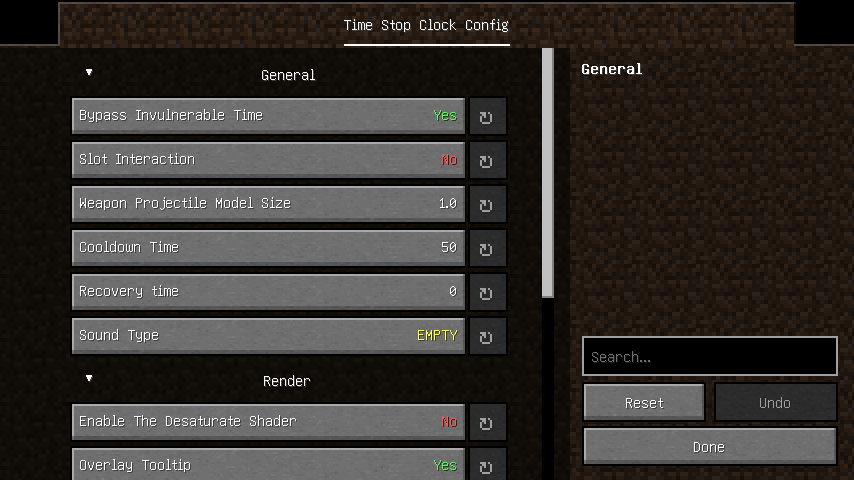
General:
- bypassInvulnerableTime - Enable the desaturate shader to convert the game graphics into a black and white effect
- slotInteraction - Whether interaction with slots in the container is allowed
- model_size -The model size of WeaponProjectile (non-vanilla projectiles shot by arrow in this mod)
- cooldown - Cooldown tick using timeclock
- soundType - The sound played when using the time clock
- ability_tick - Ticks needed to recover back to normal after using time manipulation
- reverse_timebox - Whether to reverse the feature of the Time Box
- blacklist - Blacklist of "arrow" projectiles
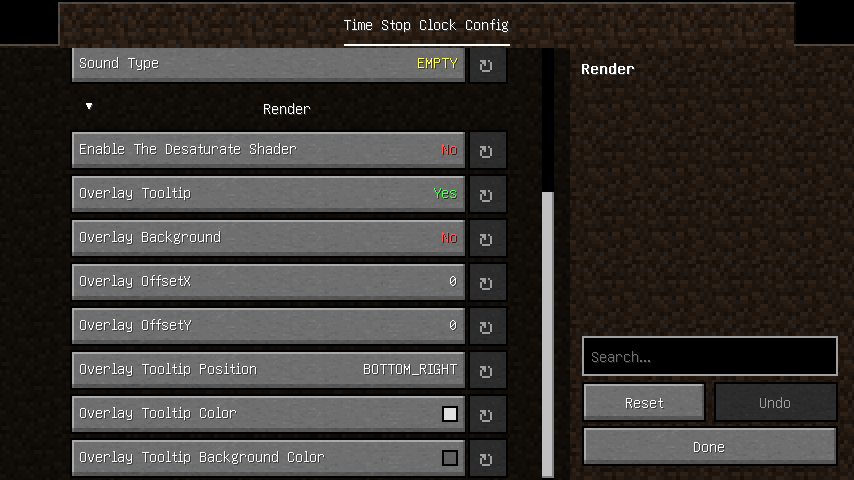
Render:
- desaturate - Enable the desaturate shader to convert the game graphics into a black and white effect
- overlay_tooltip - Add overlay of tooltip for mod on the screen
- overlay_tooltip_position - Determines which corner of the screen the tooltip overlay will be rendered
- overlay_background - The background of the tooltip overlay
- overlay_background_color - The color of the overlay tooltip background
- overlay_tooltip_offsetX - The X-axis offset of the overlay tooltip
- overlay_tooltip_offsetY - The Y-axis offset of the overlay tooltip
- overlay_tooltip_color - The color of the overlay tooltip
- glowing_color - Glowing color of whitelisted entity
- timebox_face - Whether to render the time box faces
- timebox_line - Whether to render the time box lines
Screen:
Issue Fix:
- Blueprint conflict crash
- Server startup crash
- Citadel conflict
- Glowing effect not working.
- Tickrate changes in other dimensions are not syncing to the server.
- Geckolib animation is stuttering during timestop.
- "Arrow" are infinitely generating ammunition in survival mode.
- Iron's Spells 'n Spellbooks mod is failing to cast spells properly during timestop.(forge)
- TaCZ cannot fire during time freeze.
- Command blocks cannot execute the commands of this mod.
- Server startup conflict (Forge).
Compatibility:
Citadel - Conflict with mixin(Fixed in version 1.1.0)
Compatibility
Mod Loaders
Game Versions
Recommended Gear
AffiliateHardware and extras that pair well with this mod.

As an Amazon Associate I earn from qualifying purchases.
Screenshots
Similar Mods

VillagersPlus (FORGE)
A villager extension mod, adding new villager types, trades and beautiful workstations.

Not Enough Crashes
When crashing, you can go back to the title screen and keep playing, without needing to restart, alongside other things...

Moar Tinkers
Currently adds 63 moar tinkers construct tool material types and a bunch of traits!

TexTrue's Rubidium Options
An unofficial fork of FlashyReese's "Reese's Sodium Options", made to work with FML.

L2 Library
Library for LightLand mods

Axolotl Bucket Fix
Makes the axolotl bucket item show the right axolotl type.
Included in Modpacks (57)
Most downloaded JJKL Jujutsu Kaisen Craft
 MARSHY'S SECRETS OF THE OMNITRIX - PALLADIUM BETA
 Zombie Apocalypse: Last Days in the Wasteland | Survive Hordes of Zombies
 Jujutsu Craft Adventure
 Ratufa's Guns n Drugs
 Primal Apocalypse - Unusual Survival with Dinosaurs, Guns and Quests | Prehistoric Apocalypse
 Mine Piece World
 horror the last world in ruins
 Zuri's Heroes pack
 [SAZ]SurvivorsAndZombies
 Kingdom of Elchea
 HeroCraft made by DieAvengers3
 Frizpa Studios Winter Apocalypse
 FPScraft X
 Heroes United
 Mine Piece: The Ultimate Journey
 InsaneCraft S2 (Fan Made)
 Block Ops - Warfare
 war for the omnitrix
 Brainrot Adventure