
Perfect Legacy, The Best Console edition recreation
Modpackby Snotchy1
A modpack from a console edition enthusiast for those who want to play Console edition minecraft without finding that dusty Xbox 360!
Downloads
2,631
Type
Modpack
CurseForge ID
1248730
Last Updated
Apr 11, 2026
Description

Welcome to Perfect legacy! Possibly the BEST Minecraft Console/legacy edition recreation!
If you dont have access to one of the console versions of minecraft, or just want to play a recreation of it for whatever reason, this modpack is for you!
List of main features:

The main mod that brings this modpack to life, Legacy4J brings back almost EVERY feature from the console versions of minecraft, while maintaining the modern features.
But- it's missing some core features that this modpack brings back, like the skins and world generation, for example.
Click on the "Legacy4J" image above to view it's mod page

The console editions of Minecraft had easy multiplayer world hosting. but for some reason, Java doesn't.
but with e4mc you can simply host your world online by checking the 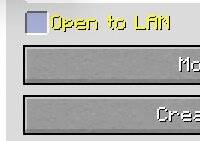 box
box
once you load in to the world, you get a chat message telling the server address of your world. just click on the message to copy it, then you can text the code to someone to add as server and play!
Click on the "E4MC" image above to view it's mod page

You know a version of minecraft that had overall smooth performance and FPS?
Legacy console edition.
You know a version of minecraft that runs terribly because it has the laziest optimization ever?
Java edition.
But sodium fixes that! Sodium does optimizing magic to java edition to make it run WAY faster. and bring support to a variety of mods, usually being shaders.
Boosting fps to around 3.2x faster, sodium makes Perfect Legacy feel much more accurate to console, because of the fps.
Click on the "Sodium" image above to view it's page

-Known bugs or flaws
- The menu title. it looks very weird. I am not skilled at making minecraft resource packs, i just put together ones cooler guys made :/
- Skin changer crash If you don't have all the skin packs applied used in your resource album, scrolling past the bottom of the skin packs section seems to crash the game. i have no idea why.
- M**io Mash-Up world not having it's textures. That is probably because of nintendo's nintendoness
If you find a bug or something that should be fixed, tell me in the discord feedback server.

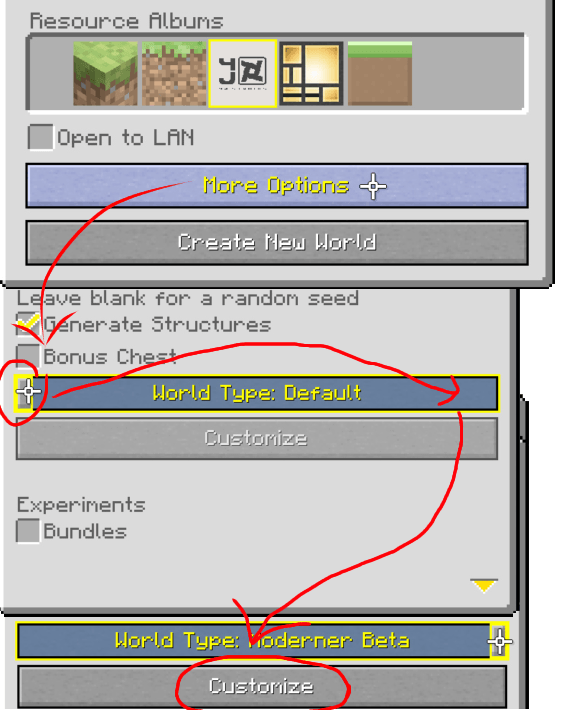
TO MAKE A WORLD WITH OLD WORLD GENERATION
Create a world. while creating it, do as this image below does:
Then, optionally you do as this image follows:
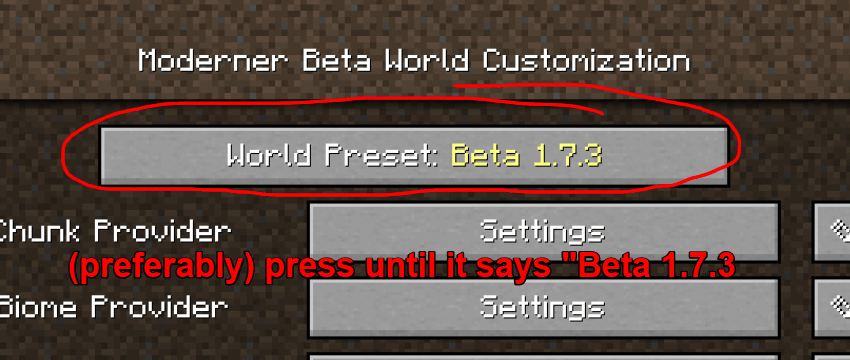
and then you can generate the world and enjoy more classic generation!
To make it look classic, or use the built-in legacy texture packs:
while in a world, creating one, or just changing packs in options > settings > graphics
choose out of these 3 albums highlighted in the image below.
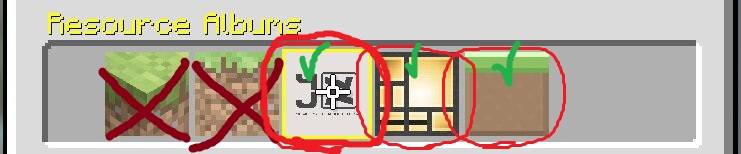
The one with the 4J studios logo is the main one with the classic programmer art textures.
if you want to add your own texture pack, copy the main one and add your own pack on top
more tips possibly next update!

Mods
- Architectury API - shedaniel
- Cloth Config API - shedaniel
- Customizable Player Models - tom54541
- e4mc - skyegreen
- Fabric API - modmuss50
- Factory API - willyicaro
- Legacy Skins - RedRain0o0
- Legacy4J - Wilyicaro
- oωo (owo-lib) - gliscowo
- Sodium - Jellysquid
Resource Packs
- C418 Songs Only - redsquare
- Classic Fog - Sydist_
Perfect Legacy modpack - Snotchy
Similar Modpacks

the man from the fog
its a man from the fog rp you can play it alone or play it with friends also with the 3 books that you have to go in boo...
Avali/Furry Floofpack (DEPRICATED)
A massive Avali/Furry modpack + dedicated server with tech and magic that is regularly updated! Tied with it's own offic...
MARSHYVERSE OFFICIAL SERVER - 1.12.2 RETURNS
The modpack for all the mods and addon needed to join the OFFICIAL marshy minecraft server!!

Hexxit Revived
a retro modded survival experience. unofficial but faithful port of Hexxit to 1.20.1

Official FiskHeroes Server
A modpack for Fisk's Superheroes that includes some QoL mods
PROJECT ZUMBI - Dlet
Zombie Apocalypse