
Audio Improvements
Modby NamelessJu
A client-side mod for some audio system improvements - mono audio and better jukeboxes & game music
Downloads
3,307,222
Type
Mod
CurseForge ID
1321370
Last Updated
Apr 9, 2026
Description
Features
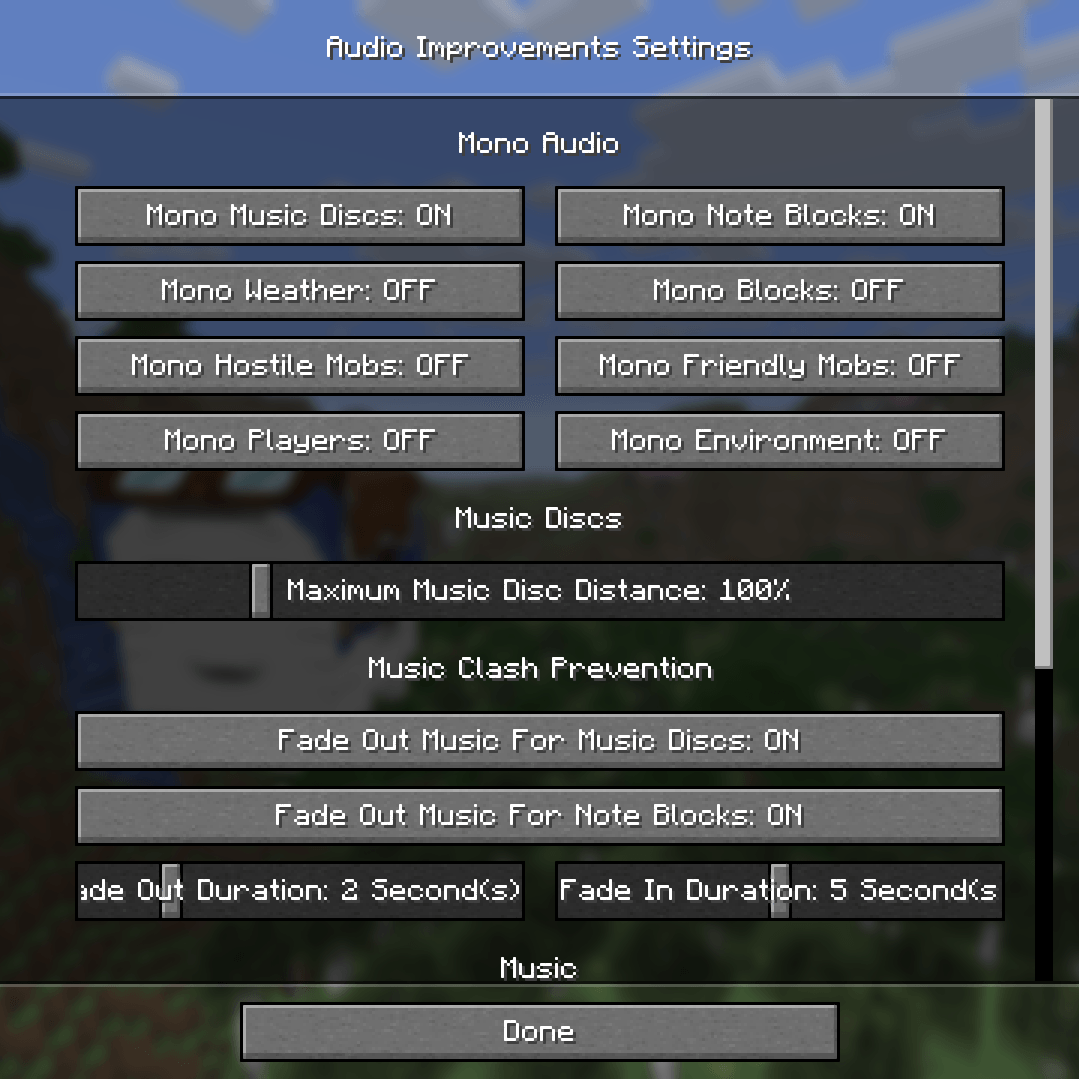
Mono audio option
-> Stops sounds from being affected by the direction you're looking in while still becoming quieter when further away
-> Options for different categories: Jukeboxes, note blocks, weather, blocks, hostile mobs, neutral mobs, players, ambience/environment (only mono jukeboxes and note blocks enabled by default)
Music disc distance multiplier
-> 50% - 300% or global
(100% by default)
Music clash prevention
-> Fades out the regular game music while a music block is playing near you
-> Toggleable seperately for jukeboxes and note blocks (both enabled by default)
-> Customizable fade in/out durations
Music repeat prevention
(enabled by default)
-> Prevents the same music piece from playing multiple times in a row
Custom music frequency
(disabled by default)
-> Replaces the vanilla music frequencies with a customizable random interval
-> Option whether this should also affect the main menu music
Speed of sound simulation
-> Delays sounds based on how far their source is from you
-> Options:
- Thunder sounds (100 blocks/second by default)
- Explosion sounds (100 blocks/second by default)
- All other sounds (disabled by default)
Doppler effect
(100% intensity by default)
-> Pitches sounds up/down depending on how fast the distance between you and them changes
-> Doesn't work on mono sounds due to sound engine limitations
Fix for vanilla bug MC-98200
(Sound category volume sliders not affecting the volume of certain sounds at higher percentages - e.g. music discs already reached 100% volume at 25% category volume)
Stereo spatialization fix
(enabled by default)
-> Fixes resource pack and mod audio that incorrectly uses stereo files for in-world sounds by converting them to mono, so the sound engine can then correctly position it instead of always playing directly at the listener
Settings
This mod is made to be highly customizable!
The settings can be opened via the Mod Menu mod on Fabric, the inbuilt mod lists on NeoForge and Forge or generally by using the command "/audioimprovements".
Screenshots
Similar Mods
![Immersive Armors [Fabric/Forge]](https://media.forgecdn.net/avatars/494/546/637806302373612811.png)
Immersive Armors [Fabric/Forge]
A lot of unique and vanilla-faithful armor sets.

No Recipe Book
Removes the Recipe Book button from the player inventory and crafting table GUI.

Embeddium (Rubidium) Extra
Port of Sodium Extra to work with Embeddium/Rubidium on (Neo)Forge
Dark Mode Everywhere
Have dark GUIs everywhere with the power of shaders

Project Red - Expansion
Expansion module for Project Red series
Paragliders
BotW style Paraglider
![Better MC [FORGE] - BMC4](https://cdn.modrinth.com/data/4BV47HRn/7f5ef7cc61b2593609aabef3ed07a866a4f11b73_96.webp)
![Better MC [NEOFORGE] BMC5](https://media.forgecdn.net/avatars/1100/202/638647377432789195.png)

![Better MC [FABRIC] BMC3](https://media.forgecdn.net/avatars/1088/209/638631037481006863.png)
![Better MC [FABRIC] BMC2](https://media.forgecdn.net/avatars/834/314/638224851106705287.png)