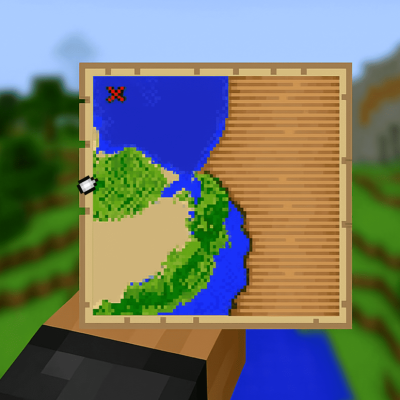
Map Distance Fix
Modby MrErenK
A simple mod that shows a player indicator instead of a white dot when outside map boundaries.
Downloads
426,530
Type
Mod
CurseForge ID
1321830
Last Updated
Apr 9, 2026
Description
MapDistanceFix
A very simple Minecraft Fabric mod that fixes map player indicators to always show the player's position and direction, even when outside map boundaries, making it much easier to navigate treasure maps and other map items.
Why This Mod?
In vanilla Minecraft, when you're far from a map's boundaries, the player indicator either disappears entirely or shows as a generic "player_off_map" and "player_off_limits" decorations without directional information. This mod fixes that by:
- Converting off-map player decorations to regular player decorations
- Maintaining correct rotation to show which direction you're facing
- Ensuring the player is always visible for better navigation
Features
- Always Visible Player: Ensures the player icon is always visible on maps, even when far outside the map boundaries
- Correct Direction: Shows the player's actual facing direction instead of a generic off-map indicator
- Distance Display: Shows the distance from the player to the map center or to the nearest structure, helping you navigate to your destination
- Configurable: Customize distance display settings via a JSON config file or in-game GUI using cloth config
- In-Game Commands: Reload config and check status without restarting the game
- Server-Side Only: No client modifications required if the mod is installed on the server
Optional Dependencies
- Cloth Config - Enables in-game configuration GUI
- Mod Menu - Provides access to the config screen from the mod list
Both mods are optional. Without them, you can still configure the mod by editing the JSON config file directly or via in-game commands
Configuration
The mod creates a configuration file at config/mapdistancefix.json with the following options:
Option Default Description showDistance true Enable or disable distance display showDistanceWhenOffMap true Show distance when the player is outside the map boundaries showDistanceInsideBoundaries false Show distance even when the player is inside the map boundaries showStructureDistances true Show the distance to the nearest structure in the map distanceFormat %dm Format string for distance (use %d for the distance value) useShortUnits true Use short format like "1.2k" for large distances shortUnitThreshold 1000 Distance threshold (in blocks) for switching to short unitsIn-Game Configuration
If you have Cloth Config and Mod Menu installed, you can access the configuration screen by:
- Opening the game menu
- Clicking "Mods" (added by Mod Menu)
- Finding "Map Distance Fix" in the list
- Clicking the configuration button
or if you don't have these mods, you can use commands:
Commands
- /mapdistancefix config <config> set/reset/get or /mdf config <config> set/reset/get - Change configs in-game
- /mapdistancefix status or /mdf status - Display current configuration settings
- /mapdistancefix reload or /mdf reload - Reload the configuration file if modified (no need to run if using /mdf config command)
Compatibility
- JAVA Compatibilty: Java 21 is required for Minecraft versions above 1.20.5, Java 17 is required for Minecraft versions above 1.19.3 till 1.20.1.
- Server Compatibility: Does not work on vanilla servers. But if the mod is installed on the server, its not required to install on the client.
- Other Mods: Should be compatible with most other mods that don't heavily modify maps.
Troubleshooting
Common Issues
Config screen not appearing
- Make sure you have both Cloth Config and Mod Menu (for fabric) installed
- Check that the versions are compatible with your Minecraft version
Distance text looks weird with shaders
- This is a known issue with some shader packs. The distance text background may appear transparent or glitchy.
- If this bothers you, disable the distance display by setting showDistance to false in the config file or through the in-game config screen (if Cloth Config is installed).
Getting Help
If you encounter issues:
- Check the latest logs for error messages
- Verify that Fabric API is correctly installed
- Try with minimal mods to isolate conflicts
- Report issues on the GitHub Issues page
Contributing
Contributions are welcome! Here's how you can help:
Pull Requests
- Follow existing code style and conventions
- Add appropriate comments and documentation
- Test thoroughly before submitting
- Update README if adding new features
Bug Reports
- Use the GitHub Issues page
- Include Minecraft version, mod version, and log files
- Describe steps to reproduce the issue
License
This project is licensed under the MIT License. Feel free to use this mod in your modpacks without asking for permission. But please do not redistribute the jar files anywhere else!
Acknowledgments
- mappings.dev for the huge help with finding proper functions
- Fabric Team for the excellent modding framework
- Minecraft Community for inspiration and feedback
- Contributors who help improve this mod
Made with ❤️ by MrErenK for the Minecraft community
For questions, suggestions, or support, feel free to open an issue on GitHub or post a comment in the curseforge page!
Screenshots
Similar Mods

TslatEntityStatus (TES)
A modern entity health/status/damage indicators mod for Minecraft
Visuality: Reforged
Little visual improvements by adding a bunch of new particles.
Nature's Spirit
A mod to overhaul the overworld :)
![Huge Structure Blocks [Fabric & Forge]](https://media.forgecdn.net/avatars/373/223/637545482079102034.png)
Huge Structure Blocks [Fabric & Forge]
Structure blocks. But bigger. Up to 512 blocks!
New Slab Variants | +300 New Slabs!
Adds hundreds of new slabs!
The New Shutters
A small decoration mod for your windows
![Better MC [FORGE] - BMC4](https://cdn.modrinth.com/data/4BV47HRn/7f5ef7cc61b2593609aabef3ed07a866a4f11b73_96.webp)
![Better MC [FABRIC] BMC3](https://media.forgecdn.net/avatars/1088/209/638631037481006863.png)

![Better MC [FABRIC] BMC2](https://media.forgecdn.net/avatars/834/314/638224851106705287.png)