
Spiky Spikes
Modby Fuzs
Don't step on it! Hurts almost as much as stepping on LEGO... ouch
Downloads
2,326,791
Type
Mod
CurseForge ID
666944
Last Updated
Apr 9, 2026
Description




📖 About:
Spiky Spikes adds some really spikey spikes. There are a bunch of tiers, all with unique abilities. So what are you waiting for? Let's go and improve your mob farms!
📚 Contents:
Spiky Spikes brings you 6 Tiers of spikes, all of them are unique.
- Wooden: Slowly damages mobs, but does not deal a killing blow.
- Stone: Damages and kills mobs, but does not drop any loot or experience.
- Iron: Damages and kills mobs, only drops normal loot without experience.
- Golden: Damages and kills mobs, only drops experience without any loot.
- Diamond: Deals a lot of damage, mobs drop all loot like when killed by a player. Can use most sword enchantments, apply via an anvil.
- Netherite: Deals a lot of damage, mobs drop all loot like when killed by a player. Can use most sword enchantments, apply via an anvil. Is resistant to explosions and cannot be destroyed by the wither boss. Deals no damage to players.
Note: Make sure when adding enchantments to diamond and netherite spikes to have all the spikes you want to enchant ready at once. You can apply enchanted books To The Whole Stack, so enchanting more spikes later will needlessly consume more of your precious books.
📷 Media:

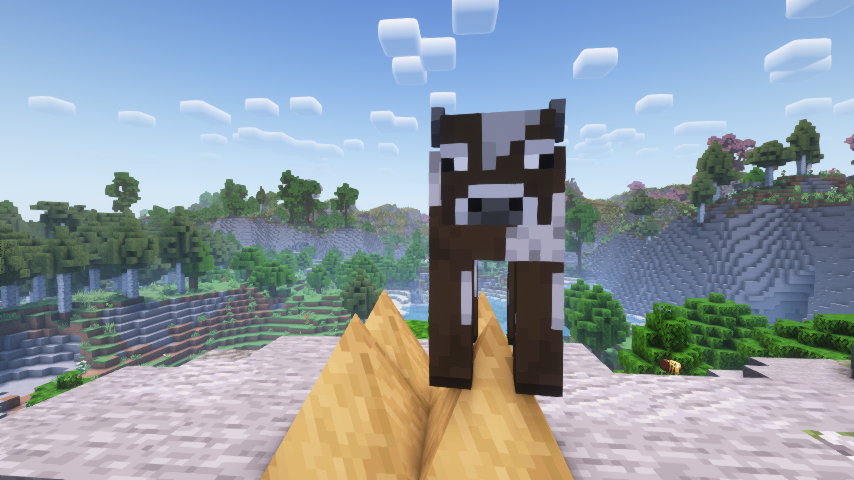 Spiky spikes are spikey
Wooden spikes bring mobs down to half a heart
Spiky spikes are spikey
Wooden spikes bring mobs down to half a heart

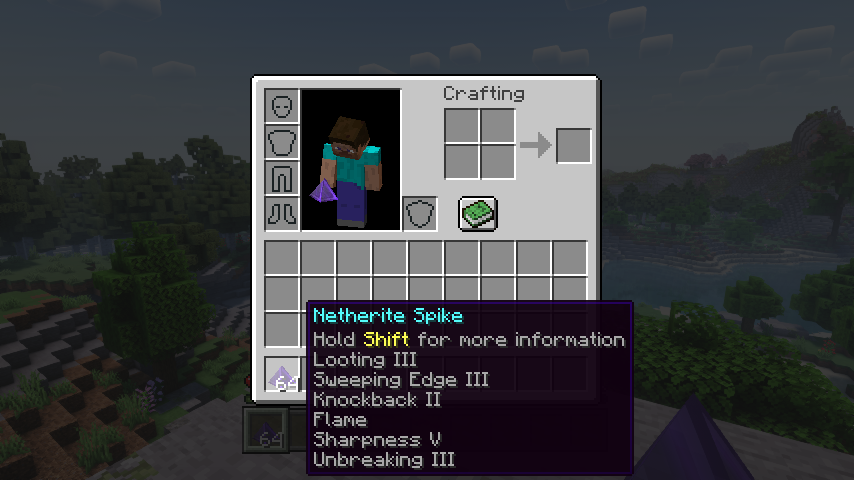 Even the wither boss isn't safe from netherite spikes
All the enchantments you can put on spikes
Even the wither boss isn't safe from netherite spikes
All the enchantments you can put on spikes
💡 FAQ:
Q: How do I configure this mod on Forge?
A: Install my Config Menus for Forge mod and do it directly in-game!
Q: How do I configure this mod on Fabric?
A: Editing configs directly in-game has not yet been implemented. Instead when in a world run the /config showfile <modid> command by choosing either CLIENT or SERVER (depending on the mod), then click the file name (ending with .toml) that appears in chat to be able to manually edit the config file in a separate editor. After saving the file, the config will automatically reload in-game after a couple of seconds, so no game restart required.
🏆 Credits:
Developing Spiky Spikes was helped and inspired by:
- RWTema for inspiring this mod from the spike blocks found in old versions of their Extra Utilities mod
- XFactHD for introducing me to the dark arts of rendering non-cube shapes in Minecraft












Screenshots
Similar Mods

Quests Additions (Forge)
An addon for the FTB quests mod. It adds some task and reward types that are missing in the base mod. (Place, Break, Rep...
Abnormals Delight
Fills content gaps and ties together Abnormals mods and Farmer's Delight!

Concurrent Chunk Management Engine (Fabric)
A Fabric mod designed to improve the chunk performance of Minecraft.

Applied Flux
store energy in ME network

Rebind Narrator
it's 2021 and you can't change the narrator key UPDATE: it's 2022 and you still can't change the narrator key UPDATE: it...
![Carrots Library [FORGE]](https://media.forgecdn.net/avatars/185/899/636830079147542826.png)
Carrots Library [FORGE]
Base library used by The_Wabbit's mods