Set Home & Waypoints
Modby DodgeMan
Want to be abble to come back after your journey ? Adding /home & /wp commands with enhanced UX
Downloads
2,006,629
Type
Mod
CurseForge ID
374386
Last Updated
Apr 9, 2026
Description
Set Home & Waypoints
Set Home & Waypoints allows players to set a home and waypoints. The development was focused on user experience (autocomplete, key bind, command feedback, colors…). This mod is configurable on both client and server side.
For 1.12.2 version, check this documentation on GitHub
4 commands to master the mod
- /shw List all available commands,
- /sethome Create or update your home,
- /home Teleport to your home,
- /wp Set, use, update, remove your waypoints.

Supported languages
- 🇬🇧 English
- 🇫🇷 French
- 🇩🇪 German
- 🇹🇼 Republic of China (Taiwan)
If your language is missing, you can contribute to this mod on GitHub by submitting a pull request.
Follow project development
You can follow working issues/features on Trello.
Installation
First of all, download Set Home & Waypoints.
Then add downloaded .jar in mods/ folder on both client and server side.
That's it!
Configuration
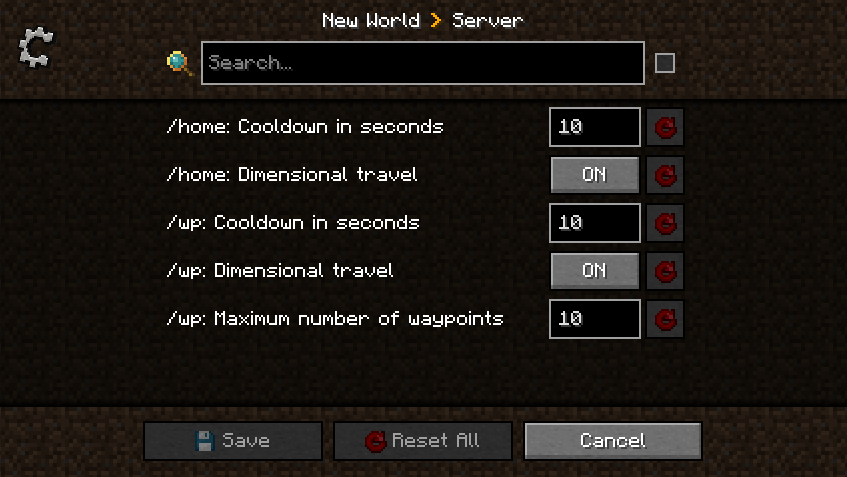
Set Home & Waypoints allows you to configure cooldown, dimensional travel and number of waypoints using commands (solo + multiplayer) or GUI (only solo) for client and config file for server.
All players can display current home and waypoints configuration by executing /home config for home configuration and /wp config for waypoints configuration.

A player with admin permission (3) can configure the server in game using /home config <…> and /wp config <…> commands without restarting the server ✅ Suggestions will guide players with sufficient permissions.
Client side using GUI
This menu was generated using Configured mod. Configured is a simple and lightweight mod that dynamically creates a configuration menu for every mod.
Client side using commands
Example of updating dimensionalTravel for Home using command:

Server side using config file
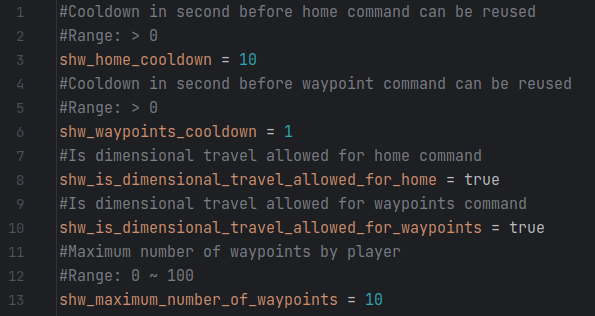
This configuration file is generated at server initialization in world/serverconfig/shw-server.toml.
Setting a new value will take instantly effect. Restarting the server is not necessary.
Updating configuration while the server is running will not notify players.
Commands usage
All commands have suggestions to guide players in game. /shw command will list all available commands.
/sethome and /home commands
Home is unique, set your home in any dimension by executing /sethome. Then, executing /home or pressing H key will teleport you on your home.
Yes, this mod come with a configurable shortcut (H key by default) to fast tp to your home. This will certainly save life.
Note that, re-executing /sethome will update home position with player location.

/wp command
Waypoints are used to save additional locations. By default, 10 waypoints are allowed.
Admins can configure this setting using /wp config maximumWaypointsNumber <count>.
Set, Use, List waypoints
Create waypoints with /wp set <waypoint name> and then teleport to them using /wp use <waypoint name>.

Executing /wp list will show all player waypoints and available space.
Update, Remove, Undo waypoints
Waypoints can be updated by executing /wp update <waypoint name> or removed by executing /wp remove <waypoint name>.
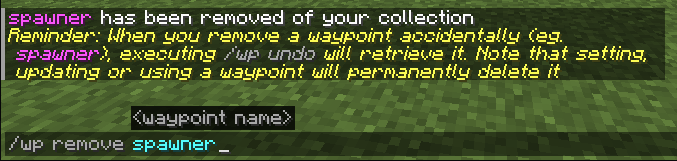
Last removed waypoint can be rollback by executing /wp undo. Note that this action will not be permitted after setting, updating or using another waypoint.

Waypoints can be cleared by executing /wp clear. Be careful, this action will remove all player waypoints and cannot be rollback.
Similar Mods

Enhanced Block Entities
Reduce block entity FPS lag with almost no compromises, and improve their visuals

Ars Additions
An Ars Nouveau addon focused on immersion and quality of life improvements
ElecCore
Shared code for Forge mods

XaeroPlus
Xaero WorldMap / Minimap Extra Features

Scape and Run: Parasites
Add more dangerous mobs (type monster Parasite-themed) to your world
Powah!
Generators, Solar panels, Energy Cells, Cables, Reactors, wireless energy ... and more!