
FreeCam by Zergatul
Modby Zergatul
This mod allows you to move camera freely
Downloads
1,058,419
Type
Mod
CurseForge ID
618947
Last Updated
Apr 9, 2026
Description
Supported versions: 1.8.9 (experimental), 1.12.2, 1.16-1.21 (Forge), 1.18-1.21 (Fabric), 1.21 (NeoForge)
Use F6 to toggle FreeCam, or change key bind in the settings.
Discord server: https://discord.gg/pB7gdDKwYE
Tutorial for versions before 2.3.0:
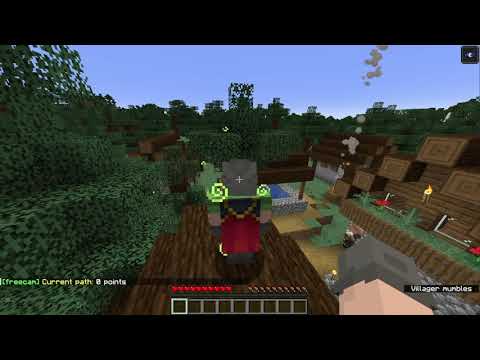
GUI settings screen added in 2.3.0 version. Type .freecam in chat to open it (or use Config button on Mod List screen in Forge)
Before 2.3.0 version use commands in chat.
Since 1.1.0 version
- Enter .freecam in chat to see your current settings
- Enter invalid command (for example .freecam 1) to see help
- Change maximum speed .freecam speed 100
- Change acceleration .freecam acc 100
- Change deceleration .freecam slow 0.001
Since 1.2.0 version
- Enable rendering hands in freecam .freecam hands 1 (may conflict with some mods)
- Disable rendering hands in freecam .freecam hands 0
Since 1.3.0 version, but removed in 1.5.0
- Disable interactions with blocks/entities in freecam .freecam ia 0
- Enable interactions with blocks/entities in freecam .freecam ia 1
Since 1.4.0 version
- 2 new keybindings you can use. They work only in freecam mode. Toggle Cam Control - use WASD keys to move your character, or camera. Toggle Eye Lock - you cannot rotate camera, it is always center on your character eyes. Crosshair and hands are not rendered in eye lock mode or when you control character.
Since 1.5.0 version
- Toggle Cam Control key replaced with Toggle Camera Lock. With Camera Lock enabled FreeCam position and rotation is locked, and you can use WASD keys to move your character and use mouse to rotate character.
- New setting: .freecam target 1 - default value. Game uses FreeCam position and rotation to calculate block or entity you target. This allows you to hit entities, place/break blocks, open containers you targeted in FreeCam mode (sometimes you can hit target you cannot normally see, or place blocks you normally cannot place). You can see target block debug information in F3 screen.
- .freecam target 0 - if you think above mod behavior is cheaty you can disable it. With this setting you can still left/right click while in FreeCam mode, but these actions will target the same block/entities you target in normal mode. Crosshair is not rendered while in FreeCam mode. You cannot see FreeCam targeted block in F3 screen.
Since 2.0.0 version
- .freecam path - display path information
- .freecam path add 1000 - add new point to the path with 1000ms delay (you should better watch video to get better understanding)
- .freecam path clear - clear path
Since 2.2.0 version
- .freecam movement spectator - change movement mode to spectator-like
- .freecam movement default - revert back
Quick download links:
- Forge 1.8.9 (experimental version)
- Forge 1.12.2
- Forge 1.16.5
- Forge 1.17.1
- Forge 1.18.2
- Forge 1.19 / Forge 1.19.2 / Forge 1.19.3 / Forge 1.19.4
- Forge 1.20 / Forge 1.20.1 / Forge 1.20.2 / Forge 1.20.4 / Forge 1.20.6
- Forge 1.21
Similar Mods
Bayou Blues
A swampy new Bayou biome!
Paginated Advancements & Custom Frames
Better advancements screen
Dynamic Trees - Biomes O' Plenty
Compatibility Mod between Dynamic Trees and Biomes O' Plenty
Cobblegen Galore
This mod lets you automatically generate essential blocks like cobblestone, basalt, and more
Ender Trigon
A mod that makes the Ender Dragon fight more difficult
What Are You Voting For? 2023
Adds the mobs from the 2023 Minecraft Mob Vote (Crab, Armadillo and Penguin) to the game early!