
AutoMessage
Modby Lupin
Now you can send automatic messages at any time during the game!
Downloads
4,556,003
Type
Mod
CurseForge ID
868624
Last Updated
Apr 9, 2026
Description

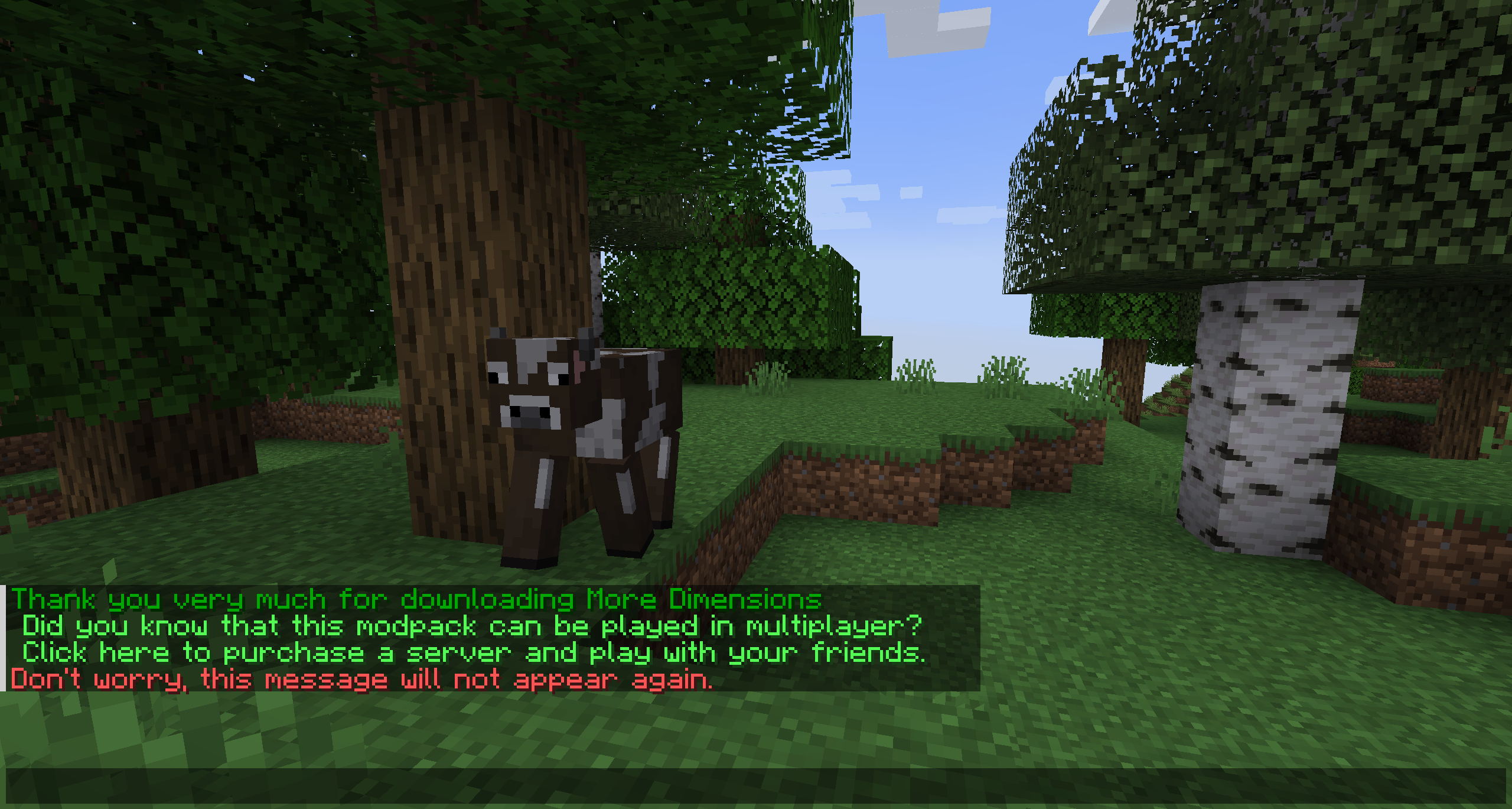
Basically, AutoMessage is responsible for adding an option to create and send messages automatically in a fast and effective way. To do this, it adds a configuration file that can be modified from start to finish by the player, and that, for example, will allow them to promote their social networks when starting a game, or simply thank them for downloading.
Do you need a server to play with your friends?

If you are looking for a server to play any mod or modpack with your friends, Bisect Hosting is your solution! They have the best quality-price Minecraft servers, and if you click on this link you will get a 25% discount, using the code "Lupin".

This mod is intended for two types of people, either the creators of mod packs, or on the other hand, the creators of multiplayer servers, since it is in charge of facilitating the sending of automatic messages.
These messages are easily customizable, through the new file that will be generated when running the mod for the first time. Among other things, you can choose the text, the color or even the links.


Update 3.0 and higher.
- No more "limits" or "delays", messages are sent when they are scheduled to.
- No limits/delays means no more data saved onto the player for tracking, just basic (separate) tags for the server and client, so there's no incompatibility with LabyMod or other mods that change player data significantly.
- There are four message schedules:
- on_first_join (sent when a player joins a level for the first time
- on_join_level (sends every time a player joins a level)
- on_death (sent every time the player dies)
- on_respawn (sent every time the player respawns)
- There are two message types:
- chat (sends like a regular chat message)
- overlay (displays centered on the client, above the action bar)
- Messages are constructed with key names: identifier, schedule, type, repeats, pack_intro, link, and text.
- This is how you send a chat message with a link, that never repeats, when the player joins a server for the first time. You can also display the player's name and the message's link in the message.
{
"identifier": "default_message",
"schedule": "on_first_join",
"type": "chat", "repeats": false,
"pack_intro": false, "link": "https://www.google.com",
"text": "Hi, %player%! Visit %link% for more info on this server!"
}
- Some key names are not required, like repeats, link, and pack_intro.
- if link is not present, no link will be attached.
- if repeats is not present, it will default to false.
- if pack_intro is not present, it will default to false.
- pack_intro is slightly different from repeats, it will check if the client has ever received the "identifier.firstJoin" tag from joining any level, and will never repeat first join messages if the message has pack_intro as true.
How do you configure this mod?
An example would be the following:
["AutoMessage Configuration"]
MESSAGES = ["§2Thank you very much for downloading AutoMessage§f", "§cDon't worry, this message will not appear again.§f"]
INTERVALS = [5, 5]
LIMITS = [1, 1]
LINKS = ["https://www.curseforge.com/members/lupiiin_/projects", "https://www.curseforge.com/members/lupiiin_/projects"]
HARD LIMITS = [1, 1]
A more detailed explanation...
The message is obviously the text that will appear on the screen, several texts can be put on different lines, separated by commas, and opening and closing with quotation marks. Color codes and guide: https://www.codewizardshq.com/minecraft-color-codes/
The interval is the time that will pass until the message is displayed on the screen.
The soft limit is the number of times the message will be sent in a single session.
The hard limit is the number of times the message will be sent for the lifetime of the player.
In links, a link should be placed if necessary.
An Important Note...
The values you place in your Soft Limit and Hard Limit configuration are tracked individually for separate worlds. For Modpack Developers, this means your message will be repeated if the player creates a new world. For Server Owners, this means that resetting your world will cause the messages to be repeated as well.
Compatibility Issues
Other mods which change player data extensively may be causing compatibility issues.
The following mods are currently incompatible:
- LabyMod
Does it work on servers?
Sure! It works perfectly! Remember that the best way to play with mods and friends is with BisectHosting, and by clicking on this link you can get a 25% discount.
Can this mod be used in modpacks?
Of course! As long as it is published only on Modrinth or CurseForge. Uploading it to any other platform would be violating our rights and is not allowed at all.
However, we are really grateful if you consider adding it to your Modrinth or CurseForge modpack. If you need any small changes or have any questions, contact us!
Can I record a video of this mod and show it on my channel?
Sure, you are free to play this mod or any of our modpacks on your channel and make a video about it, in fact, we would be very grateful for it!

Screenshots
Similar Mods

BCLib
A library mod for BetterX mods
Advanced Generators
Freeform Multiblock generators that produce MJ, RF and EU

Better Questing - Standard Expansion
Standard tasks, rewards, importers and themes for BetterQuesting

AzureLib
Java Minecraft mod using Bedrock models to create custom models and animations for items, blocks, entities

Refined Storage: Requestify
Keep your refined storage stocked with crafteable items

Reborn Storage
Refined Storage add-on adding multi-block crafters and larger disks
Included in Modpacks
 New Simple Mods - Easy to Understand | 1.21 UPDATE!
 Prehistoric World - Dinosaurs, Adventure & Quests | NEW PREHISTORY UPDATE!
 The Last War - Guns And Adventure (Survivor's World with Guns) | QUESTS UPDATE!
 Horrorland - New Horror Modpack (Herobrine, Cave Dweller...) | Horror+
 Christmas Holidays - Ideal For Festivities | Christmas Quests Update!