

PingNameTags
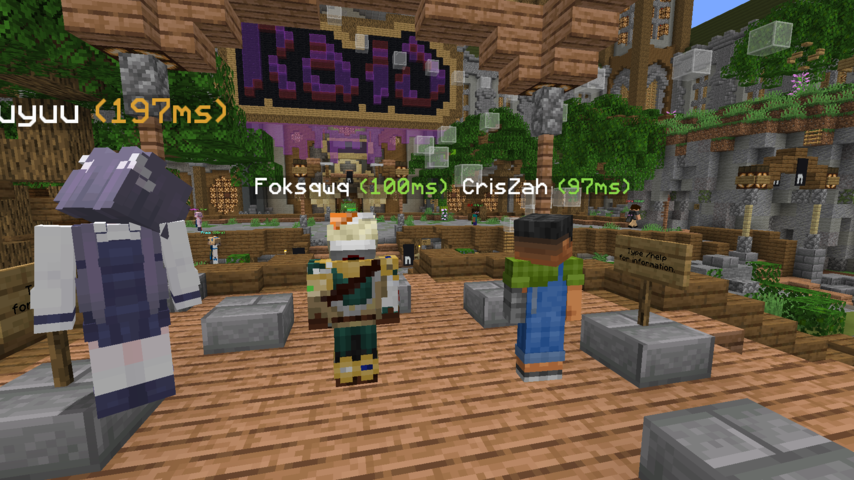
ModAdds colored ping inside player's nametag
Type
Mod
Modrinth Downloads
82,637
Modrinth ID
NJdiPXs4
Last Updated
Jul 26, 2026
Description
PingNameTags
Displays the ping next to player name tags ingame. Numbers change colour based on ping
Configurable through Mod Menu
Requirements/Installation
-
Install the Fabric Loader:
- Download the Fabric Loader from the Fabric website.
- Run the Fabric Loader installer and follow the on-screen instructions to install it for your Minecraft version.
-
Install the Fabric API and Cloth Config API:
- Download the Fabric API and Cloth Config API
- Place the downloaded JAR file into your Minecraft mods folder (located in the .minecraft directory).
Configuration
The configuration can be edited in-game if Mod Menu is installed.
Option Type Default Value Description enabled boolean true Whether ping nametags are enabled or not. togglepingnametags Key G The key that toggles ping nametags on and off. pingTextPosition Left | Right Right The position of the ping text placed next to the name. pingTextFormatString String "(%dms)" The format string for ping text. Must include a %d, which will be replaced dynamically by the actual ping value.Demo

Compatibility
Mod Loaders
Game Versions
Screenshots
Similar Mods

Status
The status mod used on the Hermitcraft server.
Copper Overhaul
A Vanilla+ mod that adds new copper block variations, tools, a chest locking system, and elevator mechanics using magnet...
Custom Stuff 4
Add and edit content using JSON files

Dungeons and Taverns Ocean Monument Overhaul
This Mod/Datapack Overhauls the Ocean Monument, turning it into a jigsaw structure, every room has randomized walls and...
Simple Gravel Ores
A standalone gravel ores mod for modern versions of Minecraft.
FTB Chunks - Modded Support
Adds support for popular modded blocks and entities in FTB Chunks map.


