
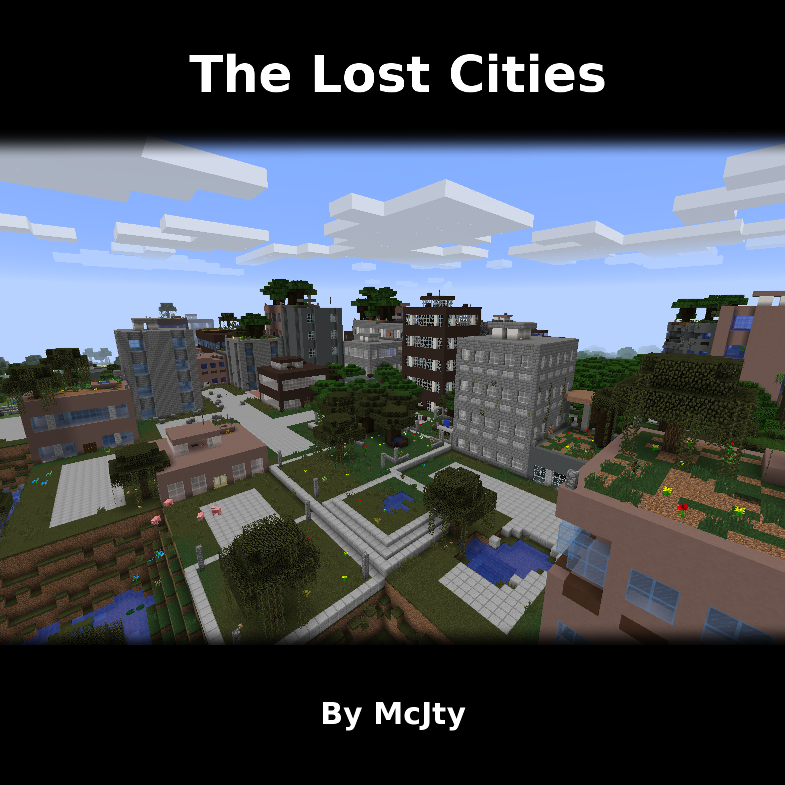
The Lost Cities
Modby McJty
The Lost Cities is a world generation mod
Type
Mod
CurseForge Downloads
92,750,189
CurseForge ID
Modrinth Downloads
11,501,005
Modrinth ID
Last Updated
Nov 7, 2026
Description
The Lost Cities
The Lost Cities transforms Minecraft's Overworld into a vast, abandoned civilization. Explore ruined skyscrapers, apartment blocks, factories, roads, highways, bridges, tunnels, subway systems, parks, flooded areas, and underground rooms filled with loot and dangers.
Cities are integrated into the normal terrain, so Lost Cities can be combined with other biome and terrain mods. Depending on the selected profile, the world can contain sprawling city regions, rare cities separated by wilderness, heavily damaged ruins, safer buildings, tall skylines, domed cities, or other specialized landscapes.
Features
- Large procedural cities with streets, buildings, parks, highways, bridges, railways, tunnels, and subways
- Detailed interiors with loot, spawners, cellars, lighting, and extensive damage and decay options
- Multiple built-in profiles for very different world-generation styles
- An in-game configuration screen for selecting a profile and customizing generation
- Support for biome and terrain-generation mods
- Data-driven buildings, palettes, city styles, world styles, and other assets for modpack authors
- Custom profiles for controlling city frequency, building height, damage, explosions, terrain, infrastructure, loot, and much more
- Server-side-only operation, allowing vanilla clients to connect when no client-side Lost Cities features are required
Note: New Street/Highway layout was commissioned by TqLxQuanZ. Thanks for the support!
Current Version Documentation
The documentation stored in the GitHub branch for your Minecraft version is the most accurate and up-to-date source. The Lost Cities Wiki remains useful for older versions and general background, but it may describe legacy behavior that no longer applies.
Minecraft 1.20.1
Minecraft 1.21.1
Minecraft 1.21.11
Minecraft 26.1.2
Setting Up a Server
Choose the profile before generating the world. Changing the profile later affects only newly generated chunks and can create abrupt borders or an inconsistent world. If the server has already generated the intended world, stop it, make a backup, and use a new level-name or remove the old world before continuing.
The profile name is the identifier shown in the Lost Cities profile selector, such as default, nodamage, or another installed profile. Names are case-sensitive. A custom profile must also be installed in the server's Lost Cities profile configuration before the world is created.
Server Setup for 1.20.1
The safest way to configure a 1.20.1 server is to prepare the settings in single player:
- Install the same Minecraft 1.20.1 mod loader, Lost Cities version, and world-generation mods on the client and server.
- On the client, create a new single-player world. Open the Lost Cities configuration from the world-creation screen, enable Lost Cities, select the desired profile, and apply any custom settings.
- Create the world once so Lost Cities writes its world-specific configuration.
- Stop the dedicated server.
- Copy
saves/<your-world>/serverconfig/lostcities-server.tomlfrom the client instance todefaultconfigs/lostcities-server.tomlin the server directory. - Open the copied file and verify that
selectedProfilecontains the desired profile. LeaveselectedCustomJsonas generated if the profile was customized in the UI. - Start the server with a new world. The file in
defaultconfigsis copied into the new world'sserverconfigdirectory and Lost Cities generates the Overworld using that profile.
For an existing server installation that has not generated its world yet, you can instead place a prepared lostcities-server.toml directly in defaultconfigs. Do not use the old level-type=lostcities setting on 1.20.1; Lost Cities is selected through its configuration.
Server Setup for 1.21.1, 1.21.11, and 26.1.2
These versions use the regular server config directory instead of a per-world serverconfig file:
- Install the matching NeoForge and Lost Cities versions on the server, together with any biome, terrain, or asset mods required by the pack.
- Start the server once so the configuration files are created, wait for startup to finish, and then stop it.
- Open
config/lostcities-server.tomlin the server directory. - In the
profilessection, setselectedProfileto the desired profile name. For example:
[profiles]
selectedProfile = "default"
selectedCustomJson = ""
- If you prepared customized settings with the in-game configuration screen, copy the generated
selectedCustomJsonvalue as well; otherwise leave it empty. - The bootstrap run may already have created a normal world. Set a new
level-nameinserver.properties, or back up and remove that generated world, so the next startup creates a completely fresh world. - Start the server. A non-empty
selectedProfileenables Lost Cities generation in the new Overworld; an empty value leaves the normal Overworld unchanged.
For all four current versions, Lost Cities can run only on the server, which permits unmodded clients to connect. Clients still need the mod when they need its configuration GUI or when the modpack contains other content that requires it on both sides.
Legacy Versions
The instructions below are retained for old modpacks. They do not apply to Minecraft 1.20.1 or newer.
Minecraft 1.14 through 1.19.x
Lost Cities is not a separate world type in these versions. In single player, choose the normal world type, open world customization, and use the LC button to enable Lost Cities and select a profile.
For a dedicated server, create and configure a single-player world first. Copy saves/<your-world>/serverconfig/lostcities-server.toml to the server's defaultconfigs directory, then generate a new server world.
Minecraft 1.12.x
Set the following in server.properties before creating the world:
level-type=lostcities
generator-settings={"profile":"nodamage"}
Replace nodamage with the desired profile. When Biomes O' Plenty is installed, use level-type=lostcities_bop for the Biomes O' Plenty variant.
Minecraft 1.12 also provides a separate Lost Cities dimension, using dimension ID 111 by default. This can be disabled for server-side-only use. To travel there, place a bed on two diamond blocks, surround it with six skulls, and try to sleep in it.
For still older releases and historical details, consult the Lost Cities Wiki and the matching branch of the GitHub repository.
Companion Mod
Lost Souls adds more challenge and danger to Lost Cities buildings.
Support
CurseForge comments are disabled because support requests are difficult to track across multiple sites. Please use the Lost Cities issue tracker for bugs and the Lost Cities Discord for discussion.
Modpack policy: Feel free to use Lost Cities in any modpack.
Compatibility
Mod Loaders
Game Versions
Recommended Gear
AffiliateHardware and extras that pair well with this mod.

As an Amazon Associate I earn from qualifying purchases.
Screenshots
Similar Mods

Just Enough Items (JEI)
View Items and Recipes

Cloth Config API (Fabric/Forge/NeoForge)
Config Screen API for Minecraft

Mouse Tweaks
Enhances inventory management by adding various functions to the mouse buttons.

Fabric API
Core API library for the Fabric toolchain

AppleSkin
Adds some useful information about food/hunger to the HUD

GeckoLib
A 3D animation library for entities, blocks, items, armor, and more!
Included in Modpacks (568)
Show fewer mutated zombie apocalypse
 Zombie Wasteland
 Craftformers Official Server Modpack
 MustardLabs Unofficial Zombie Apocalypse
 HunterZ By Xen0Xys
 Fallout - Welcome to the Wasteland (By Pacman)
 Cursed Walking sl7 edition
 Deceased Craft But Better
 Jurassic World - Apocalypse Edition
 Surviving 100 Days With Parasites (By LucasDotje)
 Luck3r's 100 Days in Zombie Apocalypse
 MHAC - My Hero Academia Craft
 Resident Craft
![Apocalypse Remnants of Earth - A Modern Zombie Apocalypse [TACZ] [Custom Generation] [Ready to go]](https://media.forgecdn.net/avatars/1556/435/639009950598342040.png) Apocalypse Remnants of Earth - A Modern Zombie Apocalypse [TACZ] [Custom Generation] [Ready to go]
Apocalypse Remnants of Earth - A Modern Zombie Apocalypse [TACZ] [Custom Generation] [Ready to go]
 scary (Really scary)
 A 100 days in a Zombie Apocalypse
 World Of Dragons
 Dawn of the Flood
 Afterfall - Zombie Apocalypse Survival | Inspired by DeceasedCraft
 Create: Beyond Earth
 MC HardcoreZ
 The Crafting Dead II
 WayPoint
 Zsombor's Zombie Apocalypse
 The Witch the Vampire and the Werewolf
 RunNGun - 100 Days Zombie Apocalypse
 SCP Apocalypse - By Gloomless
 ChernobylCraft.
 All The Neoforge
 SimplePack 4
 Blockalypse - A Modern Zombie Apocalypse
 Apocalypsecraft - Survive The Zombie Apocalypse
 Izakji's Zombie Apocalypse II Lite
![[TACZ] [SBW] BlockField](https://media.forgecdn.net/avatars/1636/677/639047802453982181.png) [TACZ] [SBW] BlockField
[TACZ] [SBW] BlockField
 fly like invincible
 Changed Goo Outbreak
 Real And Beautiful - Civilization
 Apocalipse of Zombies
 changed project: Latex
 Astral Sorcery Modpack
 VampirCraft
 Horrors From Shadows
 ForgottenWinter_legacy
 Creative Industrialization: Festering Industry
 Moni&ProjectE
 The Decimation of Mankind
 Illyrian Winter
 Lukes Paradise Parasites Riptide
 fate modpack
 Nova Academy Official
 Enough Packs For Sans
 JujutsuCraftSen
 Omnifactory Self-Torture Edition
 RL Craft but it's just the RL
 Don't Cry!
 The end human civilization(100days)
 THE Walking of the parasite. 100Days.
 Jujutsu X
 IcyHarry's Disturbing Horrors
 HORROR - The Lost Cities - Zombie Apocalypse
 Lost Cities: Too Many Mods
 Clay Soldiers The Revival
 Colony:Exodus to the stars
 Winter's Fury: A Post-Apocalyptic Adventure
![Huge Horror Pack [Horror] [Dweller] [Scary]](https://media.forgecdn.net/avatars/1731/85/639101693386634265.png) Huge Horror Pack [Horror] [Dweller] [Scary]
Huge Horror Pack [Horror] [Dweller] [Scary]
 Apocalipsis de Titanes
 Sniper-assassin
 Arachnophobia - All the worst Phobias at once
 BetterMC 12 - Enhanced Adventure Experience
 CheneTulipe Apocalipse Zombie Invasion
 JujutsuCraft: Domain Expansion
 Hardcore Pokemon
 TTIGRN : Hardcore Heroes
 ODL Zombies
 Last DayZ of Craft
![Jujutsu Craft+ [JJC+]](https://media.forgecdn.net/avatars/959/265/638454165548542370.png) Jujutsu Craft+ [JJC+]
Jujutsu Craft+ [JJC+]
 Scary christmas
 Xerlios's Sorcery Fight
 Planetcraft's Galacticraft
 Kaiju Hachi-go (Kaiju No. 8)
 Apocalypse (100 days)
![ATB [After The Bombs] Zombies](https://media.forgecdn.net/avatars/1765/665/639122372214412762.png) ATB [After The Bombs] Zombies
ATB [After The Bombs] Zombies
 Blursed JJK
 The Last Stand into Nuclear Winter by Docgamesyb
 Leviathan
 Road To Realistic
 The Nuclear Option
 MHA : Heroes Journey
 Gun and Parasite (KOR)
 FTB Unstable
 Gibuns Jujutsu Craft 100 Days Challenges
 Jujutsu Craft Infinity Evolved Anime
 Project: HORROR
 Parasyte by JarekSHark
 THE ORIGENS V2
 The Crafting Dead Reimagined
 InteritusCraft (post-apocalyptic survival)
 Void Genesis: The Quantum Abyss
 Z's Deceasedcraft Lite
 AtomBombOS