

Dynamic In-Game NBT Editor
ModEdit NBT dynamically and multis-creen.
Type
Mod
Modrinth Downloads
5,550
Modrinth ID
2K2sAo8i
Last Updated
Jul 26, 2026
Description
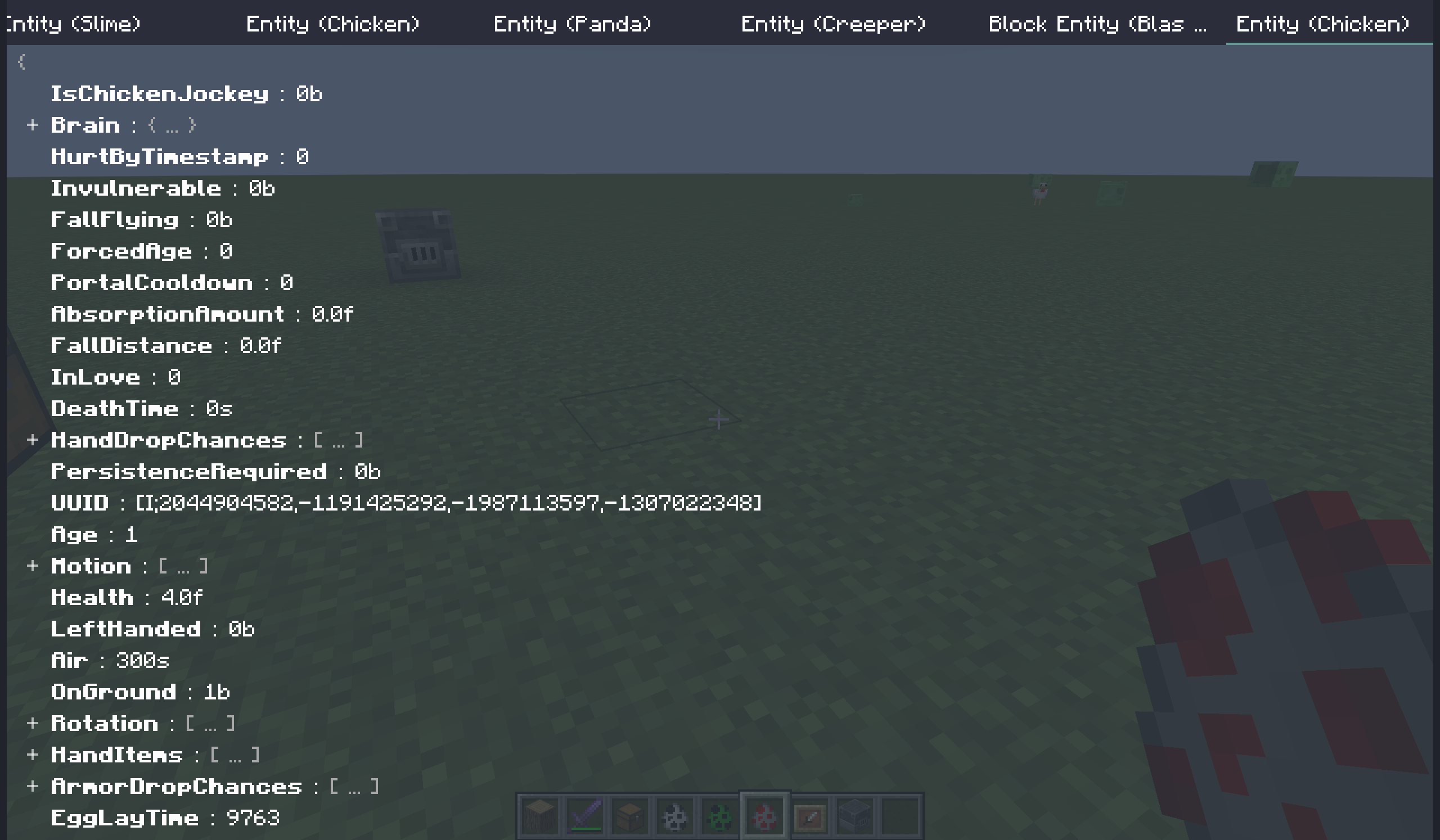
Dynamic In-Game NBT Editor (DINE) allows you to modify entities and block entities' NBT dynamically.
This mod is client-only. Installing it in dedicated server may cause problems.
This mod modifies NBT through sending data command to server. Make sure you have enough permision.
Features
Dynamic: The editor fetches NBT and update every tick,. You can observe the dynamic changes of the entity.
Multi-screen: You can have 1 or more screens (tabs) opened.
Simple and user-friendly: Minimize the number of icons displayed on the screen at any given time, while maintaining full functionality.
Opetarion Guide
Multi Screen Tab Bar
All open screens are listed in the tab bar at the top.
The tab bar can scroll horizontally.
Key Function Mouse click (left) switch to the selected tab Mouse click (middle) close the hovered tab screen Mouse click (right) call up the context menuNBT Tree
NBT is displayed in a tree structure. You can unfold/fold some nodes for better visualization.
The NBT Tree can scoll vertically.
Key Function Mouse click switch to the selected tab Double mouse click close the hovered tab screen Mouse click (right) call up the context menu Enter edit the selected node Delete delete the selected node Ctrl + C copy a node to the clipboard (not system clipboard, same below) Ctrl + X cut a node to the clipboard Ctrl + V paste a node from the clipboardQuery Server
You can turn Query server on in the right-click context menu.
When this is on, this screen will not use the NBT data stored locally on the client, but will instead attempt to query the server to fetch the NBT. This behavior functions identically to F3+I.
In this state, the displayed NBT data is guaranteed to remain synchronized with the server at all times, though it will be a delay of 1 tick.
In defualt, the server side will check your permission. If you do not have sufficient permission level, the query will fail.
Key Binds
Name Default Function Open DINE Editor not bound open the editor Edit Target not bound open a new screen of the targeted entity or block entityCommands
All these commands are client-side commands that will not be processed by the server.
- dine open the editor
- target open a new screen of the targeted entity or block entity
- entity [uuid] find out an entity with the specified UUID and open a a new screen of it
- block [pos] find the block entity at the specified position and open a a new screen of it
Config
The config file is located in [gameroot]/config/dine.prop.
The config file is in Java Properties language.
All config are loaded/reloaded when the client reload resources (You can trigger it by F3+T.).
Config Item Type Default Function defaultTryPauseGame boolean false whether a new screen try pause game entityDefaultFromServer boolean false whether a new entity screen query server blockEntityDefaultFromServer boolean false whether a new block entity screen query server checkPermissionWhenFromServer boolean true whether should check permission before query server logSentCommand boolean false whether to put sent command's content in the client log dataCommand string data the command's name with function of vanilla command dataFAQ
- Why no items' nbt/data components?
Items' nbt/data components have different processing logic in the code. While in vanilla, there are no commands that can easily modified them.
If you really need it, you can try use some entity/block entity, such as Item Frame.
- The NBT tree doesn't update / match the actual effect.
This frequently occurs on some block entities. The reason is that the server has not synchronized their NBT.
You can turn on the Query server in right-click context menu to solve this problem.
- Can I use this mod on other people's servers?
Since this is a client-only mod, you can generally join any server with this mod installed without encountering issues.
However, this does not imply that doing so is right. I will make no guarantees about it.
Compatibility
Mod Loaders
Game Versions
Recommended Gear
AffiliateHardware and extras that pair well with this mod.

As an Amazon Associate I earn from qualifying purchases.
Screenshots
Similar Mods

pv-addon-broadcast
Broadcast your voice to all players in the radius, world, server, or proxy.

Farts
Grow plants with farts
Back Up Beds
Now you can have multiple beds that you can respawn in!
Villager Archer Camp
Adds a Villager Archer Camp to the plains and forest biome

Peaceful Skeletons
Prevents skeletons from attacking players or gives them a melee weapon.

Armor Impact Sounds
Plays realistic metal sounds when entity damaged while wearing a chestplate. Works with other mods.
