

KKS Chat
ModCustom chat with player avatars, whispers, and anti-spam. Fully customizable positioning.
Type
Mod
Modrinth Downloads
656
Modrinth ID
2tjYaIWP
Last Updated
Sep 26, 2026
Description
KKS Chat
Custom chat for Minecraft with player avatars, settings, spam protection, and multi-language UI.
Main Features
Beautiful Interface
Chat shows player avatars next to messages. Each line is drawn in its own block with adjustable background transparency. You can move the whole chat to different corners or keep it centered (see Positioning).

Positioning
In Options → Chat Settings, cycle Position to place the chat on screen. Modes:
- Center (bottom) — default, above the hotbar area
- Center (top)
- Left top / Left bottom
- Right top / Right bottom
Message blocks align to the chosen side or stay centered.
Anti-Spam System
When enabled, only fully identical consecutive messages are merged and shown with a repeat counter (e.g. x3). You can turn anti-spam off in settings; history regroups or splits accordingly.

Whisper
Private messages are shown with dedicated formatting (sender / receiver).

Animations
Messages animate in and out of the screen. Choose a separate style for appearance and disappearance in the config:
- Fade — smooth opacity transition (default)
- Slide — slides in/out from left, right, top, or bottom
- Bounce — elastic spring effect on entry
- None — instant appear and disappear
Settings
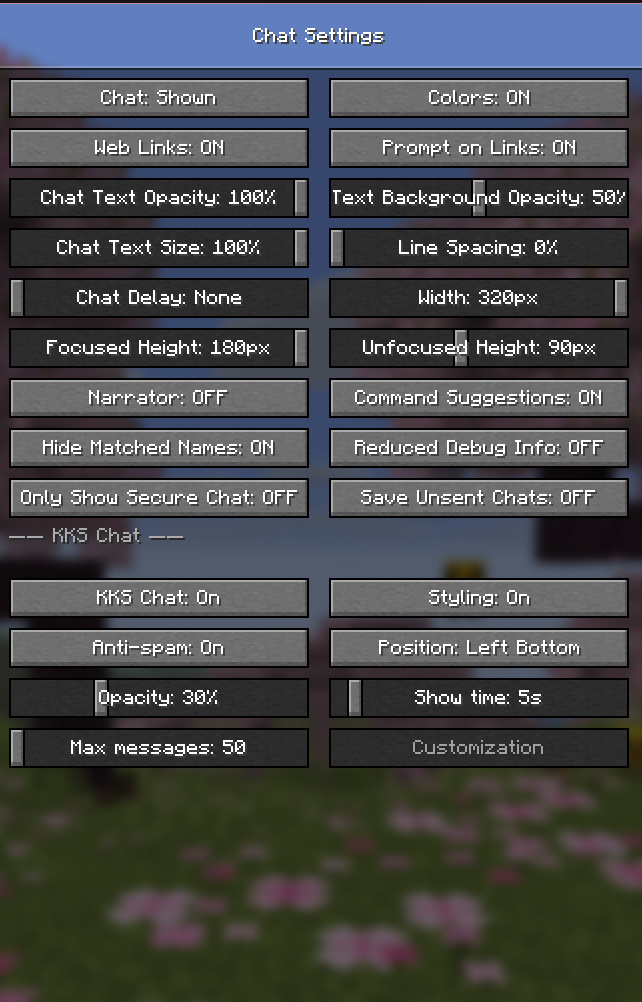
Settings are in Minecraft → Options → Chat Settings (KKS Chat section). Values are saved to config/kks-chat.json and restored after restart.
KKS Chat On / Off
Toggle between KKS Chat and the vanilla chat interface without restarting the game.
Background Transparency
0%–100% opacity for message backgrounds.
Display Time
How long overlay messages stay visible: 1–60 seconds.
Maximum Messages (history)
Stored history size: 50–500 messages (older lines are dropped).
Other Options
- Styling — turn custom message formatting on or off
- Anti-spam — enable or disable identical-message merging
- Position — see Positioning above
Supported Languages
The mod ships with 12 language files (assets/kks-chat/lang/). UI strings follow the game language when a matching file exists; otherwise English is used as fallback.
- 🇬🇧 English (en_us)
- 🇷🇺 Русский (ru_ru)
- 🇩🇪 Deutsch (de_de)
- 🇪🇸 Español (es_es)
- 🇵🇹 Português (Brasil) (pt_br)
- 🇵🇹 Português (Portugal) (pt_pt)
- 🇮🇹 Italiano (it_it)
- 🇵🇱 Polski (pl_pl)
- 🇹🇷 Türkçe (tr_tr)
- 🇰🇷 한국어 (ko_kr)
- 🇯🇵 日本語 (ja_jp)
- 🇸🇦 العربية (ar_sa)
Message History
Press T to open chat: full history with scrolling. Grouped repeats can be expanded to show each line.

Configuration
The config file is created automatically at config/kks-chat.json on first launch. All settings are documented with comments inside the file — open it in any text editor.
Icons
Each message type (system, error, whisper, join/leave, etc.) has its own icon. You can change any icon to any valid Minecraft item ID:
"iconSystem": "minecraft:stick", "iconWhisper": "minecraft:paper", "iconJoinLeave": "minecraft:oak_door"Background Colors
Set a custom background color per message type:
"bgColors": { "SYSTEM": "#000000", "ERROR": "#1A0000", "ACHIEVEMENT": "#001A04", "CHALLENGE": "#1A0028" }Animations
Configure appearance and disappearance animations independently:
"animationIn": "BOUNCE", "animationOut": "SLIDE_LEFT"Available values: FADE, SLIDE_LEFT, SLIDE_RIGHT, SLIDE_UP, SLIDE_DOWN, BOUNCE, NONE
Rules
Rules let you automatically transform messages based on conditions — change icons, colors, text, display time, or hide messages entirely. Rules are defined in kks-chat.json under "rules".
Each rule has an "if" block (conditions) and a "then" block (actions):
{ "if": { "type": "COMMAND_BLOCK" }, "then": { "hide": true } }Conditions
Field Description type Message type: PLAYER_CHAT WHISPER SYSTEM ERROR SLEEP ACHIEVEMENT CHALLENGE COMMAND_BLOCK JOIN_LEAVE SCREENSHOT contains Text contains this string startsWith Text starts with this string endsWith Text ends with this string regex Java regex — first capture group becomes {matched} matchType "ALL" (AND, default) or "ANY" (OR)Actions
Field Description hide Remove the message entirely color Tint the full message text — "#RRGGBB" colorMatch Tint only the matched fragment icon Override the icon (Minecraft item ID) displayTime Override display time in seconds replaceText Replace the entire message text replaceMatch Replace only the matched fragment stopAfter Stop — do not evaluate further rulesVariables
Use {variable} placeholders inside replaceText and replaceMatch:
Variable Value {my_name} Your in-game name {sender} Sender's name {text} Full original message {matched} Fragment matched by contains or regex {type} Message type name {time} Current time — HH:mm {time_s} Current time — HH:mm:ss {repeat} Repeat counterExample
"rules": [ { "if": { "type": "COMMAND_BLOCK" }, "then": { "hide": true } }, { "if": { "contains": "[VIP]" }, "then": { "icon": "minecraft:gold_ingot", "colorMatch": "#FFD700", "displayTime": 8 } }, { "if": { "type": "JOIN_LEAVE", "contains": "joined" }, "then": { "replaceText": "→ {sender} joined [{time_s}]", "color": "#55FF55" } } ]Support
Questions or suggestions: ddev14 on Discord.
Compatibility
Mod Loaders
Game Versions
Recommended Gear
AffiliateHardware and extras that pair well with this mod.

As an Amazon Associate I earn from qualifying purchases.
Screenshots
Similar Mods
Everrose
Craft Everrose, a rose gold alloy surpassing netherite, with gold-speed tools, special foods, and armor trims.
MikasRevs Phone 2
A phone mod for Minecraft with messaging, calls, social apps, camera, GPS, music and more. Built mainly for multiplayer...

Squishy Heads
A Simple Voice Chat addon that scales players heads when talking

KawaMood's Waystones in DNT Shrines
Addon that generates KawaMood's Waystones in DNT Shrines

Structure Maps
More explorer maps to find other structures!
Immersive Lanterns (Unofficial Patch
Unofficial patch of Immersive Lanterns by Toni. Removes hard dependencies on Sodium Dynamic Lights and Accessories, allo...