

CraftTweaker GUI
Modby Bommels05
Allows editing and managing edited recipes for CraftTweaker
Type
Mod
CurseForge Downloads
109,978
CurseForge ID
Modrinth Downloads
20,574
Modrinth ID
Last Updated
Nov 7, 2026
Description
With CraftTweaker GUI you can easily create new recipes or edit existing ones. When you are done, you can export your recipes to CraftTweaker and they will work after a simple reload. The recipes you changed are saved, so you can always see a list of changed recipes and also edit them again. CT GUI is completely client-side and does nothing on a server.
How does it work?
To start editing a recipe, you first need to open EMI (or JEI but EMI is recommended) and either click on the plus icon next to the category name, to create a new recipe, or click on the CT GUI icon next to each recipe to edit the recipe. In the editing screen, you can drag and drop items from EMI or the recipe itself into slots of the recipe. You can right-click slots to delete the item inside and scroll while hovering over them to increase or decrease the amount. On the bottom left, you can create a new Tag-Ingredient and drag it into the recipe. Some recipes also have extra options that you can configure on the side, for example shapeless when creating crafting recipes. Over the recipe itself you can change the recipe id, it will also be assigned automatically when you give the recipe an output unless you changed it before. Under the recipe you have the option to delete the original recipe you are editing, edit/replace it with the recipe you made or just create a new recipe without affecting the original one. Even when you have not exported your recipe, it will already be visible in EMI but not actually work.
Managing changed recipes
After editing a recipe or when clicking the CT button in the pause menu, you get to the changed recipes list. There you can see all changes you made and filter for the ones you have not exported yet. This is also the place to delete or edit changes you made and export them to CraftTweaker. You can also disable the edit mode and the pause menu button here or in the config.
View the full list of supported recipe types here
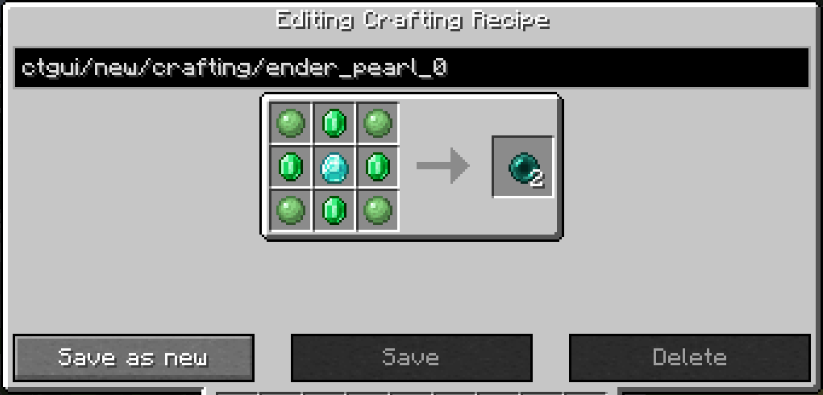
Tag editing is a bit special because it is not an actual recipe. Instead of the recipe id you enter the name of the tag and because Emi does not display tags with one or no items you have to create a new tag with the same name to add items to those.
One of the things that are disabled in the editing screen, is tag collapsing, so when editing the recipe for iron doors for example, you will see that it actually accepts the tag for iron ingots not just iron ingots themselves. You can also enable this everywhere in the config. This only works in EMI.
Compatibility
Mod Loaders
Game Versions
Recommended Gear
AffiliateHardware and extras that pair well with this mod.
As an Amazon Associate I earn from qualifying purchases.
Screenshots
Similar Mods

BCLib Neoforge
An unofficially maintained continuation of BCLib for Fabric and NeoForge, providing core utilities and shared functional...
Particle Tweaks
Substantially improves particles!

FNaF Universe: ReBuilt
A mod made with the goal of letting you build using FNAF content with as much available customization and as little rest...

Limbs
Allowing you to wear mob limbs to replace yours

Knight Quest
An adventuring armor mod!

Myths and Legends [Cobblemon Sidemod]
The 'Cobblemon Myths and Legends Addon' for Cobblemon Mod introduces key items and new spawning conditions, intended to...
Included in Modpacks (21)
Most downloaded Protocol Zero - A Modern Zombie Apocalypse
 Volormon
 Volormon
 Tech's Community Server
 Twisted Towns
 Just Create SMP S1 - But Voltura
 The aether of create
 Re-Orespawned
 Protocol Zero-(HARDCORE EDITION)
 The SV Vault
 MaidApocalypse
 VOID-BOX2
 SCSMP 2
 Cobblemon, Side by Side! (EARLY ACCESS)
 Limbones Server Modpack
 Titans Beyond the Walls
 Chronos Archives
 Exlandia 5
 Cobblemon Extended (LD16)
 Eternity - Refugievements