
World Handler - Command GUI
Modby Exopandora
Minecraft ingame GUI for commands
Type
Mod
CurseForge Downloads
336,740
CurseForge ID
228970
Last Updated
Oct 3, 2026
Description
World Handler - Command GUI
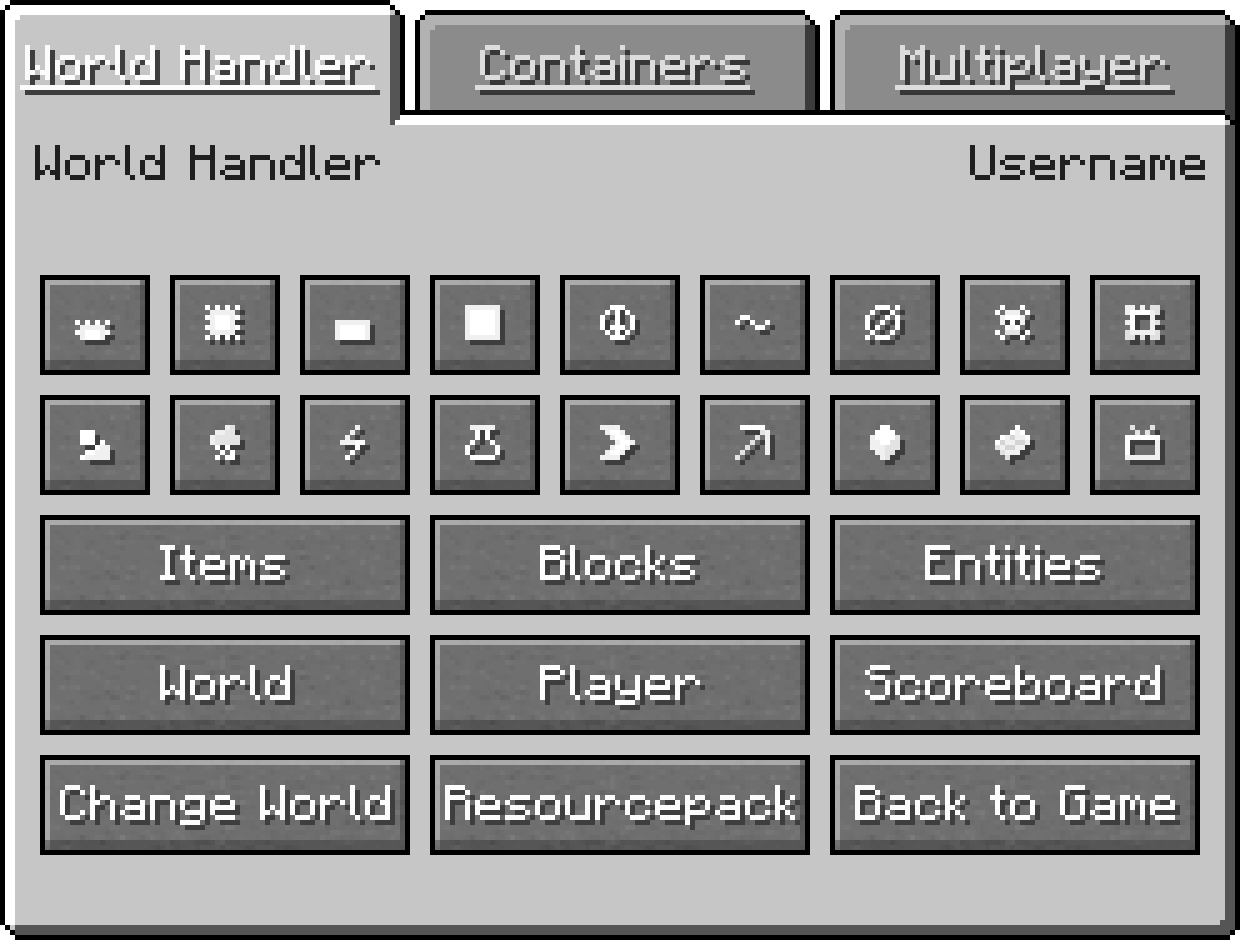
The World Handler provides a simple and easy to use graphical user interface for commands. It lets you create powerful and complex sub-commands alongside NBT-structures within seconds.
Features
- GUI for commands
- Client Commands: advancement, blockdata, clear, clone, difficulty, effect, enchant, fill, gamemode, gamerule, give, kill, recipe, scoreboard, setworldspawn, spawnpoint, summon, tag, team, time, trigger, weather, xp
- Server Commands: ban, deop, kick, op, pardon, save-all, save-off, save-on, whitelist
- World and player information
- /wh for a simplified /fill and /clone
- Expandable GUI with json files and child mods
- Client-side only
Installation
Download World Handler or build from source
Prerequisites
- 1. Make sure Minecraft Forge is installed
Installer
- 1. Run "WorldHandler-[VERSION]-UNIVERSAL.jar"
- 2. Select your Minecraft directory
- 3. Click Install
Manual
- 1. Navigate to "..\.minecraft\mods"
- 2. Copy the "WorldHandler-[VERSION]-UNIVERSAL.jar"
- 3. Follow the steps below
Launcher Settings
- 1. Select Forge as your profile
- 2. Launch Minecraft
- 3. Join a world or server
- 4. Press "V" to open the World Handler
Configuration
- ≥ 1.14.4: Manual: "..\.minecraft\config\worldhandler\worldhandler.toml"
- 1.13-1.14.4: Manual: "..\.minecraft\config\worldhandler.toml"
- 1.9-1.12: Ingame: Mods -> World Handler -> Config (Manual: "..\.minecraft\config\worldhandler.cfg")
- ≤ 1.8: Manual: "..\.minecraft\config\worldhandler\[CONFIG].cfg"
Installation with ModLoader (1.6.2)
- 1. Navigate to "..\.minecraft\mods"
- 2. Copy all files of the "World_Handler_GUI_[VERSION].zip" into the "1.6.2ML.jar"
- 3. Run Minecraft
Expansion
The World Handler GUI can also be expanded with custom tabs configured with json and javascript files or as a separate child mod written in java. A description on how to implement a custom json and javascript file can be found here and an example child mod can be found here.
FAQ
- Q: Is this client-side only ?
- A: Yes
- Q: Can you port this to fabric, liteloader, rift, etc ?
- A: No
- Q: Can i add this to my modpack ?
- A: Yes, as long as you give credit
Support
This mod will no longer be updated.
License
GNU GENERAL PUBLIC LICENSE Version 3
Recommended Gear
AffiliateHardware and extras that pair well with this mod.

As an Amazon Associate I earn from qualifying purchases.
Screenshots
Similar Mods
Better P2P
Advanced P2P managing tool for AE2
Shield Fixes
This mod resolves issues with shield sounds and corrects the animation glitch where the player's shield doesn't display...
Wynntils
Enhance your Wynncraft gameplay with Wynntils!

KubeJS Curios
Curios integration for Kubejs
GJEB (GammaJustExtremeBright)
GammaJustExtremeBright
KubeJS Offline Documentation
KubeJS Documentation files, generated dynamically via command, accessed with an html page.
Included in Modpacks (7)
 Quality Of Life (QOL)
 Just Hide - A Ransomware Horror Experience (Inspired by Twixxel & Thatmob) Scary Stalker Gameplay Recreation Modpack
 Abnormal World - A Psychological Horror Experience
 BuildBattle pack
 Battlecraft 2.0
 Ultimate War: Modern Combat Edition
 Fossils And Archaeology: Full Steam Official Server