Description
---
# Cell⁴
**Infinite ME Storage Cells for Applied Energistics 2**
---
Cell⁴ is an AE2 addon designed for modpack development. It adds three types of **Infinity Cells** that can be bound to specific items via NBT or data components, allowing infinite extraction from the ME network. Inserted matching items are silently discarded, consuming no actual storage.
**Supported versions:** 1.20.1 (Forge), 1.21.1 (NeoForge), 26.1.2 (NeoForge)
## Infinity Cell Types
- **Infinity Item Cell** — bind specific items/fluids
- **Infinity Tag Cell** — bind all items matching tags and/or from specified mods
- **Infinity ModID Cell** — bind all items from a mod
## Cell Configurator
The **Cell Configurator** is an in-game tool for editing cell data visually. Right-click while holding it to open the configuration GUI, then place a cell into the slot.
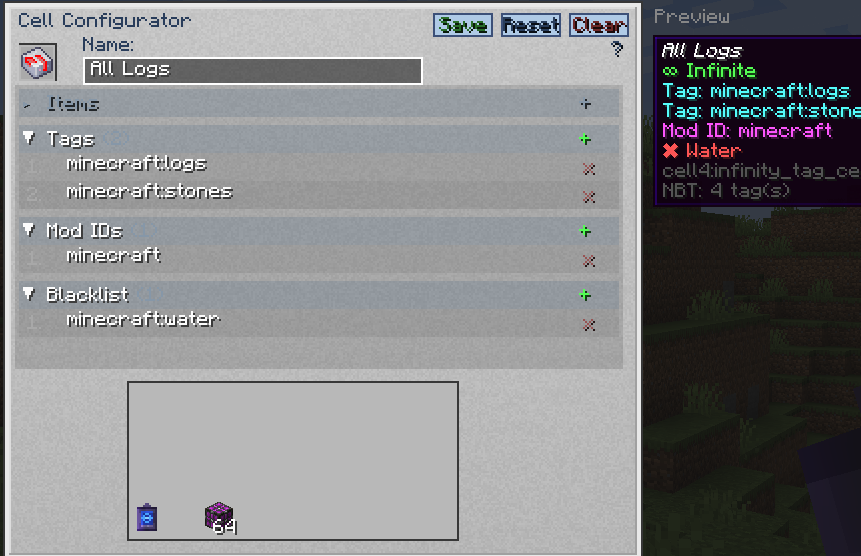
- Editable fields change based on the cell type placed in the slot.
- Inactive fields are shown in gray and cannot be edited.
- Separate multiple values with commas (e.g. `minecraft:diamond,minecraft:oak_log`).
- In the blacklist field, prefix tags with `#` (e.g. `#minecraft:birch_logs`) and mod IDs with `@` (e.g. `@mekanism`).
- Press **Tab** to cycle between editable fields.
- Press **Enter** to save changes.
- Click **Save** to apply changes, **Reset** to revert, or **Clear** to erase all fields.
| Cell Type | Editable Fields |
|-----------|----------------|
| Item Cell | `cell4item`, `cell4blacklist` |
| Tag Cell | `cell4tag`, `cell4modid`, `cell4blacklist` |
| ModID Cell | `cell4modid`, `cell4blacklist` |
### Preview
The right side of the GUI displays a **Preview** panel showing the cell's tooltip as it would appear in your inventory. If a custom name is set in the name field, the preview updates in real time with the new name shown in italic style.
## Data Keys
| Key | Target | Example |
|-----|--------|---------|
| `cell4item` | Specific items/fluids | `"minecraft:diamond"` |
| `cell4tag` | Tag | `"minecraft:logs"` |
| `cell4modid` | Mod ID (Tag Cell also supports this) | `"mekanism"` |
| `cell4blacklist` | Exclude items/tags/mods (optional) | See below |
| `cell4name` | Custom display name (optional) | `"My Diamond Cell"` |
> **1.20.1** stores these keys as raw NBT (`{...}`). **1.21.1 & 26.1.2** store them inside data components (`[custom_data={...}]`).
## Command Examples
**1.21.1 & 26.1.2** use `[custom_data={...}]` syntax; **1.20.1** uses `{...}` syntax. Tag namespace: `c:` in 1.21.1/26.1.2, `forge:` in 1.20.1.
### Single Value
```
# 1.21.1 / 26.1.2
/give @p cell4:infinity_item_cell[custom_data={cell4item:"minecraft:diamond"}]
/give @p cell4:infinity_tag_cell[custom_data={cell4tag:"minecraft:logs"}]
/give @p cell4:infinity_modid_cell[custom_data={cell4modid:"mekanism"}]
# 1.20.1
/give @p cell4:infinity_item_cell{cell4item:"minecraft:diamond"}
/give @p cell4:infinity_tag_cell{cell4tag:"minecraft:logs"}
/give @p cell4:infinity_modid_cell{cell4modid:"mekanism"}
```
### Multiple Values
```
# 1.21.1 / 26.1.2
/give @p cell4:infinity_item_cell[custom_data={cell4item:["minecraft:diamond","minecraft:oak_log"]}]
/give @p cell4:infinity_tag_cell[custom_data={cell4tag:["minecraft:logs","c:ingots/iron"]}]
/give @p cell4:infinity_modid_cell[custom_data={cell4modid:["mekanism","thermal"]}]
# 1.20.1
/give @p cell4:infinity_item_cell{cell4item:["minecraft:diamond","minecraft:oak_log"]}
/give @p cell4:infinity_tag_cell{cell4tag:["minecraft:logs","forge:ingots/iron"]}
/give @p cell4:infinity_modid_cell{cell4modid:["mekanism","thermal"]}
```
### Tag Cell with Mod ID Filter
The Infinity Tag Cell supports both `cell4tag` and `cell4modid` simultaneously:
```
# 1.21.1 / 26.1.2
/give @p cell4:infinity_tag_cell[custom_data={cell4tag:"minecraft:logs",cell4modid:"mekanism"}]
/give @p cell4:infinity_tag_cell[custom_data={cell4tag:["minecraft:logs","c:ingots/iron"],cell4modid:["mekanism","thermal"]}]
# 1.20.1
/give @p cell4:infinity_tag_cell{cell4tag:"minecraft:logs",cell4modid:"mekanism"}
/give @p cell4:infinity_tag_cell{cell4tag:["minecraft:logs","forge:ingots/iron"],cell4modid:["mekanism","thermal"]}
```
### Blacklist
Blacklist entries support three types:
- **Item** — plain identifier (e.g. `minecraft:birch_log`)
- **Tag** — prefixed with `#` (e.g. `#minecraft:birch_logs`)
- **Mod ID** — prefixed with `@` (e.g. `@mekanism`)
```
# 1.21.1 / 26.1.2
/give @p cell4:infinity_tag_cell[custom_data={cell4tag:"minecraft:logs",cell4blacklist:"minecraft:birch_log"}]
/give @p cell4:infinity_modid_cell[custom_data={cell4modid:"mekanism",cell4blacklist:["mekanism:steel_ingot","#c:ingots/steel","@thermal"]}]
# 1.20.1
/give @p cell4:infinity_tag_cell{cell4tag:"minecraft:logs",cell4blacklist:"minecraft:birch_log"}
/give @p cell4:infinity_modid_cell{cell4modid:"mekanism",cell4blacklist:["mekanism:steel_ingot","#forge:ingots/steel","@thermal"]}
```
Blacklisted items are shown in the cell tooltip with a ✖ marker.
---