

Chat Remastered
ModTransform your Minecraft chat into a Discord-like experience — share images, animated GIFs, reply to messages, adjust chat height, and let server admins control.
Type
Mod
Modrinth Downloads
248
Modrinth ID
9J1Dj16r
Last Updated
Jul 29, 2026
Description
💬 Chat Remastered — Global Chat Overhaul
A complete rewrite of the Minecraft chat experience. Send media, reply to messages, use context menus, and customize everything seamlessly.
⚡ Features
- 🖼 Images & GIFs — instant inline rendering with smooth animations.
- 💬 Replies & Threads — reply to any text message or photo, just like Discord.
- 🖱 Context Menu (Right-Click) — quickly reply, copy text, or manage messages via a modern pop-up menu.
- 🎨 Text Selection — highlight and select specific lines directly in the chat window.
- ⚙️ In-game settings menu — easily customize image sizes and chat limits.
- ⚡ Instant load + smart placeholders while media is downloading.
- 🔍 Fullscreen viewer — click on any image to zoom in.
- 📐 Adjustable size — change media scaling in chat settings (50%–200%).
- 📏 Adjustable height — tweak chat window height (windowed or fullscreen).
- 🕐 Cooldown system — prevents chat spamming.
- 🔒 Server moderation — granular photo/reply blocking, global media deletion, and out-of-the-box integration with server mute mods.
- 🗂 Wide format support — PNG, JPEG, WebP, BMP, TIFF, and GIF.
📷 How to Send Media
- 🖱 Drag & Drop right into the chat window.
- 📁 Click the chat attachment icon to open the file picker.
- 📋 Paste directly from your clipboard using Ctrl + V.
🖼 In-Game Experience
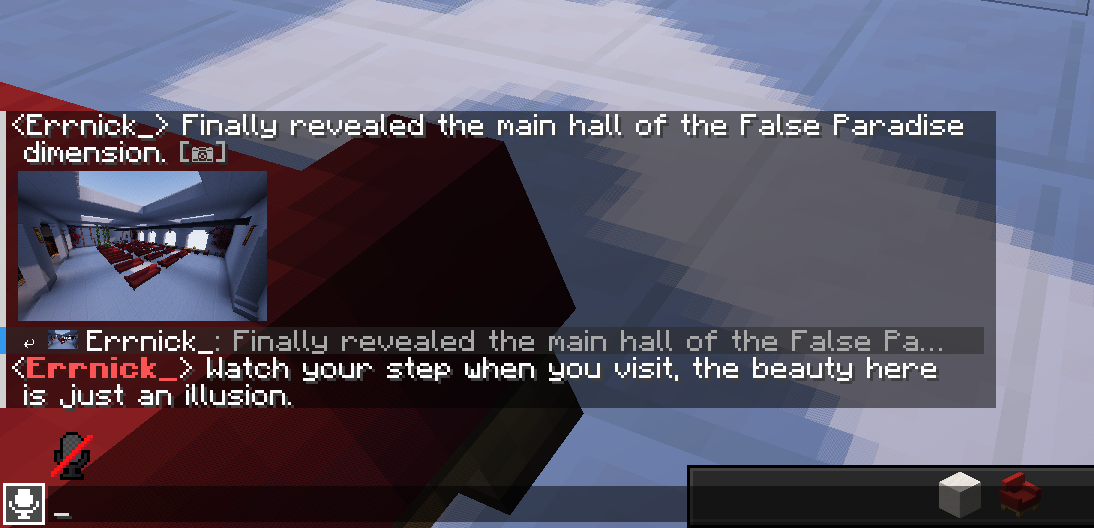
1. Media & Replies
See full images directly inside the chat loop and reply to specific messages or photos with a visual connection.
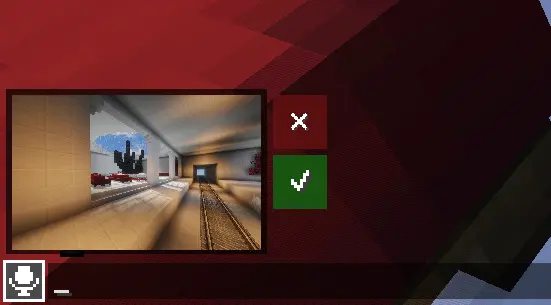
2. Pre-send Preview
Preview your media above the chat input field before sending it to the server, ensuring you always share the right file.
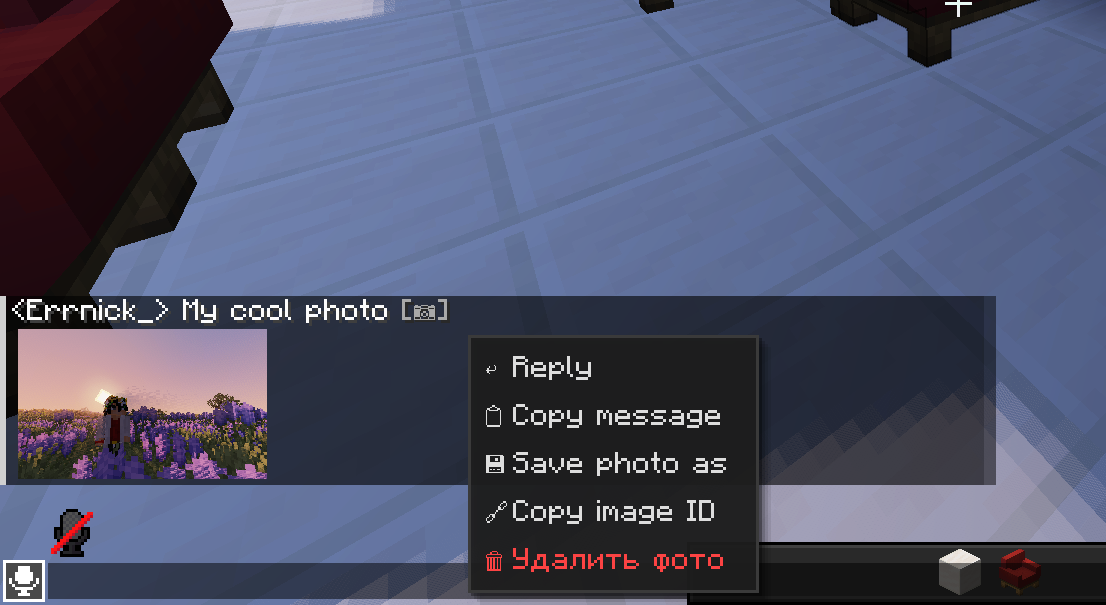
3. Context Menu & Text Selection
Right-click on any message to open a modern pop-up menu. Easily reply, copy message contents, or interact with chat text.
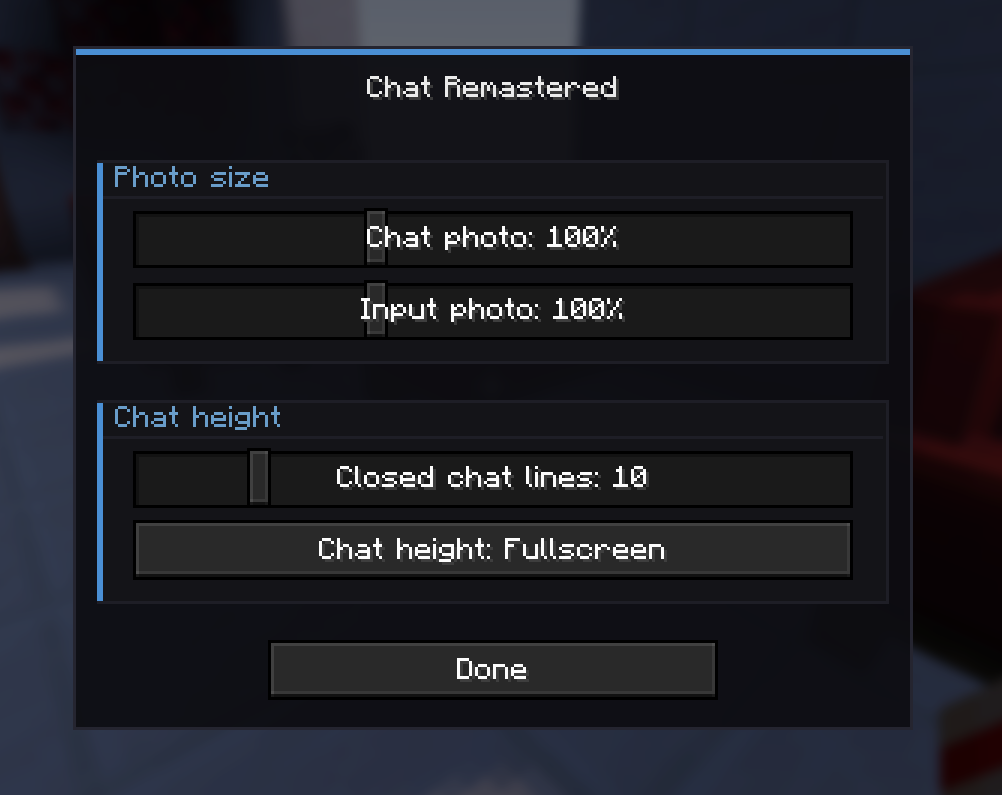
4. In-Game Settings
Fine-tune your chat experience without leaving the game. Adjust photo scale both in chat and input fields, limit lines for closed chat, or switch to a full-screen chat window.
📋 Requirements
- Fabric Loader (Latest version recommended)
- Fabric API
- Kotlin for Fabric
🛠 Installation
💻 Client-Side (Required)
- Install Fabric Loader
- Download and place Fabric API into your mods folder.
- Download and place Kotlin for Fabric into your mods folder.
- Place chat-remastered.jar into .minecraft/mods/
🖥 Server-Side (Required for sharing)
- Place the mod and its dependencies into the server's mods folder.
- Open TCP port 5050 (or change it in config) to allow media transfer.
- Configure settings via config/chat-remastered-server.json.
⚠️ Important: Without the server-side installation, players will not be able to send or view media.
🔒 Third-Party Moderation Support
The mod automatically respects restrictions from other popular moderation tools:
- 🔨 BanHammer — Muted players are automatically blocked from sending images, GIFs, and other media attachments.
⚙️ Server Configuration
Option Default Description resolution 720 Max media resolution (360 / 480 / 720 / HD / 2K) imagePort 5050 TCP transfer port autoDownload false Auto-download full media when received photoCooldownSeconds 5 Cooldown between uploads per player (seconds) gifEnabled true Allow players to send animated GIFs gifMaxDim 480 Max GIF resolution players can upload (240–1920)🔧 Commands
🖥 Server Commands (/chat-remastered-admin)
Operator only or server console.
Command Description /chat-remastered-admin block-photo <player> Block player from sending photos /chat-remastered-admin unblock-photo <player> Unblock player from sending photos (no rejoin needed) /chat-remastered-admin mute <player> Block player from sending photos and replies /chat-remastered-admin unmute <player> Unblock player from sending photos and replies /chat-remastered-admin delete <imageId> Delete image for all players globally /chat-remastered-admin test <player> Check mod status, ban status and upload token for a player /chat-remastered Show mod version and protocol info💻 Client Commands (/chat-remastered)
Client-side only, work without server operator permissions.
Command Description /chat-remastered clearcache Clear image disk cache (RAM cache stays) /chat-remastered delete <imageId> Delete image (forwarded to server) /chat-remastered Show mod version and protocol info🛠 Debug Commands (/chatremastereddebug)
Client-side debug tools for developers and testing.
Command Description /chatremastereddebug placeholder [ratio] Show image placeholder with given aspect ratio /chatremastereddebug placeholder custom <width> <height> Show placeholder with custom size /chatremastereddebug placeholder_deleted [ratio] Show deleted image placeholder (red ✗) /chatremastereddebug placeholder_error [ratio] Show error image placeholder (yellow !) /chatremastereddebug test Test connection to mod server💡 Available aspect ratios: 1_1, 4_3, 3_2, 16_9, 16_10, 21_9, 9_16, 3_4, 2_3 Tip: Right-click any media or message in chat to quickly copy its ID for deletion or management.
❓ FAQ (Frequently Asked Questions)
Q: Do all players need this mod installed? A: Yes, both the server and the clients must have the mod installed to see and send images.
Q: Does this mod upload images to third-party hosting? A: No, it uses its own lightweight built-in TCP transfer system directly through your server, keeping your data private.
Q: Will big images lag the server or cause TPS drops? A: Absolutely not. Media transfer runs fully asynchronously on a dedicated TCP port (5050). Traffic peaks at just a few MB/s, and RAM usage is capped at ~100MB.
Q: How is media stored? Is there an auto-wipe? A: Images are stored in the server cache as binary files with sender data. To save disk space, they are automatically deleted after 1 day. If an admin or player deletes a message, it is instantly wiped from both server and client caches.
Q: How does the mute system work? A: You can completely mute a player (blocking photos and replies) or just restrict them from sending photos. It also has native integration with BanHammer — any active mute there automatically applies to Chat Remastered.
Q: Will shaders (Iris/Oculus) break the image rendering? A: No. The chat media render operates as an independent UI element and does not interfere with the 3D world rendering or shader pipelines.
Q: What happens if a file is corrupted or a packet is lost? A: The mod doesn't rely on external URLs. If something goes wrong during transmission or rendering, the image is instantly replaced with a clean error placeholder (yellow !).
Q: Are sent images logged in the server console? A: Not currently, as the server console only handles text data. Advanced logging features for administrators are planned for future updates.
📅 Road Map
Chat Remastered is actively maintained and expanding across Minecraft versions and platforms.
📦 Supported Versions
- Fabric 1.21.11 ✔
🔜 Coming Next
Platform / Feature Status Fabric (26.x+) 🔜 In progress NeoForge 1.21.11 - 26.x 🔜 In progress Fabric legacy (1.20.x) 📅 Planned Forge / NeoForge 📅 Planned Quilt 📅 Planned Paper / Spigot / Purpur (Server plugin) ⚡ Planned Video support ❌ Cancelled (Highly unlikely due to heavy Minecraft performance impact)Compatibility
Mod Loaders
Game Versions
Recommended Gear
AffiliateHardware and extras that pair well with this mod.

As an Amazon Associate I earn from qualifying purchases.
Screenshots
Similar Mods

Botania Applie
Botania Applie is a Minecraft 1.12.2 mod that deeply integrates Botania's mana system with Applied Energistics 2 (AE2)....
Custom Waypoints
This mod allows you to create custom waypoints with extensive customization and utilities using commands.

Ashswagg's Stasis Rod
All this mod does is gives you the rod Ashswagg used to stasis his members into the void. Do /giveTeleportRod and pull a...
Multi Jump
A mod that adds enchantments and potions that provide you with extra mid-air jumps
SCP-4975 (Birdman, Dweller, Time's Up)
You will hear clicking noises around you. But only the target will be able to hear these noises. Once it starts chasing...

ComboCounter
A mod that counts ur combo and crit and displays on screen and also resets if u can't keep that chain...