

Grid Easy
ModA lightweight 3D grid overlay for precise building, alignment, and per-axis spacing control. 정밀한 건축과 축별 간격 조절을 위한 가볍고 최적화된 3D Grid Overlay 모드입니다.
Type
Mod
Modrinth Downloads
750
Modrinth ID
2Qp9xwtQ
Last Updated
Jul 29, 2026
Description
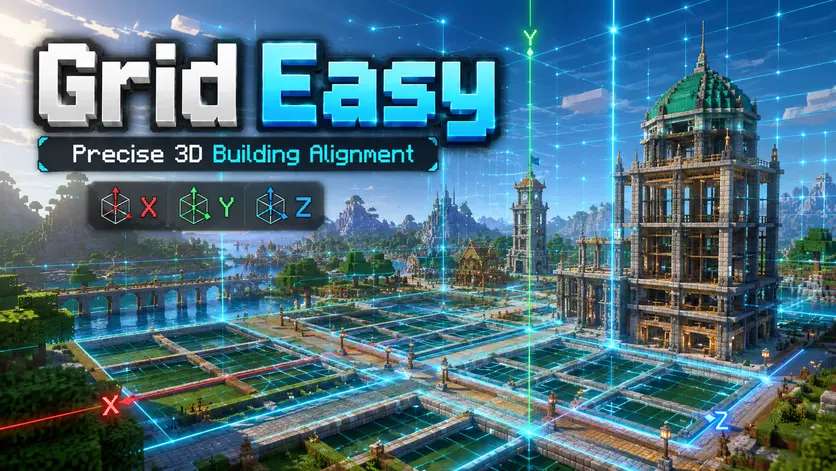
🧱 Grid Easy
Grid Easy is a lightweight and optimized 3D grid overlay mod designed for builders who want better precision, cleaner alignment, and more control over spacing in Minecraft.
With an origin-based 3D grid system and independent X / Y / Z spacing controls, Grid Easy helps you plan structures, align blocks, visualize space, and build with confidence.
Whether you are working on massive builds, technical structures, city layouts, redstone systems, or detailed interiors, Grid Easy gives you a clean visual guide without unnecessary complexity.
✨ Why Grid Easy?
Minecraft building often comes down to precision.
🔹 A few blocks off-center can break symmetry.
🔹 Uneven spacing can ruin a large structure.
🔹 Vertical alignment can be hard to judge by eye.
🔹 Large projects are easier when you have a clear visual guide.
Grid Easy solves this by giving you a customizable 3D alignment grid directly in your world.
Simple to use.
Easy to configure.
Built for builders.
🚀 Key Features
🌐 3D Grid Overlay
- Full X / Y / Z axis grid rendering
- Visualize space in three dimensions
- Useful for both horizontal and vertical alignment
- Great for large structures and layered builds
📏 Independent Axis Spacing
- Configure X spacing independently
- Configure Y spacing independently
- Configure Z spacing independently
- Perfect for advanced layouts, floors, towers, and technical builds
🎯 Origin-Based Alignment
- Grid starts from a defined origin point
- Supports relative origin offsets
- Keeps alignment consistent and predictable
- Useful when building from a fixed reference point
🎨 Clean Configuration UI
- Modern two-column settings layout
- Quick access to spacing, radius, origin, and color options
- Color presets with live preview
- Config screen automatically disables the grid while editing
⚡ Performance Friendly
- Optimized rendering logic
- Built-in render count safety limit
- Designed to reduce unnecessary FPS drops
- Lightweight client-side rendering only
🧩 Mod Menu Support
- Optional Mod Menu integration
- Open the config screen directly from Mod Menu
- Works even without Mod Menu installed
🎮 Default Controls
Key Action . Toggle Grid ON / OFF , Open Config Screen [ Decrease Grid Spacing ] Increase Grid Spacing🏗️ Recommended For
Grid Easy is especially useful for:
- 🏰 Large-scale building projects
- 🏙️ City planning
- 🧱 Symmetrical structures
- 🔧 Technical builds
- 🔴 Redstone spacing
- 🛋️ Interior alignment
- 🎨 Pixel art layouts
- 🗼 Vertical structure planning
- 📐 Precise block alignment
📦 Requirements
- Minecraft 1.21.4
- Fabric Loader
- Fabric API
Optional:
- Mod Menu
📝 Notes
Grid Easy is a client-side utility mod.
It does not modify:
- World generation
- Blocks
- Entities
- Server-side behavior
It only renders a visual grid overlay on the client, making it safe and convenient for building assistance.
🇰🇷 한국어 설명
🧱 Grid Easy
Grid Easy는 마인크래프트에서 건축, 정렬, 간격 조절을 더 쉽고 정확하게 도와주는 가볍고 최적화된 3D Grid Overlay 모드입니다.
기준점 기반의 3D Grid 시스템과 X / Y / Z 축별 개별 간격 설정을 통해 구조물의 위치, 대칭, 간격을 훨씬 직관적으로 확인할 수 있습니다.
대형 건축, 기술 건축, 도시 설계, 레드스톤 구조, 인테리어 작업 등 정밀한 배치가 필요한 상황에서 깔끔한 시각적 기준선을 제공합니다.
✨ 왜 Grid Easy인가요?
마인크래프트 건축은 결국 정밀함이 중요합니다.
🔹 몇 블록만 어긋나도 대칭이 깨질 수 있습니다.
🔹 간격이 일정하지 않으면 대형 구조물이 어색해질 수 있습니다.
🔹 수직 정렬은 눈으로만 맞추기 어렵습니다.
🔹 큰 건축물일수록 명확한 기준선이 필요합니다.
Grid Easy는 월드 안에 직접 표시되는 3D Grid를 통해 이런 문제를 해결합니다.
간단하게 사용하고,
쉽게 설정하고,
정확하게 건축할 수 있도록 설계되었습니다.
🚀 주요 기능
🌐 3D Grid Overlay
- X / Y / Z 축 기반 3D Grid 렌더링
- 수평 정렬뿐만 아니라 수직 정렬까지 지원
- 공간 구조를 직관적으로 확인 가능
- 대형 구조물과 층 구조 설계에 유용
📏 축별 개별 간격 설정
- X축 간격 개별 조절
- Y축 간격 개별 조절
- Z축 간격 개별 조절
- 층고, 기둥 간격, 도로 폭, 구조물 배치 등에 활용 가능
🎯 Origin 기반 정렬 시스템
- 기준점 기반 Grid 생성
- 상대좌표 Origin Offset 지원
- 일정한 기준점으로 안정적인 정렬 가능
- 특정 위치를 중심으로 건축할 때 유용
🎨 깔끔한 설정 UI
- 보기 좋은 2열 설정 화면
- 간격, 범위, Origin, 색상 설정 지원
- 색상 프리셋 및 실시간 색상 미리보기
- Grid ON 상태에서 설정창 진입 시 자동 OFF 처리
⚡ 성능 최적화
- 최적화된 렌더링 로직
- 렌더 개수 안전 제한 적용
- FPS 저하를 줄이도록 설계
- 클라이언트 전용 경량 렌더링
🧩 Mod Menu 지원
- Mod Menu 연동 지원
- Mod Menu에서 설정창 바로 열기 가능
- Mod Menu 없이도 사용 가능
🎮 기본 조작 키
키 기능 . Grid ON / OFF , 설정창 열기 [ Grid 간격 감소 ] Grid 간격 증가🏗️ 추천 사용 환경
Grid Easy는 이런 상황에서 특히 유용합니다.
- 🏰 대형 건축 프로젝트
- 🏙️ 도시 설계
- 🧱 대칭 구조물 제작
- 🔧 기술 건축
- 🔴 레드스톤 간격 조절
- 🛋️ 인테리어 정렬
- 🎨 픽셀 아트 제작
- 🗼 수직 구조 설계
- 📐 정밀한 블록 정렬
📦 필요 사항
- Minecraft 1.21.4
- Fabric Loader
- Fabric API
선택 사항:
- Mod Menu
📝 참고 사항
Grid Easy는 클라이언트 전용 유틸리티 모드입니다.
다음 요소를 변경하지 않습니다.
- 월드 생성
- 블록
- 엔티티
- 서버 동작
클라이언트 화면에 Grid Overlay만 표시하여 건축을 보조하므로, 서버에 영향을 주지 않고 안전하게 사용할 수 있습니다.
Compatibility
Mod Loaders
Game Versions
Recommended Gear
AffiliateHardware and extras that pair well with this mod.

As an Amazon Associate I earn from qualifying purchases.
Screenshots
Similar Mods

ClearVision
Removes Blindness, Darkness, and water/lava/powder snow fog and overlays.
Kelp Remover
Kelp shall be no more.
Keep Inventory Lose XP
Players keep Inventory but drop experience on death.

archivist.jar
highly experimental one-creator psychological mod

Quests Tweaker
A mod to integrate FTBQuests with CraftTweaker.
Bridge Worm
A worm that attacks you