
Storage Drawers
Modby Texelsaur
Interactive compartment storage for your workshops.
Description


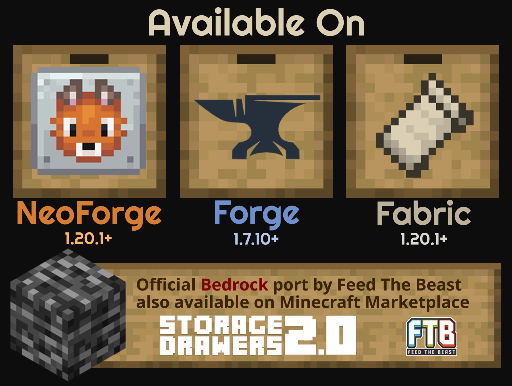 Bedrock: Feed The Beast has brought an official port to the Bedrock Marketplace, available here.
Please visit Feed The Beast's discord server for any support related to the Bedrock version.
Dependencies
MC versions 1.8 - 1.12 depend on the Chameleon library.
Fabric versions have an optional dependency on Forge Config API Port to support configuration.
Support
The best place to get support is the Texel Mods discord server. I don't have a great track record for keeping up with the issues tracker, so please let me know about any major issues there.
Translations
Translations are now being managed on a Crowdin project. If you'd like to translate a language that's not listed, open a GitHub issue. Thank you to everyone who has helped translate this mod!
Addons
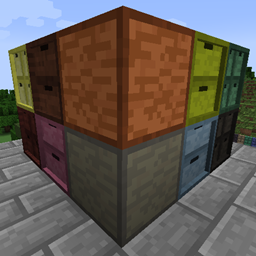
Storage Drawers Extras
A pack that adds additional wood variants for some supported mods. Revived for 1.20.

Fluid Drawers Legacy
By joe_vettek. Adds fluid variants of drawers. For 1.16+.
Check this list for other addons that may be supported for your game version.
Overview
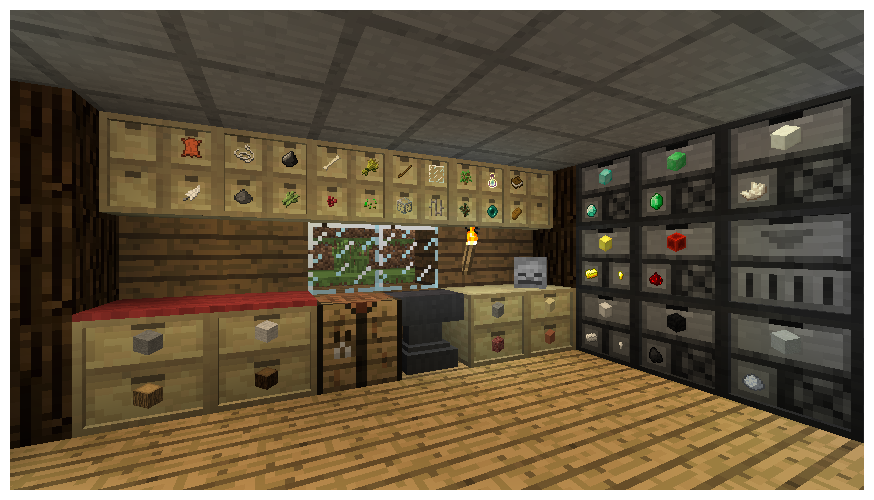
Put your most frequently used items within convenient reach. Storage Drawers borrows ideas from Jabba and Bibliocraft, resulting in a highly functional, compact, and aesthetic storage solution that is meant to complement rather than replace those mods.
Usage
There is no traditional slotted inventory with these containers. Interaction is click-based similar to Jabba. Clicking on one of drawers on front will interact with that drawer.
- Right-Click: Insert full stack in hand into drawer (or partial stack if the drawer fills).
- Double-Right-Click: Insert all compatible stacks in inventory into drawer (or until drawer fills).
- Left-Click: Remove a single item from the drawer.
- Shift+Left-Click: Remove a full stack from the drawer.
- Shift+Right-Click with empty hand: Open a UI to see exact item counts and manage applied upgrades.
The shift-click behavior is reversed from Jabba. This is based on the theory that you normally interact with stacks in Jabba, but will want to normally interact with single items in Storage Drawers. The controls can be reversed in the mod config to match Jabba.
Style, Choices, Upgrades
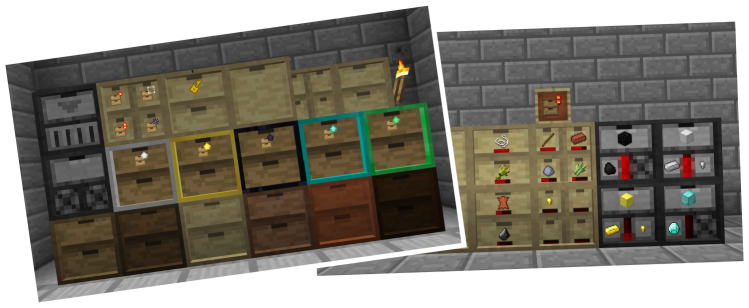
The wooden drawers are the main storage block in Storage Drawers, and they come in a variety of configurations and styles. You can pick from any of the Vanilla plank colors when crafting to get a matching block.
Drawers come in six configurations, trading capacity and compactness at different points:
- Half-size 1x1: Stores 16 stacks per drawer.
- Half-size 2x2: Stores 4 stacks per drawer.
- Half-size 1x2: Stores 8 stacks per drawer.
- Full-size 2x2: Stores 8 stacks per drawer.
- Full-size 1x2: Stores 16 stacks per drawer.
- Full-size 1x1: Stores 32 stacks per drawer.
All drawers (and other supporting blocks) can be crafted in framed versions, which lets them be restyled with different block materials.
Capacity can be further boosted with storage upgrades. Upgrades do not need to be applied in sequence, so you can pick the size you need from the start.
Many other kinds of upgrades can also be applied:
- Balanced Fill: Equalizes item counts between multiple drawers holding the same item
- Conversion: Can automatically substitute same-kind items, like variations of metal ingots
- Creative: Upgrades for infinite storage or infinite supply
- Fill Level: Adds a visual fill bar
- Hopper: Collects items in-world
- Illumination: Brightens labels in dark places
- Magnet: Collects items in-world from a distance
- One Stack: Downgrades storage space to a single stack
- Portability: Carry drawers without encumberance (if option is enabled)
- Redstone: Emit redstone based on fill levels
- Void: Voids excess items added to full drawers
Drawers can also be locked or unlocked with the Drawer Key. When a drawer is locked, it will maintain its current item association even if the last item is removed. This will prevent pipes and other transport systems from re-filling that drawer with other items.
Other keys and tools exist to alter other aspects of drawers:
- Quanitfy Key: Adds item counts to drawers
- Concealment Key: Hide drawer labels (and save render performance)
- Priority Key: Change a drawer's priority on a controller network
- Personal Key: Prevent other players from interacting with your drawer blocks
- Pause Key: Pauses a drawer from moving items on a network or performing most actions
- Drawer Puller: A tool to remove individual drawers from their blocks
The "key" tools can also be used on controllers to mass-act on all connected drawers.
Compacting Drawers and the Drawer Controller
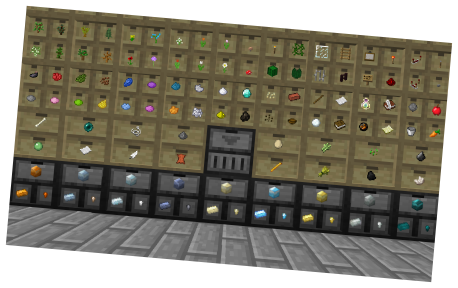
Compacting drawers are a special stone-colored drawer that auto-convert compressible items. Instead of manually crafting and uncrafting between gold blocks, ingots, and nuggets, put them in a compacting drawer. The drawer will internally maintain a pool of the material, and let you insert or remove the material in any of the shown forms.
The compacting behavior applies to any item with a compressed recipe, including redstone, glowstone, wheat, and many others.
Drawer Controllers are the second special block in the mod. They will search for any connected drawer within 50 blocks by default (configurable), and then expose all of those drawers as a large combined inventory. This lets you hook up a single pipe, tube, duct, spark, storage bus, etc. and interact with the entire bank of drawers.
The second function of the controller is as a deposit-only interactive block. By right-clicking on the front face with an item, the item will be deposited into the connected network. By double-right clicking, it will attempt to dump your entire inventory. Items will only be dumped if they already exist in the network, allowing you to clear out a bunch of mob drops or farmed crops without literally dumping your entire inventory.
Controller IO blocks act as an extension of a drawer controller, exposing more faces for attaching machines, pipes, or crafting frames. Controllers will bind to an IO when they find them on the network, and all IOs bound to the same controller will share the same inventory and range as that controller. Unlike drawers, IOs cannot be shared, and you should be careful to not put them in range of multiple controllers. Using controller IO is better for performance than using multiple controllers.
Trim blocks are decorative wood paneled blocks similar to wooden drawers, but they can also be used to connect drawer blocks within a controller network.
Compatibility
While some players choose to use Storage Drawers as a replacement for other storage mods, it works best with others. Pair up with more complex storage mods like Applied Energistics 2 or Refined Storage and attach your drawer controller network to their storage network, taking advantage of their access terminals and other features.
Compatibility with other mods varies version to version. In the more recent 1.20.1+ branches, special integration has been added for:
- FTB Chunks (to better respect chunk protection)
- FTB Teams (to support team-based personal locking)
- CoFH Core (to support CoFH friends list personal locking)
- Jade and TheOneProbe (additional info on their tooltips)
Configuration
Many aspects of the mod can be configured via its main config file storagedrawers-common-v2.toml. Some of the things that can be configured:
- Per-block and per-upgrade storage amounts
- Individually disable any tool or upgrade
- Tweak or disable a wide array of features
Most config items can be live-reloaded using a mod like Configured, though a few entries may require a full world reload or individual world chunks to reload.
Other Resources
Official project thread: http://www.minecraftforum.net/forums/mapping-and-modding/minecraft-mods/2198533
GitHub Project Page: https://github.com/jaquadro/StorageDrawers
Permissions
You are permitted to include this mod in any mod pack for public or private distribution.
Compatibility
Mod Loaders
Game Versions
Recommended Gear
AffiliateHardware and extras that pair well with this mod.

Minecraft Enderman Character Plush
Enderman plush toys, and a reliable gift for a younger player.

LEGO Minecraft Set
Official sets that translate the building side of the game off-screen.
As an Amazon Associate I earn from qualifying purchases.
Screenshots
Similar Mods

Just Enough Items (JEI)
View Items and Recipes
Cloth Config API (Fabric/Forge/NeoForge)
Config Screen API for Minecraft
Mouse Tweaks
Enhances inventory management by adding various functions to the mouse buttons.

Fabric API
Core API library for the Fabric toolchain

AppleSkin
Adds some useful information about food/hunger to the HUD

GeckoLib
A 3D animation library for entities, blocks, items, armor, and more!
Included in Modpacks (2,066)
Show fewer SCP OUTBREAK - ULTIMATE MC SCP EXPERINCE
 GregFactory Sky
 Create: Clockwork+ [Forge]
 Create Cobblemon-ised
 Technocratica
 Gregnautics
 explorify
 Magic Sky
 Fossilized
 Ores, Gears & Backpacks
 The Walking Dead Apocalypse
 Zombie Apocalypse Of DOOM!
 Rise of Tech 2
 Servidor Magnatas
 Wither Storm Series
 SharpSharp RPG
 Dragon Block C Infinite Power Anime
 Age of dinosaurS
 LordOfTheRings | By ACEGaming
 Z Apocalypse - A Modern Zombie Apocalypse
 Rexxit Reborn
 Christopia Realistic
 Tiny Block
 Infinity Foundation
 How To Train Your Dragon 100 Days Survival Winter Storm
 A little bit of Shaders and More
 Bleach awaken
 Unique-Social Build Your City 2
 Galacticraft ULTRA
 STALKS Baby Challenge
 Chaos OneBlock
 SCP: Run
 Create Optimized [FORGE]
 Super Mine
 Nature's Journey
 Kabbalah Block
 Fantasy Vs. Science Quarks & Magic
 Feed the Singularity
 Halo Quest
 dragonball Xenoverse
 Infinity Craft ultra
 Thaumic Industries
 Medullacraft: Immersive Rocketry
 Create: Above and Beyond NEW
 Not Too Complicated
 Fairy Tail - Zero Arc
 Blocks Of The Sky
 Better With Rats
 Project Avaritia EMC Adventure
 Calculator Skies
 Arcane Twilight
 Knights, Mages, and Pirates Oh! My
 Enigmatica 2 Expert Unofficial Skybound - E2EuS
 Beyond Zombie
 One Chunk Ultimate Edition
 Create x Valkyriensky's
 Progressionistic
 CuteCraft [FABRIC]
 RWBY Craft
 Void Genesis
 Fantazy Tech
 Chiseled Worlds
 AtariKafa Modlu Survival S3
 Egged Up
 QSMP 2 Community Edition
 DragonFire Ultimate
 Fossils and Archaeology: Survival Evolved
 Adventure Naruto
 Parasites by Forge Labs (Forked Edition)
 MasterTech: Hollow Beginning
 Legends Reborn: Medieval (LRM)
 Project Nope Zone
 MagiCraft4 - The Curse of Ignis
 SuperHeroes, Quests, Adventure!
 Builder's Toolbox | Best Building Experience
 The Immersive Revolution
 HunterXHunter
 Fairycore and Caves and Cliffs
 New One Piece Era
 Naruto Shinobi Legends (Naruto Destinations)
 Iznogoud's Scary World
 Comes Alive & The Autumn Days
 Path of Truth
 Actually Additions: The Mod: The Modpack
 Bleach: Thousand Year Block War
 Jujutsu Slayer
 MultiSkyBlock 2
 Gejmr Futurecraft (Aldax)
 Ultra Hardcore
 Volormon
 All The Forge 9
 Project Create 1.20
 Nuclear Tech Reborn
 Projekt Millenaire
 Create:Infinity Mechanism
 Fantasy World Adventure (Become a dragon)
 Create: Above and Beyond, And Then Some!
 Tardis + Mahou Tsukai and more
 World Of Big Horror
 Omega Adventure Pack 1.12.2