
Effortless Building
Modby Requioss
Makes building easier by providing tools like mirrors, arrays, build modes and a block randomizer. For survival and creative mode.
Type
Mod
CurseForge Downloads
12,951,059
CurseForge ID
Modrinth Downloads
1,566,040
Modrinth ID
Last Updated
Nov 6, 2026
Description
Many mods make it easier to break blocks, but not many focus on placing them. Even the most experienced players still often place blocks one by one. This mod makes building easier by providing tools like mirrors, arrays, build modes and a block randomizer.
- Place and break multiple blocks at once
- Mirror blocks in realtime
- Place random blocks using the Randomizer Bag
- Undo and redo
- Fully supported in survival mode
Build Modes
<iframe width="638" height="358" src="https://www.youtube.com/embed/LmYSV4z1UbE?si=YOx8QcqLMOKWQXNl" title="YouTube video player" frameborder="0" allow="clipboard-write; encrypted-media; picture-in-picture; web-share" referrerpolicy="strict-origin-when-cross-origin" allowfullscreen></iframe>Hold ALT to open the radial menu and select a build mode. With a block in hand, right-click to pick the starting position. Aim somewhere else, then right-click again to build the shape.
Build modes can be used to place blocks, break blocks, and interact with certain blocks. When holding a tool, right-clicking will interact with all the blocks in the shape. For example, stripping logs with an axe, pathing with a shovel, tilling with a hoe, and placing liquids with a bucket.
Available build modes:
- Disabled
- Single
- Line
- Wall
- Floor
- Cube
- Diagonal Line
- Diagonal Wall
- Slope Floor
- Circle
- Cylinder
- Sphere
On the right side of the radial menu you can find additional options for each build mode. On the left side you can find buttons for undo/redo, replace options, opening the modifier settings and config screens.
More videos
<iframe width="638" height="358" src="https://www.youtube.com/embed/TLwh-SA8gOQ?si=Z5eJaXFKhwah0kd1" title="YouTube video player" frameborder="0" allow="clipboard-write; encrypted-media; picture-in-picture; web-share" referrerpolicy="strict-origin-when-cross-origin" allowfullscreen></iframe> <iframe width="638" height="358" src="https://www.youtube.com/embed/H1D38C_nL_Y?si=YXwpB_Gx4krnoIOV" title="YouTube video player" frameborder="0" allow="clipboard-write; encrypted-media; picture-in-picture; web-share" referrerpolicy="strict-origin-when-cross-origin" allowfullscreen></iframe>Build Modifiers
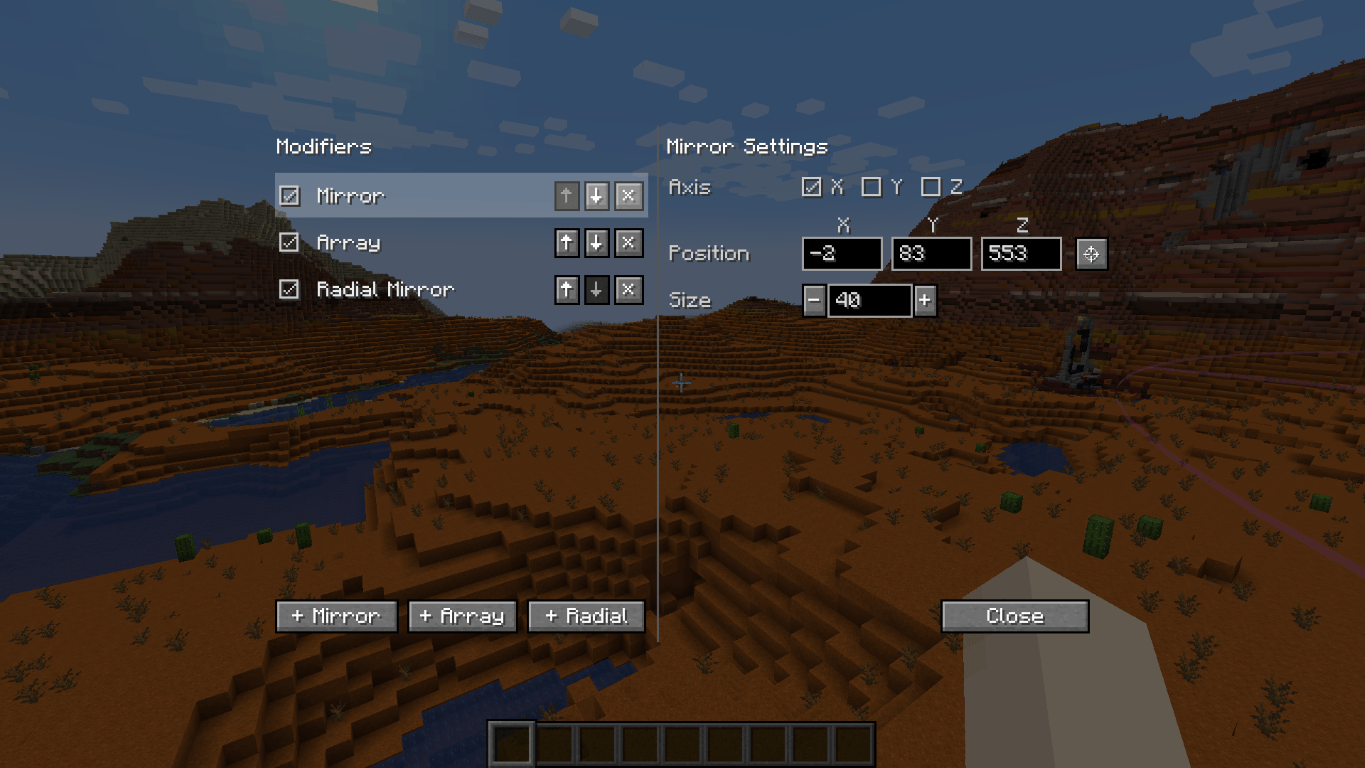
<iframe src="https://www.youtube.com/embed/kZjJhdPeVZI" height="358" width="638"></iframe>Modifiers can place additional blocks for each block you placed. You can enable any number of modifiers in the modifier settings. Open the modifier settings with the button in the radial menu, or use the keybind (default NUMPAD+).
- Mirror. Place a mirror at a position of a certain size. Each block placed on one side gets mirrored to the other side.
- Array. Copies the block you placed in a certain direction a certain number of times. Useful for repeated builds like tunnels and walls.
- Radial Mirror. Divides an area in slices around a central point. Each slice copies your block placements.
Randomizer Tool
This item allows you to place random blocks. Configure the tool by shift-rightclicking when in hand.
- Use it in combination with build modes and build modifiers.
- While placing a shape, you can open the randomizer tool and change its settings. You can preview those settings in realtime!
- Setting the ratio of an empty slot will cause air gaps to appear in your shape.
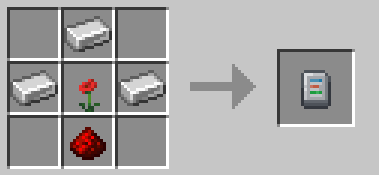
Crafting recipe: 3 iron ingots, 1 redstone dust, 1 any flower.
Replace Options
Use the button to the left of the radial menu to cycle through replace options.
- Replace Only Air: You can only place blocks where there was air. Replaceables such as short grass and ferns can still be replaced.
- Replace Blocks And Air: You can replace blocks and air.
- Replace Only Blocks: You can only replace blocks, not air.
- Filter By Offhand: You can only replace blocks that match the block in your offhand.
Undo and Redo
Press CTRL+Z to undo and CTRL+Y to redo placing blocks.
Survival-friendly
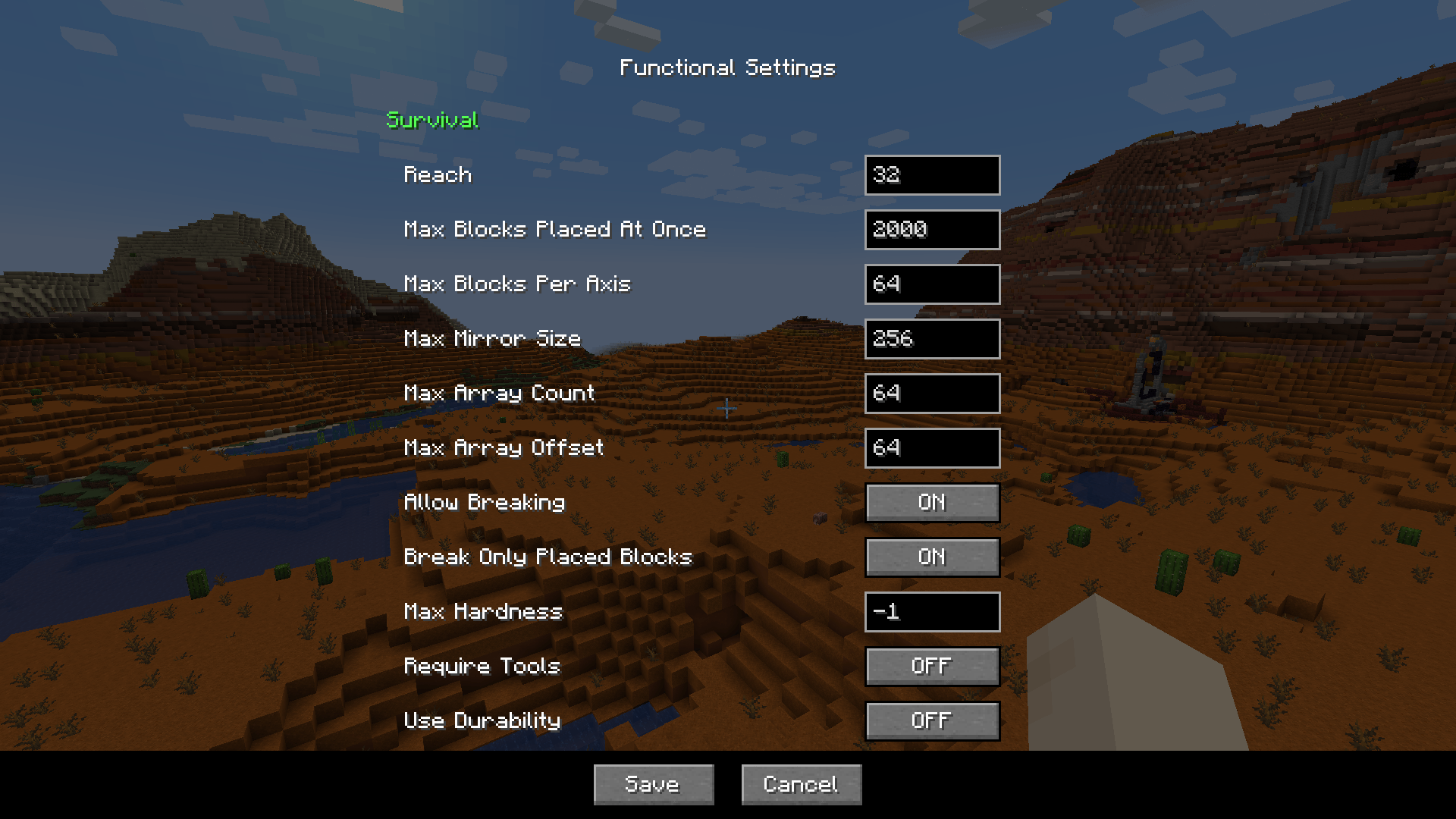
Playing this mod in survival mode is fully supported. All actions consume the right number of blocks from your inventory. It is fully configurable, so you can find settings that feel balanced for you.
Here's a small sample of what you can configure:
- How far away you can place blocks
- The maximum number of blocks placed at once
- The maximum size of the mirror and array
- Whether you can break and replace multiple blocks at once, including if tools are required, if they should use durability, etc. By default, you can break and replace blocks that you placed in the same play session.
The functional settings can be found in the radial menu. On a server, you can only edit functional settings if you are an admin.
FAQ
"Can I add this mod to my modpack?"
Yes, certainly!
"Is this mod available for bedrock edition?"
Yes, ExterLeo made a version that works in Bedrock Edition.
"Is this a client-side only mod?"
No, it needs to be installed on both server and client. The server part places the blocks in bulk. If there was no server part, the client would need to send all the blocks individually, which will overload most servers.
"Am I allowed to make my own version of this mod?"
Yes, as long as you comply with the LGPL-3.0 license (usually this means: link to this page, license your modification under LGPL-3.0, make the code visible and state significant changes).
Mod Spotlights
Mod Spotlights
<iframe width="638" height="358" src="https://www.youtube.com/embed/q_jeay6xRqc?si=aMp2hZ6APEwMzgUf" title="YouTube video player" frameborder="0" allow="clipboard-write; encrypted-media; picture-in-picture; web-share" referrerpolicy="strict-origin-when-cross-origin" allowfullscreen></iframe> <iframe width="638" height="358" src="https://www.youtube.com/embed/NUuWzrFNrUo?si=6nS1g2AcA6YJuUBB" title="YouTube video player" frameborder="0" allow="clipboard-write; encrypted-media; picture-in-picture; web-share" referrerpolicy="strict-origin-when-cross-origin" allowfullscreen></iframe> <iframe width="638" height="358" src="https://www.youtube.com/embed/WTE0MbvQbTk?si=v3yx9qG_h1bHtSnu" title="YouTube video player" frameborder="0" allow="clipboard-write; encrypted-media; picture-in-picture; web-share" referrerpolicy="strict-origin-when-cross-origin" allowfullscreen></iframe>Credits
Many thanks to Grimmauld for porting to 1.16, Dashos for fixing 'fake player' related crashes and manapart for porting to 1.19!
Radial Menu inspired by Chisels & Bits by AlgorithmX2
Compatibility
Mod Loaders
Game Versions
Recommended Gear
AffiliateHardware and extras that pair well with this mod.

Mini PC for Self-Hosting
A low-power box that can sit in a cupboard and run a modded server around the clock.

LEGO Minecraft Set
Official sets that translate the building side of the game off-screen.
As an Amazon Associate I earn from qualifying purchases.
Screenshots
Similar Mods

Iris Shaders
A modern shaders mod for Minecraft intended to be compatible with existing Optifine shaders

Inventory Tweaks [1.12 only]
Tweaks to inventory handling for ease of use, including sorting and automatic replacement of broken tools or exhausted s...
Chisels & Bits - For Forge
Create endless custom decorations using in game materials.
In Control!
Be In Control of mob spawns
Handcrafted
Make your house a home!
Fzzy Config
Config API with automatic GUIs, powerful validation options, server-client sync, and more!
Included in Modpacks (282)
Show fewer Star Technology
 Nomifactory CEu
 UniversIO
 Omnifactory
 Valhelsia 5
 SUPERIOR - RPG
 Mystic Horizons
 机械动力:更多附属与优化 Creat : More Attachments and Optimization
 Ages Of War (Nukes,Bombs and Guns!!)
 Dreamcraft [FABRIC]
 Magiculture 2
 Nomifactory
 Arcane Chronicles : Ice and Fire
 Project Sacrifice
 Farming Crossing 4
 Farming Crossing 5: Made to Order!
 FTB Presents Architect's Exodus
 Create Flavored
 Reimagined
 Modded Together
 Wold's Vaults - Vault Hunters Expansion
 Sky Greg
 Prey: An Expansive RPG Nightmare Modpack
 Dungeon Train Pack- A Lore-Rich Roguelite Adventure
 Create Comes Alive (Create + MCA)
 bombs, guns, and planes
 Mystic's Monstrosity
 Remain [Zombie + SCP Apocalypse]
 Fear The Mist
 Create Re-Flavored
 ReligiousPack3-Season2
 Farming Crossing 3
 StaTech Industry 2
 Kjwippy's FNAF Pack
 Sky Revolutions
 Adventure of Tech VI
 Clockwerk Pixelmon
 Into The Betweenlands
 Medieval Europe Adventures
 Brass
 Cottage Craft
 Magitech Fantasia
 Technological Journey
 Multiblock Madness 2
 Cosmic Frontiers
 World of Minecraft Normal
 Mystic's Monstrosity - Greedy Edition
 Farming Crossing 2
 Craftin With Katherine
 Farming Crossing
 Infinite Alchemy
 World of Minecraft - Meidde
 Arcane Isles
 Interactions
 Cozy Cooking: Mechanical Muffins
 Farming Crossing 6 Dinner Party
 High-Altitude Alchemy
 CRIF 2 - Create an empire of Rats to fight "Ice&Fire"
 AMP - Mechanisms, Magic & Masonry
 FTB Builders Paradise 2
 cool building
 Best One Block
 Beyond Fantasy - A Magic RPG Modpack
 Simply Skyblock
 Cozy Cooking: Delicious Decor
 Crazy Kitty's Fnaf Management Wanted Pack
 Create 2 Mekanism 2: Sky Edition
 Resonant Rise 5
 Create: Clockwork+ [Forge]
 Ars Nouveau Discord Server
 Create: Basically Everything
 the twixxel stalker (horror)
 Dungeon Train Pack: A Lore-Rich Roguelite Adventure
 Arcreux - Enhanced Pixelmon
 Builder's Toolbox | Best Building Experience
 mrfazbear's sonicraft pack
 Tardis + Mahou Tsukai and more
 Gregtech: Skybound
 Create: Getting Creative!
 CursedFate Awakened
 Legends of Pokemon
 Into The Betweenlands 2
 Crazycrafting For The Crazycrafting Server
 Minecraft City
 Create Guns and Boats
 Quantum Skies
 TekTopia Extended
 Kajzera's Fnaf Pack
 Telos
 Better Survival (BSurvival)
 MCreative SMP
 Creatopia Unbound
 Testing DMZ Legacy
 CobblemonCove - Cobblemon
 FOXY COZY LITE
 Singularity Create
 Greg-E
 ReNightmares Official Server Pack
 Omnifactory Self-Torture Edition
 GregTech: Flatter Than Ever (GT:FTE)