

Aura
ModpackThe #1 alternative to Lunar, Badlion, and Feather. Insane FPS boosts, QOL features, and unique mods that outperform any other client.
Type
Modpack
Modrinth Downloads
10,487
Modrinth ID
jAuTqrr8
Last Updated
Jul 29, 2026
Description
⚡ Aura •ᴗ• - READ THE FULL DESCRIPTION
Not another "maximum FPS, zero bloat" pack.




This pack has two modes and one required setup step. Skip it and your game crashes. Read this before downloading.
⬇️ Download • ⚠️ Setup Warning • 💬 Discord • 💖 Donate
15 hearts (follows) on the modpack and i'll make a version 26 release!
🚨 Before You Launch
Aura ships with both Flashback and ViaFabricPlus. They do not work together. Pick your mode and disable the other before opening the game.
🎬 Creator Mode 🌐 Server Mode Keep Flashback ViaFabricPlus Disable ViaFabricPlus Flashback Best for Replays • Freecam • Cinematics • Screenshots Hypixel • 1.8 PvP • Old Servers • Version SwitchingIf your game crashes on launch, this is almost always why. You can switch modes any time.
So what actually is Aura?
Alright, honest talk.
Every optimization modpack says the same thing now. "Maximum FPS. Zero bloat. Best performance. Lightweight." Those words stopped meaning anything a while ago. Every serious Fabric pack already runs Sodium, Lithium, and FerriteCore. That is the engine now. That is the expected baseline. Having it is not a selling point.
The real question is what the pack does after the engine. And that is where most packs split into two camps that are both kind of frustrating.
Camp 1: Fast but empty. You install a barebones FPS pack, your frames go up, and then you spend an hour adding zoom, shulker previews, replay tools, chat fixes, server compatibility, and all the stuff you actually use. At that point you are building the client yourself anyway.
Camp 2: Feature-packed but messy. You install a bigger pack and half the mods are untouched, some of them overlap, a few are outdated, and the whole thing feels like someone dropped 150 JARs into a folder and called it a day.
Aura is neither of those.
The way Aura gets built is different. The pack gets compared against the biggest optimization and client-style packs on Modrinth, one by one. What are they doing better? What is Aura missing? What looks useful but does not actually improve anything? What is silently causing conflicts? Then the stack gets rebuilt around what actually passes that test.
If it runs on a 2012 MacBook Air, it will fly on your PC. But beyond raw frames, the goal is a setup that feels finished the second it opens. Fast, polished, and stacked with everything you would normally spend time hunting down yourself.
Every pack has the engine now. The difference is the whole client.
📊 Benchmarks (estimated)
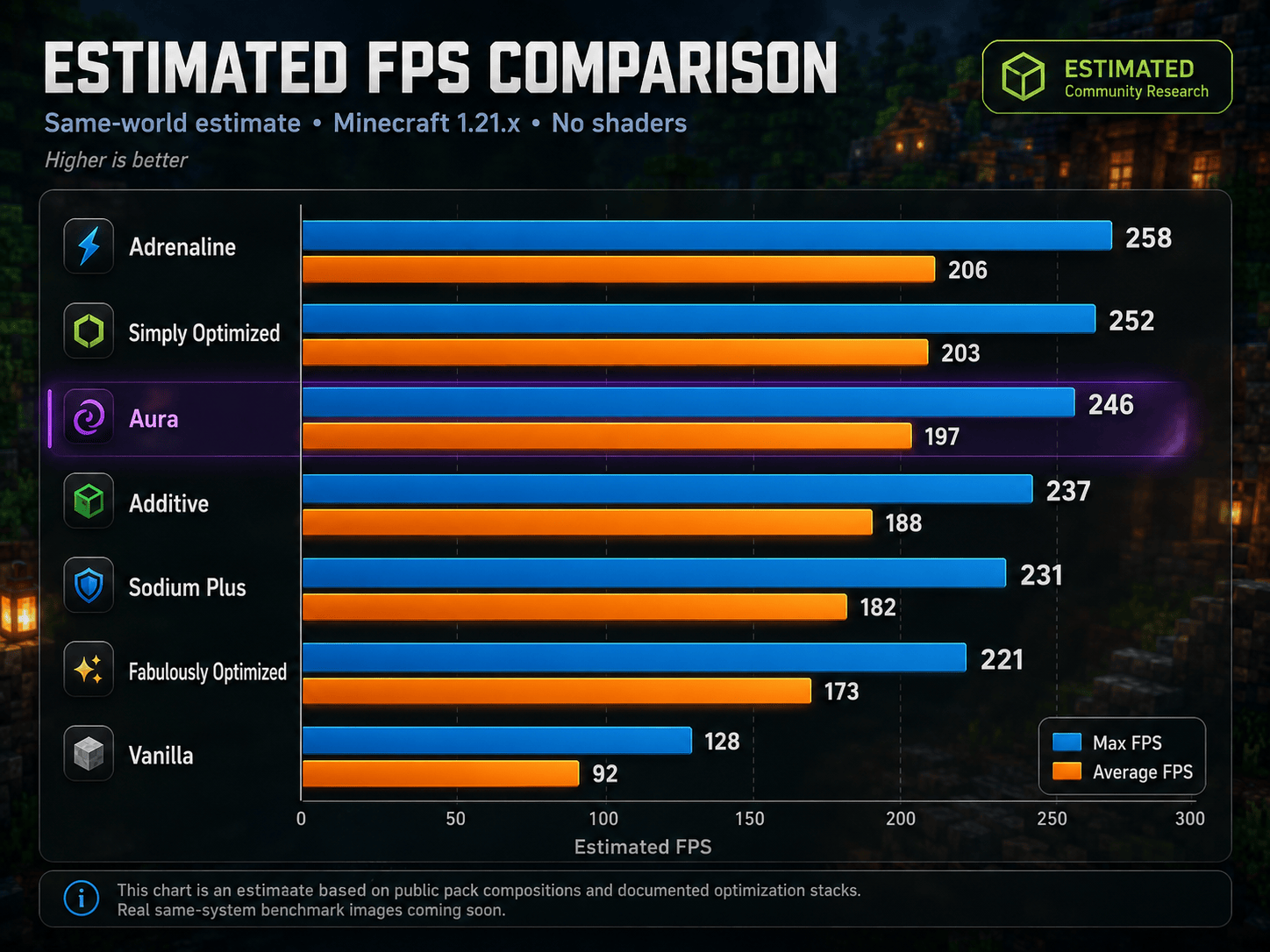
What Aura is built around
Area What that means Raw FPS Better rendering, lower memory use, fewer wasted frames, smoother frame pacing Loading Faster startup, faster reloads, less waiting around Visuals Shaders, connected textures, better lighting, better entities, cleaner UI Client feel Zoom, better menus, better controls, better chat, useful HUD and inventory tools Creator tools Replays, Freecam, high resolution screenshots, voice chat, building tools Multiplayer Version switching, chat privacy, packet fixes, faster pings, server QoLHow Aura fits
You want... Better fit... Absolute minimum Sodium setup, nothing extra Simply Optimized, Adrenaline OptiFine replacement with shaders Fabulously Optimized, Additive A locked managed client Lunar, Feather, Badlion A fast, open, client-style setup that already feels complete AuraUnlike locked clients, you can remove things, add things, and make it yours. Aura is the Fabric setup that tries to feel like a client without locking you into one.
What's Inside
You will not see most of these working. You will feel them.
Rendering
Mod What it does Sodium Complete rendering rewrite. The gold standard for FPS on Fabric. ImmediatelyFast Faster HUD, text, entity, and UI batch rendering. Iris Shaders Full shader support that does not destroy your framerate to enable. Entity Culling Stops rendering entities behind walls and out of view. Ixeris Aggressive multi-layer culling. The More Culling successor. Cull Fewer Leaves Reduces leaf rendering overhead without ruining the look. Better Block Entities Performance improvements for chests, signs, beds, and banners. Particle Core Optimized particle rendering, matters near portals and farms.Memory and Loading
Mod What it does Lithium Optimizes game logic, ticking, AI, and pathfinding. FerriteCore Cuts RAM usage significantly. ModernFix Fixes memory leaks, slashes startup time. Dynamic FPS Drops frame rate when tabbed out to save resources. FastQuit Saves and exits worlds instantly. Remove Reloading Screen Skips the resource reload overlay. Clumps Merges XP orbs to reduce entity lag near farms.World, Lighting and Network
Mod What it does ScalableLux Faster lighting engine replacing the vanilla one. NoisiumForked Faster worldgen noise calculations. Fast Noise Speeds up noise math across the engine. ServerCore Connection and tick performance improvements. Packet Fixer Prevents disconnects from oversized or malformed packets. Debugify Fixes a long list of confirmed vanilla bugs. Crash Assistant Better crash diagnostics and recovery info.Make Minecraft feel modern. But only as much as your PC can handle.
Shaders and Lighting
Mod What it does Iris Shaders Full OptiFine-compatible shader support on Fabric. Complementary Shaders - Unbound Included shader pack, ready to enable. LambDynamicLights Hold a torch and it lights the area around you. No placing needed.Resource Pack Parity
Mod What it does Continuity Connected textures and glass, the thing most people install OptiFine for. BetterGrassify OptiFine-style improved grass rendering. Animatica Animated texture support for resource packs. Entity Model Features Custom entity models through resource packs. Entity Texture Features Emissive, random, and layered entity textures. Entity Sound Features Custom entity sounds through resource packs. OptiGUI Custom container and GUI textures from resource packs. Skyboxify Custom skybox support. Cape Provider Cape support from all major providers.UI and Polish
Mod What it does Chat Heads Player face icons next to chat messages. Chat Patches Chat history improvements and small QoL fixes. Clean Tooltips Cleaner, modern item tooltip styling. Natural Motion Blur Subtle motion blur for a smoother feel. BetterHandBobbing Improved first-person hand movement. Reese's Sodium Options Better organized Sodium video settings screen.For max FPS: shaders are optional. Aura runs well without them.
This is the part that makes Aura feel like a real client instead of a pile of FPS mods.
HUD and Information
Mod What it does AppleSkin Real hunger and saturation display instead of guessing. Held Item Info Durability, enchantments, and item details on held items. Pick Up Notifier Corner popup showing what you just picked up. Better Statistics Screen Categorized stats with a cleaner interface. Better Mount HUD Cleaner HUD while riding horses, boats, and mounts. Better Selection Improved block selection highlight. Ping View Shows your actual ping number instead of colored bars.Controls and Camera
Mod What it does Zoomify Smooth scroll-to-zoom. Configurable. Better than OptiFine zoom. Controlling Searchable, filterable keybind manager. BactroMod Instant fullbright, low fire overlay, fog removal toggles. MacOS Input Fixes Input handling fixes for Mac users. Smooth Scrolling Smoother scrolling in all menus.Inventory and Management
Mod What it does Item Scroller Move entire stacks using the scroll wheel. Mouse Tweaks Better mouse drag and interaction in inventories. Shulker Box Tooltip Preview shulker contents without placing them. Searchables Search in creative menus and container screens.World and Game
Mod What it does Cherished Worlds Pin favorite worlds to the top of the list. Cubes Without Borders True borderless fullscreen window mode. Auth Me Re-authenticate without closing the game. Stfu Removes repetitive and unnecessary spam messages. clientcommands Useful client-side command additions. Stendhal Advanced book and sign editing with formatting support.Also includes: Mod Menu, Resourcify, quick pack, Paginated Advancements, CalcMod, Emoji Type, Client Tweaks, Language Reload, YOSBR, Title Fixer, Main Menu Credits
Two setups. Pick the one that fits how you play and disable the other before launching.
🎬 Creator Mode — Keep Flashback, Disable ViaFabricPlus
Mod What it does Flashback Cinema-quality in-game replay recorder. Freecam Detach your camera for cinematic shots and fly through walls. Fabrishot Screenshots at massive resolutions, way beyond vanilla. Simple Voice Chat Proximity voice for SMP content and group recording. Axiom Advanced in-game world editor and building toolkit. Stendhal Advanced book and sign editing with rich formatting. BactroMod Fullbright, low fire, fog removal for clean recordings.🌐 Server Mode — Keep ViaFabricPlus, Disable Flashback
Mod What it does ViaFabricPlus Join servers running any version from 1.8 through current. NoChatReports Removes signed chat reporting for privacy. Gnetum Network-level performance improvements. Fast Server Pings Server list loads faster. Noxesium Reduces lag spikes on large servers. e4mc Share your world to friends without port forwarding. Auth Me Re-authenticate when your session expires without restarting. Packet Fixer Prevents disconnects from packet issues.Aura is not a cheat client. No aim assist. No combat advantages. That said, some servers restrict features like Freecam or fullbright regardless of intent. Check the rules of whatever server you play on.
These run silently in the background and make everything else work.
Fabric API, Fabric Language Kotlin, Cloth Config API, YetAnotherConfigLib (YACL), Fzzy Config, Forge Config API Port, Balm, MaLiLib, MidnightLib, Puzzle, Puzzles Lib, TCDCommons API, Text Placeholder API, MixinTrace
⚡ Installation
1. Install the Modrinth App or Fabric Loader for Minecraft 1.21.11 2. Install Aura from Modrinth 3. Decide: Creator Mode or Server Mode? 4. Disable either Flashback or ViaFabricPlus (not both, not neither) 5. Launch Minecraft 6. Adjust shaders, dynamic lights, and render distance for your hardwareFirst launch takes longer while configs are built. After that it is fast.
For max FPS: turn shaders off first, set dynamic lights to Off or Simple, lower render distance before touching anything else, and do not over-allocate RAM. 4 to 6 GB is the sweet spot. More is not better.
❓ FAQ
Yes. Works on any vanilla or modded Java Edition server. The server needs nothing installed.
They are built for completely different setups and do not coexist here. One is for replays. One is for version switching. Pick the one you need. You can swap any time.
Aura has no aim assist, no combat advantages, nothing like that. But some servers restrict features like Freecam or fullbright regardless of intent. Check the rules and disable anything that is not allowed.
No. If you only want the smallest Sodium setup, use a barebones pack. Aura is for players who want the FPS base and all the client tools they would normally spend time adding afterward, already included and already working.
A lot of the list is libraries, config APIs, and small fixes running in the background. The goal is not "more mods equals better." The goal is a setup that already feels complete.
Almost certainly both Flashback and ViaFabricPlus are enabled at the same time. Scroll to the top, pick your mode, disable the other one.
Yes. Aura is a foundation, not a locked system. Add what you want, test it, and remove anything that causes problems.
❤️ Support
Aura exists because the Minecraft modding community is genuinely incredible. Every mod in this pack comes from developers who put real work into making the game better. Aura just brings the best pieces together.
If it helped you, consider supporting continued development.

📜 Credits
Respect to the Fabric team, CaffeineMC (Sodium, Lithium, FerriteCore), Iris Shaders, and every mod developer whose work is in this pack. Aura is built on top of their work. Go support them too.
Every pack has the engine now. The difference is the whole client.
Built for players who want Minecraft to run better, feel cleaner, and not need rebuilding from scratch.

Compatibility
Mod Loaders
Game Versions
Recommended Gear
AffiliateHardware and extras that pair well with this modpack.

As an Amazon Associate I earn from qualifying purchases.
Similar Modpacks

EQUISTAR
A realistic Equestrian experience in Minecraft.
Create: Sky Factory
Combination between Skyblock and Create, complemented by Tech & Magic mods.
Peace of Mind
A Quest Based, Beginner Friendly Modpack designed for Peaceful Difficulty

Cursed Walking - Lite Edition
A lightweight, barebones zombie modpack that prioritizes performance.

Senpirates Tensura 100 Days Modpack
The modpack used by Senpirates during his 100 days in the world of Tensura!

Russia
This modpack features a freezing cold winter storm with horror mods.
Contained Mods (100)

Cloth Config API (Fabric/Forge/NeoForge)
Config Screen API for Minecraft

Mouse Tweaks
Enhances inventory management by adding various functions to the mouse buttons.

AppleSkin
Adds some useful information about food/hunger to the HUD

Balm
Abstraction Layer for Multi-Loader Mods

ImmediatelyFast
Speed up immediate mode rendering in Minecraft

Controlling
Adds a search bar to the Key-Bindings menu

Clumps
Clumps XP orbs together to reduce lag
Entity Culling Fabric/Forge
Using async path-tracing to hide BlockEntities/Entities that are not visible

Puzzles Lib
Why is it called Puzzles? That's the puzzle.
Searchables
Searchables is a library mod that adds helper methods that allow for searching and filtering elements based on component...

Fabric API
Core API library for the Fabric toolchain
![[EMF] Entity Model Features [Fabric & Forge]](https://media.forgecdn.net/avatars/983/284/638491564386011875.png)
[EMF] Entity Model Features [Fabric & Forge]
EMF is an, OptiFine format, Custom Entity Model replacement mod available for Fabric and Forge.

YetAnotherConfigLib
A builder-based configuration library for Minecraft.

Sodium
The fastest and most compatible rendering optimization mod for Minecraft. Now available for both NeoForge and Fabric!

Iris Shaders
A modern shader pack loader for Minecraft intended to be compatible with existing OptiFine shader packs

FerriteCore
Memory usage optimizations
![[ETF] Entity Texture Features](https://cdn.modrinth.com/data/BVzZfTc1/af683d206d50b05258d865b0d6e4aa2f2cee12f2_96.webp)
[ETF] Entity Texture Features
Emissive, Random & Custom texture support for entities in resourcepacks just like Optifine but for Fabric

Packet Fixer
A simple mod to solve various problems with packets, NBTs and timeouts.

Fzzy Config
Config API with automatic GUIs, powerful validation options, server-client sync, and more!

Crash Assistant
Shows a GUI after Minecraft crashes, immediately showing and analyzing all affected logs.

Simple Voice Chat
A working voice chat in Minecraft!
No Chat Reports
Makes chat unreportable (where possible)

Lithium (Fabric/NeoForge)
An optimization mod for Minecraft which improves server performance significantly.

Chat Heads
See who are you chatting with!

Forge Config API Port
NeoForge's & Forge's config systems provided to other modding ecosystems. Designed for a multiloader architecture.

Mod Menu
Adds a mod menu to view the list of mods you have installed.

Reese's Sodium Options
Alternative Options Menu for Sodium

Fabric Language Kotlin
Fabric language module for Kotlin
Continuity
A Minecraft mod that allows for efficient connected textures

MidnightLib
Common library with a built-in configuration system

Sodium Extra
Features that shouldn't be in Sodium

Pick Up Notifier
Be notified about all the things you've just collected.

Cherished Worlds
Favorite/pin/bookmark certain worlds, which will always be at the top of the list and cannot be deleted.

Text Placeholder API
Placeholder and Text manipulation library for your Minecraft mods.

Freecam
A highly customizable freecam mod.

BactroMod
Fullbright, low fire, low shield, no fog, no pumpkin blur and more all in one mod!

Axiom
Small additions to Minecraft

Better Statistics Screen
A Minecraft mod that improves the statistics screen and makes it more useful.

Smooth Scrolling
Customize the scrolling smoothness or speed in various places like chat, hotbar, creative screen...

Dynamic FPS
Improve performance when Minecraft is in the background

clientcommands
Client Commands is a tiny utility for other mods to add client side only commands with Auto Completion

Particle Core
Particle optimizations: Culling, rendering optimizations, configurable particle-type-specific spawn reduction, and potio...

Zoomify
A zoom mod with infinite customizability.

ServerCore
A mod that aims to optimize the minecraft server.
Ping View
Displays your and other players ping in the tab list.

LambDynamicLights
The most feature-complete and optimized dynamic lighting mod.

Natural Motion Blur
A motion blur mod that tries to mimic human vision motion blur by blending frames together, reducing stroboscopic effect...
e4mc
Open a LAN server to anyone, anywhere, anytime.
Paginated Advancements & Custom Frames
Better advancements screen

Debugify
Fixes Minecraft bugs found on the bug tracker
Cubes Without Borders
A mod that allows you to play Minecraft in a borderless fullscreen window.
![[ESF] Entity Sound Features](https://cdn.modrinth.com/data/IMuO8COj/a46f4aa1a729bd9114ce610df40b543c144a95d5_96.webp)
[ESF] Entity Sound Features
Allows for entity sound variation using OptiFine format property rules

Flashback
Record your Minecraft gameplay, play it back and create stunning cinematic shots

Gnetum
Distribute HUD updates over multiple frames to improve performance
Complementary Shaders - Unbound
Transforming the visuals of Minecraft with exceptional quality, detail, and performance.

Ixeris
Buffered raw input and threaded event polling

Your Options Shall Be Respected (YOSBR)
Your options shall be respected.
MixinTrace
Adds a list of mixins in the stack trace to crash reports
Language Reload
Reduces load times and adds fallbacks for languages

Skyboxify
A skybox mod that allows you to use OptiFine skies in Fabric 1.21+

Better Mount HUD
Improves the ingame HUD while riding a mount

Sodium Shadowy Path Blocks
Reintroduces vanilla-like smooth lighting to non-full blocks (e.g. dirt paths and how they have dark shading when direct...

Main Menu Credits
Adds a way of adding information to the user's title screen.
BetterGrassify
Gamers can finally touch grass!? OptiFine's Fancy and Fast better grass implemented on Fabric and NeoForge!

Puzzle
Adds resourcepack features and a GUI to more conveniently configure OptiFine alternatives.

Cape Provider
Provides you with capes! You can choose from various providers or add your own
OptiGUI
Blazing fast custom GUI textures on Fabric and Quilt with built-in OptiFine custom GUI resource pack support

Remove Reloading Screen
Makes resource packs load in the background, allowing you to do other things while waiting!
Client Tweaks
There, I fixed Minecraft for you. Various optional tweaks to improve Minecraft Quality of Life.
FastQuit
Lets you return to the Title Screen early while your world is still saving in the background!
MaLiLib
A library mod required for masa's client-side mods
ScalableLux
A Fabric mod based on Starlight that improves the performance of light updates in Minecraft.
Better Selection
Makes text more pleasant to select by improving the "move by word" feature (Ctrl+← and Ctrl+→).

CalcMod
A calculator in your chat with shortcuts designed for Minecraft.

Stendhal
Stendhal is a client-side Fabric mod offering new and enhanced visual utilities for books, signs, anvil and the in-game...
![Shulker Box Tooltip [Fabric/Forge/NeoForge]](https://media.forgecdn.net/avatars/850/113/638251427406536090.png)
Shulker Box Tooltip [Fabric/Forge/NeoForge]
What's in my shulker box?

Animatica
A mod for loading OptiFine animations via the MCPatcher animated texture format
NoisiumForked
Optimises worldgen performance for a better gameplay experience.
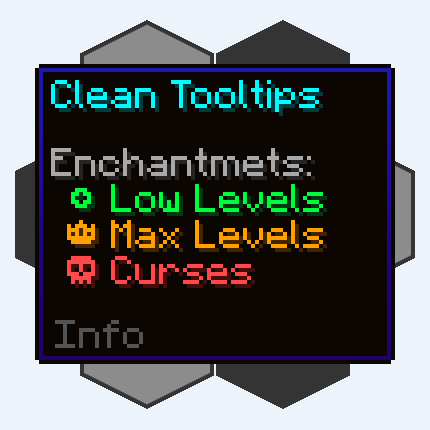
Clean Tooltips
Improving Tooltips by creating a clean and consistent look! Durability Tooltip & more!
Shuttfup
A mod that fixes some minor annoyances!

ModernFix-mVUS
A fork of ModernFix that adds minor version update support.
Fast Noise
This optimizes noise generation
MacOS Input Fixes
This mod fixes many Minecraft macOS input bugs. It makes scrolling with shift work properly on macOS, left click + contr...

Chat Patches
A Minecraft-Fabric client-side mod that touches up a few aspects of Minecraft's mundane chat.
TCDCommons API
TheCSDev's personal library mod for the Minecraft modding enviroment.

Fabrishot
Take large screenshots because why not
Held Item Info
Shows information (like enchantments) about the held item under its name

Cull Fewer Leaves
Cull leaves while looking hot! A continuation of Cull Less Leaves.

Auth Me
Authenticate yourself and re-validate your session

Resourcify
In-game resource pack, data pack and shader browser and updater

Emoji Type (Fabric/Quilt/NeoForge)
A client-side mod that makes it easier to type emoji (in chat, on signs, etc).

Better Block Entities
A Minecraft optimization mod for Fabric/Sodium that improves FPS / Block Entity Rendering by implementing a Hybrid Rende...

quick pack
Improve datapack / resourcepack zip file loading times
Entity View Distance
This mods allows more precise manipulation of entity view distance on client and server

ViaFabricPlus
Minecraft Fabric mod which allows you to join EVERY Minecraft server version (Classic, Alpha, Beta, Release, April Fools...
Item Scroller
Move items by mouse wheel scrolling, Shift + dragging, etc.

Fast Server Pings
Rewritten server ping pipeline using optimized Netty I/O, along with SWR caching.

BetterHandBobbing
This mod separates the hand bobbing from view bobbing to it's own setting. It's useful for players who have motion sick...
Title Fixer
Makes the in-game HUD title fit the screen at all times.

Noxesium
Improves play experience on multiplayer servers.