

Cape Provider
Modby litetex
Provides you with capes! You can choose from various providers or add your own
Type
Mod
CurseForge Downloads
499,029
CurseForge ID
1291862
Modrinth Downloads
2,972,868
Modrinth ID
orXAsira
Last Updated
Jul 28, 2026
Description
 Provides you with capes!
You can choose from various providers or add your own.
Improved/Reworked version of the ["Capes" mod](https://github.com/CaelTheColher/Capes):
* Improved and easier cape provider integration
* Allows ordering providers
* Support for custom providers
* More options to fine tune how capes are applied
* Written only in Java (no Kotlin needed)
* Various fixes and improvements
### Creating a custom cape provider
Provides you with capes!
You can choose from various providers or add your own.
Improved/Reworked version of the ["Capes" mod](https://github.com/CaelTheColher/Capes):
* Improved and easier cape provider integration
* Allows ordering providers
* Support for custom providers
* More options to fine tune how capes are applied
* Written only in Java (no Kotlin needed)
* Various fixes and improvements
### Creating a custom cape provider
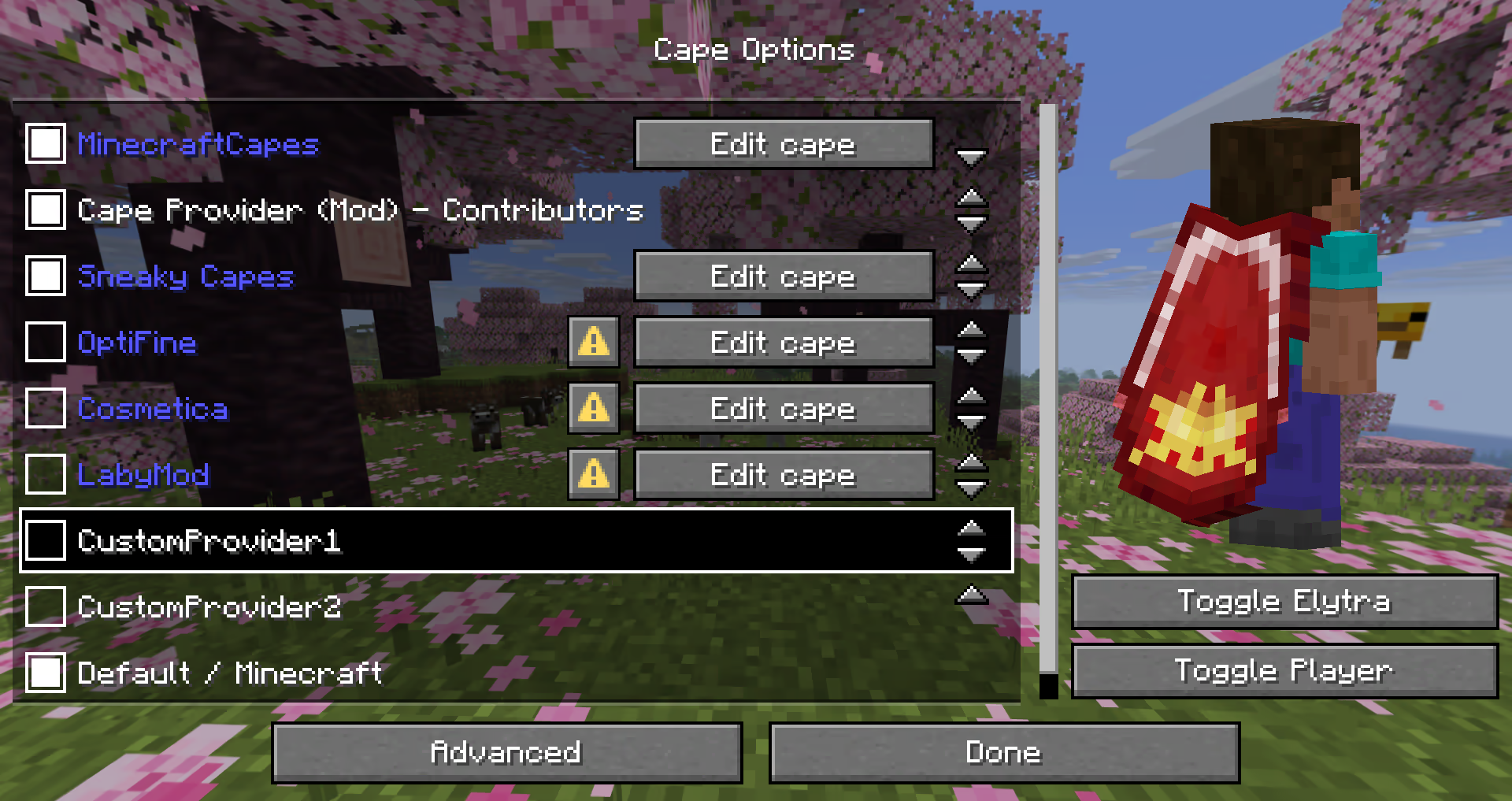 The mod provides many different ways how a provider can be added.
The following possibilities are sorted by simplicity:
#### Simple Local Provider
> Recommended for:
> * Users that just want a customizable cape
> * Modpacks (using `config/cape-provider/simple-custom`)
The simplest way to display a cape is by going into the `config/cape-provider` directory and creating a cape texture file named `cape.png`.
Additionally there are the following optional files:
* `owners.txt` - Determines which player names or UUIDs will get the cape displayed. If this file is not present then all players will display with the cape.
* `name.txt` - To override the display name of the provider
You can also add more providers by creating corresponding directories in `config/cape-provider/simple-custom`.
The mod provides many different ways how a provider can be added.
The following possibilities are sorted by simplicity:
#### Simple Local Provider
> Recommended for:
> * Users that just want a customizable cape
> * Modpacks (using `config/cape-provider/simple-custom`)
The simplest way to display a cape is by going into the `config/cape-provider` directory and creating a cape texture file named `cape.png`.
Additionally there are the following optional files:
* `owners.txt` - Determines which player names or UUIDs will get the cape displayed. If this file is not present then all players will display with the cape.
* `name.txt` - To override the display name of the provider
You can also add more providers by creating corresponding directories in `config/cape-provider/simple-custom`.Example: `config/cape-provider/simple-custom/my-super-cool-provider/cape.png` #### Remote Provider in configuration > Recommended for: > * Users that want to add a custom remote provider This demo showcases how to apply the capes inside [``custom-cape-demo``](https://github.com/litetex-oss/mcm-cape-provider/tree/dev/custom-cape-demo). 1. Open the config file located in ``config/cape-provider/config.json`` 2. In the ``remoteCustomProviders`` section add the following entry: ```jsonc { "id": "cp1", "name": "CustomProvider1", // You can replace uuid with $id, $name or $idNoHyphen to customize the cape per Player "uriTemplate": "https://raw.githubusercontent.com/litetex-oss/mcm-cape-provider/refs/heads/dev/custom-cape-demo/uuid.png" } ``` Example for SkinMC ```jsonc { "id": "skinmc", "name": "SkinMC", "uriTemplate": "https://skinmc.net/api/v1/skinmcCape/$id" } ``` 3. Restart the game and activate the provider For more details have a look at [RemoteCustomProvider](https://github.com/litetex-oss/mcm-cape-provider/tree/dev/src/main/java/net/litetex/capes/provider/custom/remote/RemoteCustomProvider.java) and [RemoteCustomProviderConfig](https://github.com/litetex-oss/mcm-cape-provider/tree/dev/src/main/java/net/litetex/capes/provider/custom/remote/RemoteCustomProviderConfig.java) NOTE: Texture resolvers can be selected using the `textureResolverId` attribute (see below for details). #### via Mods > Recommended for: > * Mods If you are a mod developer and want to e.g. display a cape for supporters or contributors of your mod, you can provide it using the mod's resources and/or metadata in ``fabric.mod.json``. The overall behavior is similar to how [``modmenu``](https://github.com/TerraformersMC/ModMenu?tab=readme-ov-file#fabric-metadata-api) handles this. ##### Local/Simple (Recommended) This approach requires no network communication and is the recommended way. It works by reading metadata and resources from the `cape` directory. Here is an example: 1. Add the following mod metadata: ``fabric.mod.json`` ```json5 { ... "custom": { "cape": "Contributors" } } ``` 2. Create a `cape` directory inside `resources` 3. Add the cape texture in `cape/cape.png` 4. Add the players that should be given the cape in `cape/owners.txt` with their UUIDs or names Note: There is also a more detailed variant ``fabric.mod.json`` ```json5 { "custom": { "cape": { "name-extra": "Contributors", "owners": { // You can also used UUIDs "names": [ "Notch" ] } } } } ``` The mod uses this strategy itself. See the [`fabric.mod.json`](https://github.com/litetex-oss/mcm-cape-provider/tree/dev/src/main/resources/fabric.mod.json) or [`cape` directory](https://github.com/litetex-oss/mcm-cape-provider/tree/dev/src/main/resources/cape) for details. ##### Remote Here's an example implementation that shows how a remote cape provider can be added: ``fabric.mod.json`` ```json5 { ... "custom": { "cape": "https://raw.githubusercontent.com/litetex-oss/mcm-cape-provider/refs/heads/dev/custom-cape-demo/uuid.png" } } ``` Here's a more detailed variant ``fabric.mod.json`` ```json5 { "custom": { "cape": { // Gives everyone a christmas cape // You can also use variables here, like $uuid. See above for more details // You may have to escape the $ with \ or you can alternatively use § instead of $ // Alternative: "uriTemplate" "url": "https://example.org/textures/§uuid.png", "changeCapeUrl": "https://...", "rateLimitedReqPerSec": 20 // Default is 20 } } } ``` #### Programmatic You can also create a [programmatic cape provider](https://github.com/litetex-oss/mcm-cape-provider/tree/dev/PROGRAMMATIC_PROVIDER.md). ### Further notes #### Maximum size Images/Textures should not exceed 10MB. Otherwise they might be ignored. #### Texture resolvers / Animated textures The following resolvers are currently built-in: | Resolver-ID | Animated | Format | Example | Notes | | --- | --- | --- | --- | --- | | `default` / null | ❌ | [PNG](https://de.wikipedia.org/wiki/Portable_Network_Graphics) | [uuid.png](https://raw.githubusercontent.com/litetex-oss/mcm-cape-provider/refs/heads/dev/custom-cape-demo/uuid.png) | | | `sprite` | ✔ | Stacked [PNG](https://de.wikipedia.org/wiki/Portable_Network_Graphics) | [animated.png](https://raw.githubusercontent.com/litetex-oss/mcm-cape-provider/refs/heads/dev/custom-cape-demo/animated.png) | | | `gif` | ✔ | [GIF](https://de.wikipedia.org/wiki/Graphics_Interchange_Format) | [animated.gif](https://raw.githubusercontent.com/litetex-oss/mcm-cape-provider/refs/heads/dev/custom-cape-demo/animated.gif) | _Usage not recommended_
GIFs require more resources when compared to more modern formats like PNG. | Please note that animated textures can be frozen or completely disabled in the settings.
Compatibility
Mod Loaders
Game Versions
Screenshots
Similar Mods

Bosses of Mass Destruction
WIP mod that adds boss fights to minecraft
Entity Collision FPS Fix
Client Side mod that optimizes entity's on the render thread. Fixes https://bugs.mojang.com/browse/MC-228976
Better Biome Blend
Improves and fixes biome color blending

FTB Library (Fabric)
Common code for all GUI stuff in FTB Mods. Component/layer based GUI creation. Used by mods such as FTB Chunks, FTB Ques...

AllTheCompressed
adds several compressed versions of blocks

Nether Chested
Use the Nether's power to store 8 times more items than usual in this chest.
Included in Modpacks
 Beautifully Optimized
 Light Craft | FPS Boost Max
 Fabulously Optimized
 LebaneseMC
 Azure Visuals
 Enchant.cz
 Adaptive
 RakibFPS
 Nickly Optimized
 editon's Modpack
 EMF
EMF
 Statera
 SJ's OPTIMIZED
 Void's essentially optimized pack
 CivOptimized
 The Intergalactic Squirrels
 Cookies&Cream Modpack LITE
 asphyxia mods
 SimplyVanilla
 Cobblefine
 Steve Fans
 Salted Caramel
 Gensou
 prjkt333
 CaptnJason's Server Pack
 Aura
Aura
 Turtle's Auxiliar Modpack
 Veloz
Veloz
 Semarina
 LUNAR PVP
 Fastest Client
 Mortium optimised
 Eshkere-modpack
 Smolder's Ultimatum
 Zomb's PvP Optimization
![[FMCS-H] fps X media X crystal x survival Optimized HIGH](https://cdn.modrinth.com/data/XfzNjXtG/78a204af016980428d930b31e72f9c8daef922d9_96.webp) [FMCS-H] fps X media X crystal x survival Optimized HIGH
[FMCS-H] fps X media X crystal x survival Optimized HIGH
![[FMCS-M] fps X media X crystal x survival Optimized MEDIUM](https://cdn.modrinth.com/data/IQ4tssSp/7f90dee82e769db707a0012f235d28d2eee369b8_96.webp) [FMCS-M] fps X media X crystal x survival Optimized MEDIUM
[FMCS-M] fps X media X crystal x survival Optimized MEDIUM
 Opinionatedly Optimized
 TEDS Plus
 Spunky Optimized
 emad modpack
 Fabulous
 Just Essential Survival modpack
 Lemon pack
 Visual Overhaul
 CraftNepal
 Fabulously Vulkan
 KPBSPM - SPm Edition
 Modded Bridge
 KPBSPM - Pojav Edition
 Vanilla Rewired
 Fantastically Optimised (Vulkan)
 UnitedUnion
 ZeroFabric
 Additive
 PlasmoPack
 Rise of the Ancients
BasicCraft
Rise of the Ancients
BasicCraft
 KindredCraft
 Zalitherlauncher Boost FPS
 SiestaSMP Modpack
 Fps Optimized
 GABG's XVanilla
 Ultimate PBR Essentials
 MerVik’s Vanilla+
 SEAF MC Modpack
 Agile Optimized
 Unstable Unfathon - MODPACK
 Hackerbbrine's Optimizations
 DogsPack
 SurShield Everyone
 ImagineFun Add-Ons
 Abyss Server Pack
 FurCraft
 OCSMP
OCSMP