

Cape Provider
Modby litetex
Provides you with capes! You can choose from various providers or add your own
Type
Mod
CurseForge Downloads
990,707
CurseForge ID
Modrinth Downloads
5,968,363
Modrinth ID
Last Updated
Nov 6, 2026
Description

Provides you with capes!
You can choose from various providers or add your own.
Improved/Reworked version of the "Capes" mod:
- Improved and easier cape provider integration
- Allows ordering providers
- Support for custom providers
- More options to fine tune how capes are applied
- Written only in Java (no Kotlin needed)
- Various fixes and improvements
Creating a custom cape provider
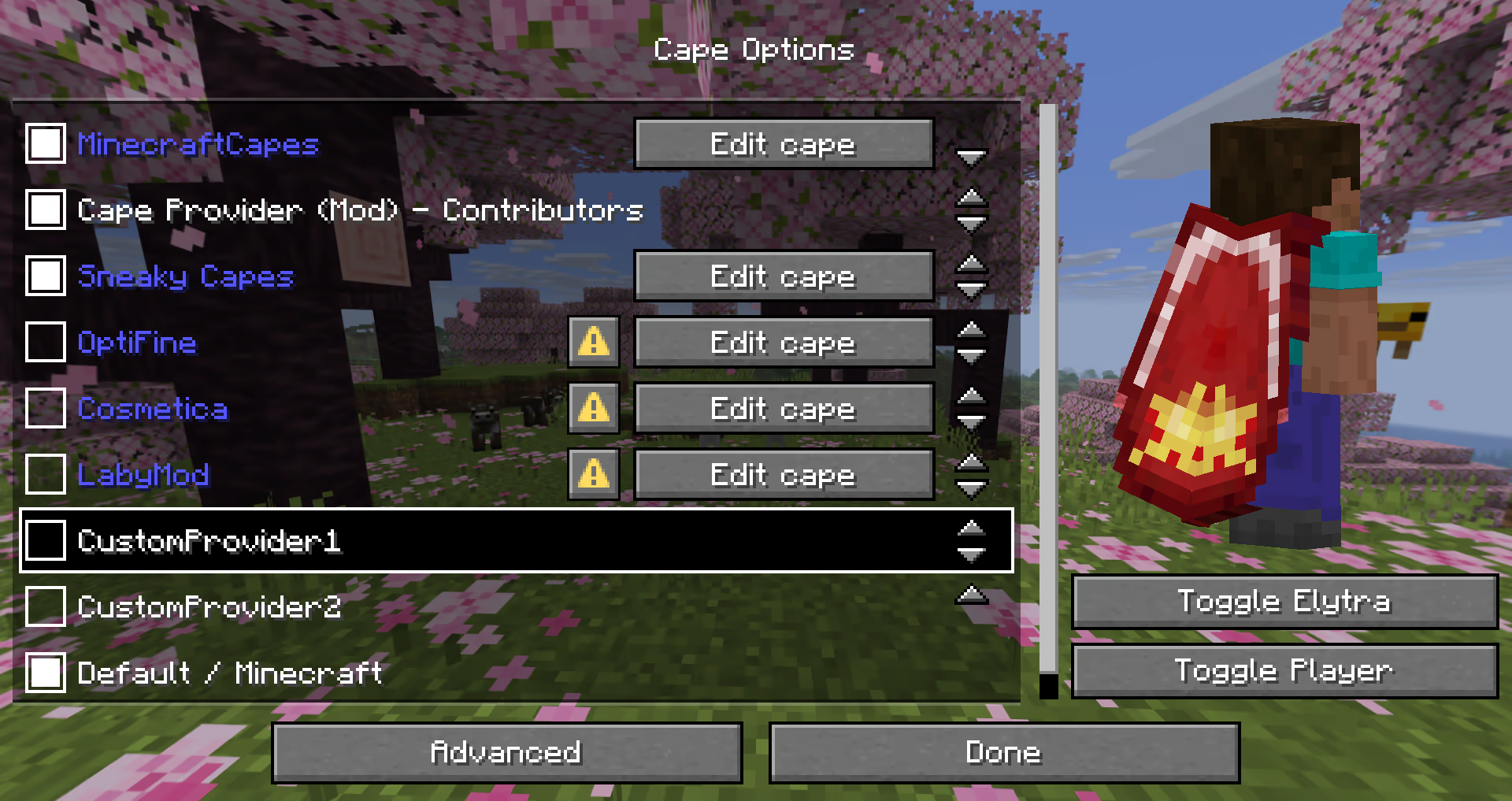
The mod provides many different ways how a provider can be added.
The following possibilities are sorted by simplicity:
Simple Local Provider
Recommended for:
- Users that just want a customizable cape
- Modpacks (using
config/cape-provider/simple-custom)
The simplest way to display a cape is by going into the config/cape-provider directory and creating a cape texture file named cape.png.
Additionally there are the following optional files:
owners.txt- Determines which player names or UUIDs will get the cape displayed. If this file is not present then all players will display with the cape.name.txt- To override the display name of the provider
You can also add more providers by creating corresponding directories in config/cape-provider/simple-custom.
Example: config/cape-provider/simple-custom/my-super-cool-provider/cape.png
Remote Provider in configuration
Recommended for:
- Users that want to add a custom remote provider
This demo showcases how to apply the capes inside custom-cape-demo.
-
Open the config file located in
config/cape-provider/config.json -
In the
remoteCustomProviderssection add the following entry:{ "id": "cp1", "name": "CustomProvider1", // You can replace uuid with $id, $name or $idNoHyphen to customize the cape per Player "uriTemplate": "https://raw.githubusercontent.com/litetex-oss/mcm-cape-provider/refs/heads/dev/custom-cape-demo/uuid.png" }Example for SkinMC
{ "id": "skinmc", "name": "SkinMC", "uriTemplate": "https://skinmc.net/api/v1/skinmcCape/$id" } -
Restart the game and activate the provider
For more details have a look at RemoteCustomProvider and RemoteCustomProviderConfig
NOTE: Texture resolvers can be selected using the textureResolverId attribute (see below for details).
via Mods
Recommended for:
- Mods
If you are a mod developer and want to e.g. display a cape for supporters or contributors of your mod, you can provide it using the mod's resources and/or metadata in fabric.mod.json.
The overall behavior is similar to how modmenu handles this.
Local/Simple (Recommended)
This approach requires no network communication and is the recommended way.
It works by reading metadata and resources from the cape directory.
Here is an example:
- Add the following mod metadata:
fabric.mod.json{ ... "custom": { "cape": "Contributors" } } - Create a
capedirectory insideresources - Add the cape texture in
cape/cape.png - Add the players that should be given the cape in
cape/owners.txtwith their UUIDs or names
Note: There is also a more detailed variant
fabric.mod.json
{
  "custom": {
    "cape": {
      "name-extra": "Contributors",
      "owners": {
        // You can also used UUIDs
        "names": [
          "Notch"
        ]
      }
    }
  }
}
The mod uses this strategy itself. See the fabric.mod.json or cape directory for details.
Remote
Here's an example implementation that shows how a remote cape provider can be added:
fabric.mod.json
{
  ...
  "custom": {
    "cape": "https://raw.githubusercontent.com/litetex-oss/mcm-cape-provider/refs/heads/dev/custom-cape-demo/uuid.png"
  }
}
Here's a more detailed variant
fabric.mod.json
{
  "custom": {
    "cape": {
      // Gives everyone a christmas cape
      // You can also use variables here, like $uuid. See above for more details
      // You may have to escape the $ with \ or you can alternatively use § instead of $
      // Alternative: "uriTemplate"
      "url": "https://example.org/textures/§uuid.png",
      "changeCapeUrl": "https://...",
      "rateLimitedReqPerSec": 20 // Default is 20
    }
  }
}
Programmatic
You can also create a programmatic cape provider.
Further notes
Maximum size
Images/Textures should not exceed 10MB. Otherwise they might be ignored.
Texture resolvers / Animated textures
The following resolvers are currently built-in:
| Resolver-ID | Animated | Format | Example | Notes |
|---|---|---|---|---|
default / null |
❌ | PNG | uuid.png | |
sprite |
✔ | Stacked PNG | animated.png | |
gif |
✔ | GIF | animated.gif | Usage not recommended GIFs require more resources when compared to more modern formats like PNG. |


Please note that animated textures can be frozen or completely disabled in the settings.
Compatibility
Mod Loaders
Game Versions
Recommended Gear
AffiliateHardware and extras that pair well with this mod.

Minecraft Enderman Character Plush
Enderman plush toys, and a reliable gift for a younger player.

Mini PC for Self-Hosting
A low-power box that can sit in a cupboard and run a modded server around the clock.

LEGO Minecraft Set
Official sets that translate the building side of the game off-screen.
As an Amazon Associate I earn from qualifying purchases.
Screenshots
Similar Mods

Trading Post
Rule the village! Trade with every villager at once!

Relics
Just a mod about useful items with unique mechanics :3

WanionLib
Shared code library used by all WanionCane mods!
![Fast Async World Save[Forge/Fabric]](https://media.forgecdn.net/avatars/920/973/638384996050010285.png)
Fast Async World Save[Forge/Fabric]
Prevent lag-spikes and data loss during intermittent world saves
Tesla Core Lib
Minecraft library useful in creating power hungry machines

Naturalist Lite
Adds 47 animals *(and 66 variants)* to your world with immersive behaviors and drops.
Included in Modpacks (119)
Show fewer Fabulously Optimized
 Spunky Optimized
 Additive
 Light Craft | FPS Boost Max
 LUNAR PVP
 ALAND's Immersive Hypixel SkyBlock
 SimplyFine
 Void's essentially optimized pack
 ALAND's Optimized Hypixel SkyBlock
 KPBSPM - SPm Edition
 Nickly Optimized
 Fastest Client
 Fps Optimized
BasicCraft
Fps Optimized
BasicCraft
 Azure Visuals
 Aura
Aura
 Ultimate PBR Essentials
 OCSMP
OCSMP
 Thosh's Client
 Turtle's Auxiliar Modpack
 Adaptive
 Beautifully Optimized
 SimplyVanilla
 ImagineFun Add-Ons
 PonyCraft a New Generation Vanilla
 Astrion
 Zalitherlauncher Boost FPS
 TEDS Plus
 editon's Modpack
 emad modpack
 GABG's XVanilla
 Hackerbbrine's Optimizations
 Unstable Unfathon - MODPACK
 Banandez Optimized
 Virtues of Life
 asphyxia mods
 Simple Server Set: Base
 EMF
EMF
 Caffeine
 Salted Caramel
 LebaneseMC
 GalleyRP Askalon
 The Intergalactic Squirrels
 FurCraft
 CivOptimized
 Statera
 Luna Modpack
 Cobblefine
 FlyamPack
 SJ's OPTIMIZED
 Enchant.cz
![[FMCS-M] fps X media X crystal x survival Optimized MEDIUM](https://cdn.modrinth.com/data/IQ4tssSp/7f90dee82e769db707a0012f235d28d2eee369b8_96.webp) [FMCS-M] fps X media X crystal x survival Optimized MEDIUM
[FMCS-M] fps X media X crystal x survival Optimized MEDIUM
 Sherbert
 RakibFPS
 Fabulous
 Decked Out Vanilla+
 Zomb's PvP Optimization
 Gensou
 Waymarked
 Smart & whimscape
 KPBSPM - Pojav Edition
 Verbesserung
 Steve Fans
 KindredCraft
 CraftNepal
 ORICHILL Client
 Visual Overhaul
 DTEmpire Optimized
 Sorbet
 Eshkere-modpack
 CloudyWorlds Modpack
 Slightly Vanilla
 Modded Bridge
![[FMCS-H] fps X media X crystal x survival Optimized HIGH](https://cdn.modrinth.com/data/XfzNjXtG/78a204af016980428d930b31e72f9c8daef922d9_96.webp) [FMCS-H] fps X media X crystal x survival Optimized HIGH
[FMCS-H] fps X media X crystal x survival Optimized HIGH
 Fishy's Client
 Fabulously Vulkan
 SEAF MC Modpack
 Cookies&Cream Modpack LITE
 Optimized Magic RPG
 Just Essential Survival modpack
 DogsPack
 KeeKee's SMP Complete
 KeeKee's SMP Visual
 Semarina
 Abyss Server Pack
 KeeKee's SMP Utility
 Just QoL
 Snowbound Serenity
 KeeKee's SMP Lite
 PlasmoPack
 UnitedUnion
 Lemon pack
 Mortium optimised
 Fabulously Matcha
 Fox's Ultimate MacBook Modpack
 Rise of the Ancients
 HDR+
HDR+
 MerVik’s Vanilla+
 ZeroFabric
 SiestaSMP Modpack