

Aeronautics: Winds & Weather
ModAdds realistic wind, weather and temperature to create aeronautics and create mod
Description
Aeronautics: Winds and Weather
<iframe width="560" height="315" src="https://www.youtube-nocookie.com/embed/FoTh0C_jfik" title="YouTube video player" frameborder="0" allow="accelerometer; autoplay; clipboard-write; encrypted-media; gyroscope; picture-in-picture; web-share" allowfullscreen></iframe>This mod turns wind and weather into working parts of the world. Build sail-powered ships, run windmills from real wind speed, watch storms move across the horizon, and use heat and altitude to your advantage.
Wind changes with location, terrain, time, weather, altitude, and temperature. Oceans are windier, mountains provide shelter, and the upper atmosphere can contain powerful moving wind bands.
Windcatchers
Windcatchers are dedicated sail blocks for ships and windmills. Ordinary wool, Create sails, and propellers are not randomly treated as environmental sails.
- Can be dyed
- Appears in the Aeronautics creative section
- Display their forces in contraption diagrams
Sail direction matters. Facing the wind produces strong propulsion, diagonal sails catch less, and edge-on sails produce almost no force.
More Windcatchers increase acceleration and maximum speed. Ship size, mass, heavy materials, sail angle, and sail placement are all considered. A properly supplied ship can reach 95% of the current wind speed.
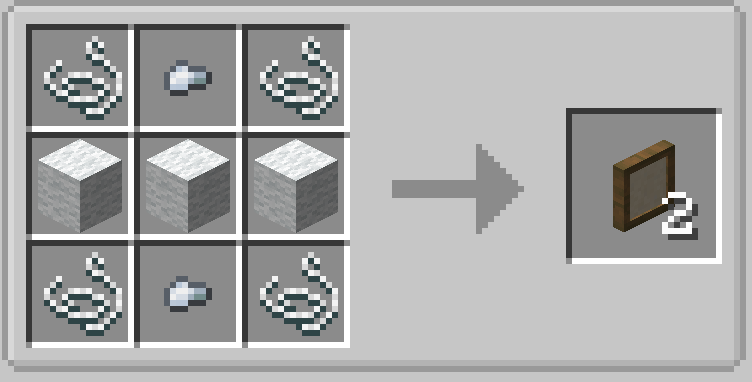
Crafting
Produces two Windcatchers:
Windmills
Windcatchers work with Windmill Bearings.
- RPM follows the current wind speed
- More Windcatchers provide more Stress Units
- Ordinary Create windmills remain unchanged
HUD
Use the aviator goggles to get an overview HUD of the weather, temperature and wind

Commands
Check or override wind:
/aerowind set <speed> <bearing>
/aerowind clear
Choose what ambient wind affects:
/aerowind mode query
/aerowind mode windcatchers
/aerowind mode everything
windcatchers is the default. everything applies restrained wind drag to every Sable contraption.
Check or control regional weather:
/aeroweather query
/aeroweather set <type> <intensity> [duration] [radius]
/aeroweather clear [radius]
Example:
/aeroweather set thunderstorm 7 600
Quick weather commands are also available:
/aeroweather windy [seconds]
/aeroweather rain [seconds]
/aeroweather storm [seconds]
/aeroweather thunderstorm [seconds]
/aeroweather snow [seconds]
/aeroweather blizzard [seconds]
/aeroweather hail [seconds]
/aeroweather fog [seconds]
/aeroweather heatwave [seconds]
/aeroweather sandstorm [seconds]
/aeroweather monsoon [seconds]
Compatibility
Required:
- Minecraft 1.21.1
- NeoForge 21.1+
- Create 6.0.10
- Sable 2.0.x
- Java 21
- Create Aeronautics
Optional integration:
- ProtoManly Weather
- Weather2
- Simple Clouds
- Better Clouds
External weather mods can provide wind direction, speed, and weather conditions. Manual /aerowind set overrides always take priority.
Install the mod on both the server and clients.
Configuration
Wind strength, ocean exposure, upper-atmosphere wind, heat, thermals, Windcatcher performance, weather regions, storm effects, clouds, fog, audio, particles, HUD, and compatibility can all be configured.
Compatibility
Mod Loaders
Game Versions
Recommended Gear
AffiliateHardware and extras that pair well with this mod.

As an Amazon Associate I earn from qualifying purchases.
Screenshots
Similar Mods

Balanced Epic Fight
Makes some Epic Fight combat features more balanced

Techopolis Mod
A mod used in the Techopolis modpack
Mod Settings
Provides an easy to access configuration screen for all installed mods on Fabric
Villager Tannery House
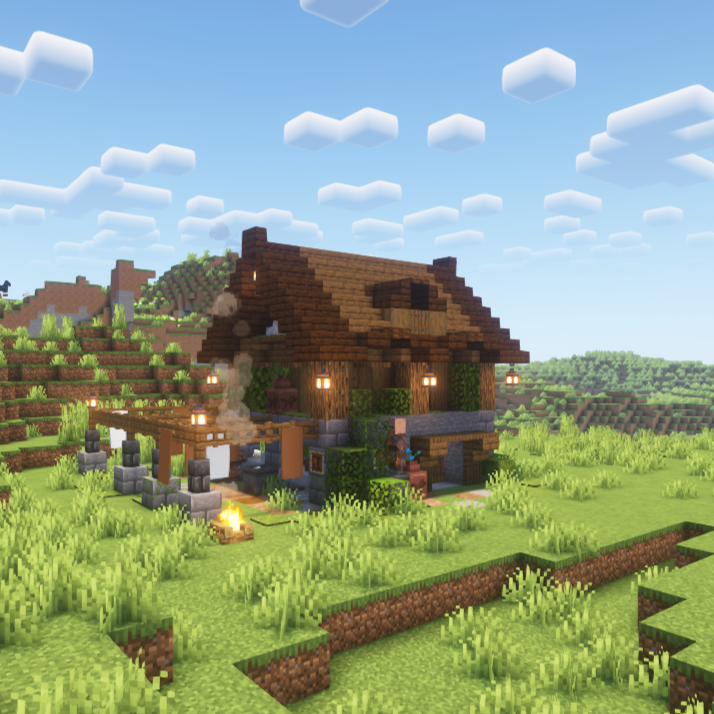
Adds a Villager Tannery to the Plains and Forest biomes, with Leatherworker and Shepherd villagers working inside.

Miku Plushies
you can now have Hatsune Miku Plushies all over your world
![Radio Towers and Guns [TaCZ]](https://media.forgecdn.net/avatars/1478/881/638961228577050243.png)
Radio Towers and Guns [TaCZ]
This Mods adds guns (from TaCZ) to chests in Radio Towers and Airdrops mod.

