
Litematica
Modby masady
A modern schematic mod written for Fabric (and LiteLoader on 1.12.x), with extra features for Creative mode work
Type
Mod
CurseForge Downloads
14,689,243
CurseForge ID
Modrinth Downloads
27,750,479
Modrinth ID
Last Updated
Nov 7, 2026
Description
Description
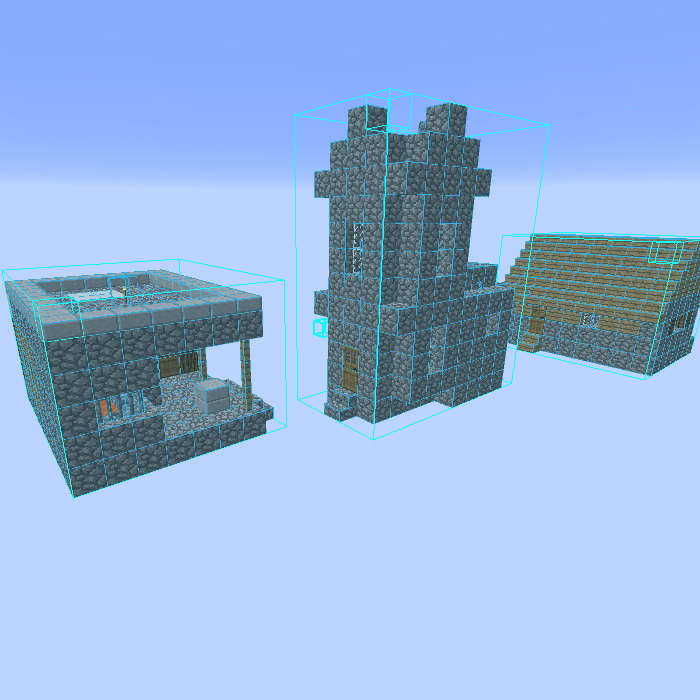
Litematica is a modern schematic mod primarily targeting light mod loaders like LiteLoader on MC 1.12.x, Rift on MC 1.13.x and Fabric on MC 1.14+.
There is also a Forge version, but currently only for MC 1.12.2. For later MC versions there are currently only third party ports such as Forgematica.
Litematica has all the main features (plus a bunch more) of the old Schematica mod, except for the printer, which is not planned for Litematica itself, but instead is left to extension mods (see: aria1th printer or the other printer).
Compatibility with shaders
Litematica's rendering doesn't currently work properly with shaders (even with Iris) in 1.21.3+. So when you need to use Litematica (schematic rendering), disable shaders.
In older MC versions the rendering works better with shaders, at least with Iris, but also depending on the shader pack. Some shader packs break the rendering pretty badly, but some used to work pretty nicely. Optifine in general is/was a lot more problematic, pretty much you can't use shaders at all with Optifine if you use Litematica. The general recommendation is to use Sodium (and Iris) instead of Optifine.
Hotkeys
The default hotkey to open the Litematica main menu is M.
Note: If you use a non-QWERTY keyboard layout, then the keys may be different, such as M becoming , on AZERTY.
Other common default hotkeys:
M + C- The direct hotkey to open the config menuM + R- Toggle ON/OFF ALL rendering from LitematicaM + G- Toggle ON/OFF just schematic rendering ("ghost blocks" - all HUDs for example will still render)M + T- Toggle ON/OFF the "tool item" (which is by default a stick) functionalityM + P- Directly open the Schematic Placements menu/listM + V- Open the Schematic Verifier menuNumpad minus- Open the placement configuration menu for the currently selected placementNumpad multiply- Open the Area Editor menuPage Up/Down- Change the selected layer in the render layers settingsM + Page Up/Down- Change the render layers modeCtrl + scroll(holding the tool) - Cycle the "tool mode" (there is also a button for this in the lower left corner of the main menu)Alt + scroll(holding the tool) - Nudge/move the selected placement or area selection box or corner (depending on the tool mode) in the direction the player is looking atCtrl + M- Toggle or cycle the "sub-mode" or main setting of some of the "tool modes", such aspasteReplaceBehaviorin Paste mode, theCornersvs.Expandbehavior in Area Selection mode, or theAreavs.Placementbehavior of the Delete mode
Warning for multiplayer
The Easy Place mode feature may get you banned on some servers!
The Easy Place feature will always be clicking on the target position's air block, and this can easily be detected by anti-cheat systems. So this can result in at least two things: The block placement will just be rejected and you just get client-side ghost blocks, or some anti-cheat system flags that as cheating and auto-bans you from the server. So before using Easy Place, find out of it's allowed on the server!
If you have Optifine...
In general I don't recommend using Optifine (with Litematica, or otherwise) due to the various rendering issues it causes. Instead I would recommend using Sodium and/or Iris if you want shaders.
If you have Optifine installed, then there are some options that you most likely will need to disable in Optifine, or otherwise it will break the schematic rendering:
- If you get glitchy weird triangles, then in 1.16+ first try updating to the latest Litematica version. If that doesn't work, then set shaders to
OFF(notInternal) and restart the game. Render Regionsprobably needs to be disabled to prevent weird rendering issues (the schematic partially rendering in weird places)Fast Rendermight also need to be disabled if there are still some weird HUD/GUI rendering issues
Documentation
There is a wiki. The wiki is still being worked on, and it will probably have a new address at some point (or rather there will be a new wiki in a new location with a lot more coverage).
Other/older documentation and explanations, some FAQ answers
Here is a Reddit post that explains the very basics of the mod:
Litematica - Easy Place support on servers
Misc explanations on Reddit or my Discord server
Schematic format conversions:
Litematica Normal selection mode with sub-regions:
- https://old.reddit.com/r/feedthebeast/comments/r9n9mi/litematicas_addselectionbox_keybind_wont_work/
- https://old.reddit.com/r/feedthebeast/comments/r9n9mi/litematicas_addselectionbox_keybind_wont_work/hnpe9yg/
Litematica - hiding an area selection:
- https://github.com/maruohon/litematica/discussions/755#discussioncomment-6772682
- https://old.reddit.com/r/fabricmc/comments/yw9r5y/litematica_1192_issues/ixr7l5h/
Litematica - can't create new selection sub-regions (in Simple mode):
Litematica - Normal/Multi-Region area selection tutorial:
Litematica - Easy Place on a server with FabricCarpet but no CarpetExtra:
- https://discord.com/channels/169369095538606080/566649314001158165/1235158483792433214
- https://discord.com/channels/169369095538606080/566649314001158165/1221223833889935420
Litematica - easy/fast selections tutorial:
Litematica - schematic formats:
- https://discord.com/channels/169369095538606080/183172448919748608/1180841121845354516
- https://discord.com/channels/169369095538606080/566649314001158165/1176569283271213098
- https://discord.com/channels/169369095538606080/566649314001158165/1097540707931127938
- https://discord.com/channels/169369095538606080/169369095538606080/1081089742944337941
- https://discord.com/channels/169369095538606080/566649314001158165/1097564948999184394
- https://github.com/maruohon/litematica/issues/812#issuecomment-1924300257
Litematica - saving and pasting with block entity data:
Litematica - Material Lists variants:
Litematica - Manual Origin issue:
Litematica - placing stairs correctly:
Litematica - performance tips with large schematics:
Litematica - large schematics, bad performance or crashes, what to do:
Litematica - how to only show one block type at a time:
Litematica not working/keys not working:
Litematica "only render one block":
Litematica - finding the schematics directory/game directory:
- https://old.reddit.com/r/litematica/comments/1co6vh4/downloading_schematics_on_different_versions_of/l3c21l9/
- https://old.reddit.com/r/litematica/comments/13es48n/how_to_import_schematics_on_mac/kb8bu5d/
Litematica - using sub-regions:
Litematica - pasting redstone on servers:
- https://discord.com/channels/169369095538606080/566649314001158165/1063578995347685446
- https://legacy.curseforge.com/minecraft/mc-mods/litematica?comment=2838
- https://discord.com/channels/169369095538606080/566649314001158165/1227276878830764183
Litematica - pasting inventory contents on servers, feat. Litemoretica:
Litematica - paste task not running + somewhat comprehensive mspt and profiling quick howto:
Litematica - schematic placement explained:
Litematica - material list:
Litematica - performance tips with large schematics:
Litematica - no schematics directory in the .minecraft directory:
Litematica "not working" (not in Controls) -> F3, malilib keys, Mod Menu:
World Edit pasting:
MacOS how to go up one directory:
Youtube tutorials
Here are some of the better Youtube tutorial videos I've come across.
Youtube tutorials
<iframe width="560" height="315" src="https://www.youtube-nocookie.com/embed/aMZSXAKZzpo" title="YouTube video player" frameborder="0" allow="accelerometer; autoplay; clipboard-write; encrypted-media; gyroscope; picture-in-picture; web-share" allowfullscreen></iframe> <iframe width="560" height="315" src="https://www.youtube-nocookie.com/embed/pHa_GBLHulw" title="YouTube video player" frameborder="0" allow="accelerometer; autoplay; clipboard-write; encrypted-media; gyroscope; picture-in-picture; web-share" allowfullscreen></iframe> <iframe width="560" height="315" src="https://www.youtube-nocookie.com/embed/zHZLvJgpRag" title="YouTube video player" frameborder="0" allow="accelerometer; autoplay; clipboard-write; encrypted-media; gyroscope; picture-in-picture; web-share" allowfullscreen></iframe> <iframe width="560" height="315" src="https://www.youtube-nocookie.com/embed/KhvEs_iMBjU" title="YouTube video player" frameborder="0" allow="accelerometer; autoplay; clipboard-write; encrypted-media; gyroscope; picture-in-picture; web-share" allowfullscreen></iframe>Compatibility
Mod Loaders
Game Versions
Recommended Gear
AffiliateHardware and extras that pair well with this mod.

Minecraft Enderman Character Plush
Enderman plush toys, and a reliable gift for a younger player.

LEGO Minecraft Set
Official sets that translate the building side of the game off-screen.
As an Amazon Associate I earn from qualifying purchases.
Screenshots
Similar Mods

Clumps
Clumps XP orbs together to reduce lag

Sodium
The fastest and most compatible rendering optimization mod for Minecraft. Now available for both NeoForge and Fabric!
Xaero's Minimap
Displays the nearby world terrain, players, mobs, entities in the corner of your screen. Lets you create waypoints which...
JourneyMap
Real-time map used for mapping in-game or your browser as you explore.

Jade 🔍
Shows information about what you are looking at. (Hwyla/WAILA fork for Minecraft 1.16+)
Waystones
Teleport from waystone to waystone or craft magical scrolls to warp.
Included in Modpacks (580)
Show fewer Create Refabricated
 EwMedieval Modpack
 Soulspark
 Fidelity
 Jotunheimr
![Redstone Witch [Lite]](https://cdn.modrinth.com/data/sFA4kyET/be528d560ef1b56de7490ea97d88365c86dff043_96.webp) Redstone Witch [Lite]
Redstone Witch [Lite]
 DittoLand Cobblemon
 VANILLA FPS (VF+)
 Anything is Possible Reborn (AIPr)
 Dominion Basics pack
 Simply Rudimentary
 Paradise ModPack
![[FMCS-H] fps X media X crystal x survival Optimized HIGH](https://cdn.modrinth.com/data/XfzNjXtG/78a204af016980428d930b31e72f9c8daef922d9_96.webp) [FMCS-H] fps X media X crystal x survival Optimized HIGH
[FMCS-H] fps X media X crystal x survival Optimized HIGH
 Convenient Optimization
 Fast & Fine
 Хрєкотрон
 Hisoka Optimized
FarmItCraft
Hisoka Optimized
FarmItCraft
 Craft Attack 14 Pack
 Vanilla Planifolia
 Tomato Performance Pack
 Piekarnia Modpack
 Create SMP Marrdoxx
Core PvP
Create SMP Marrdoxx
Core PvP
 Mytocrafted
 UNIPACK
 KnopiaPack
 Azelie
 Show me the Fantastic Create
 Maniac's Adventure
 Cookies&Cream Modpack LITE
 Nayxo's Trailer Modpack
 Almost Pure Vanilla
 vilmiComfort
 Flynn's Modpack
 Projekt 2025
 Golden Hearth
 minehak&krutosh2's Pompous PepeLand Playground
 Just Essential Survival modpack
 The Better Pokeblocks Modpack
 Renice Cubed
 The True Vanilla
 Serenor
 DogsPack
 TealFire - Vanilla+
 SkullClient
 KeeKee's SMP Complete
 Simple Survival Immersion - SSI
 Cobblemon Extra
 Terra Nexus
 Cozmic's Vanilla Enhanced
 Flamee Pack
 Fermium
 EdonMe Survival
 сборка OV3RN
 Ekaii Plus
 MarchewkaSMP
 ChaMods
 Semarina
 My Hero Legacy
 MineCrew-Extra
 The Last Ring Bearer
 Renderium Optimized
 Jordan's Modpack
 Bambam Modpack
 Vanilla Odyssey
 KeeKee's SMP Utility
 Just QoL
 Vanilla Enhanced
 Yet Another Vanilla But Better (YAVBB)
 Velocity
 AgalarMC Vanilla
 Snowbound Serenity
 CARCHcraft
 Lumora
 CobbleSpirits
 EW optimized
 Kitty Pack
 Barely Modded
 FDMPack
 Icabu 4 modpack
 Pibblecraft
 Mihuco's Modpack
 Destiny's Kitchen Sink
 V-Civilization V-Island (Unofficial)
 Quant
Quant
 team pkb pack
 LAHORI_PLAYZ
 Schleichi's Mods
 Better Cobblemon Adventure with friends
 VIRISMP
 HypeCraft - Saison 3
 Mazite
 AWAWA'S Clan
 Bud Du Bud
![Masivo SMP - Farfadox Server [Fan Made]](https://media.forgecdn.net/avatars/1794/137/639136622570736641.png) Masivo SMP - Farfadox Server [Fan Made]
Masivo SMP - Farfadox Server [Fan Made]
 DarkFoe Live!!
 Just Vanilla
 NM-modpack
 Pocket SMP