
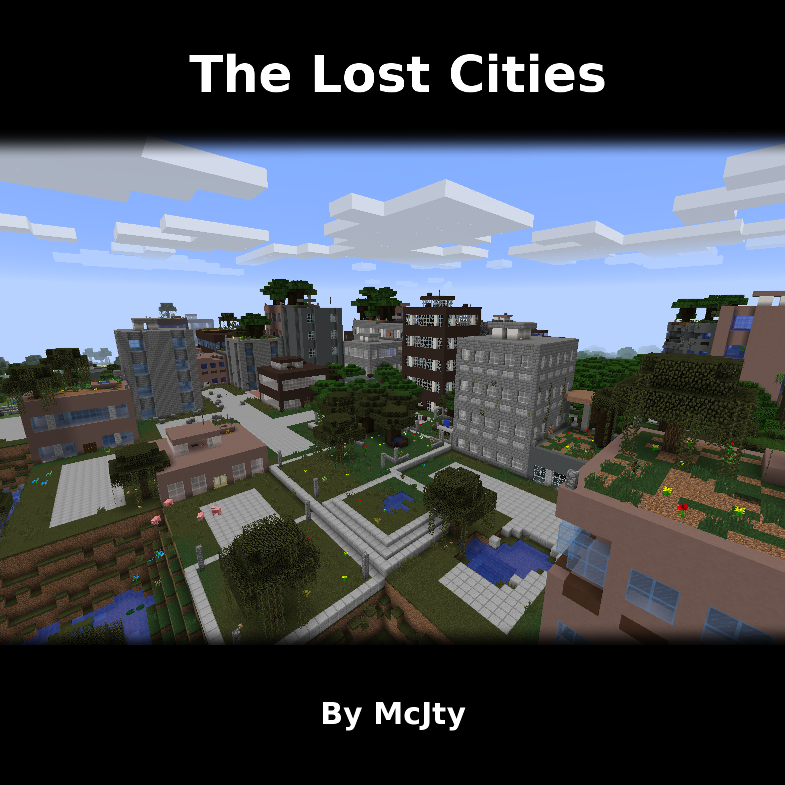
The Lost Cities
Modby McJty
The Lost Cities is a world generation mod
Type
Mod
CurseForge Downloads
92,750,189
CurseForge ID
Modrinth Downloads
11,501,005
Modrinth ID
Last Updated
Nov 7, 2026
Description
The Lost Cities
The Lost Cities transforms Minecraft's Overworld into a vast, abandoned civilization. Explore ruined skyscrapers, apartment blocks, factories, roads, highways, bridges, tunnels, subway systems, parks, flooded areas, and underground rooms filled with loot and dangers.
Cities are integrated into the normal terrain, so Lost Cities can be combined with other biome and terrain mods. Depending on the selected profile, the world can contain sprawling city regions, rare cities separated by wilderness, heavily damaged ruins, safer buildings, tall skylines, domed cities, or other specialized landscapes.
Features
- Large procedural cities with streets, buildings, parks, highways, bridges, railways, tunnels, and subways
- Detailed interiors with loot, spawners, cellars, lighting, and extensive damage and decay options
- Multiple built-in profiles for very different world-generation styles
- An in-game configuration screen for selecting a profile and customizing generation
- Support for biome and terrain-generation mods
- Data-driven buildings, palettes, city styles, world styles, and other assets for modpack authors
- Custom profiles for controlling city frequency, building height, damage, explosions, terrain, infrastructure, loot, and much more
- Server-side-only operation, allowing vanilla clients to connect when no client-side Lost Cities features are required
Note: New Street/Highway layout was commissioned by TqLxQuanZ. Thanks for the support!
Current Version Documentation
The documentation stored in the GitHub branch for your Minecraft version is the most accurate and up-to-date source. The Lost Cities Wiki remains useful for older versions and general background, but it may describe legacy behavior that no longer applies.
Minecraft 1.20.1
Minecraft 1.21.1
Minecraft 1.21.11
Minecraft 26.1.2
Setting Up a Server
Choose the profile before generating the world. Changing the profile later affects only newly generated chunks and can create abrupt borders or an inconsistent world. If the server has already generated the intended world, stop it, make a backup, and use a new level-name or remove the old world before continuing.
The profile name is the identifier shown in the Lost Cities profile selector, such as default, nodamage, or another installed profile. Names are case-sensitive. A custom profile must also be installed in the server's Lost Cities profile configuration before the world is created.
Server Setup for 1.20.1
The safest way to configure a 1.20.1 server is to prepare the settings in single player:
- Install the same Minecraft 1.20.1 mod loader, Lost Cities version, and world-generation mods on the client and server.
- On the client, create a new single-player world. Open the Lost Cities configuration from the world-creation screen, enable Lost Cities, select the desired profile, and apply any custom settings.
- Create the world once so Lost Cities writes its world-specific configuration.
- Stop the dedicated server.
- Copy
saves/<your-world>/serverconfig/lostcities-server.tomlfrom the client instance todefaultconfigs/lostcities-server.tomlin the server directory. - Open the copied file and verify that
selectedProfilecontains the desired profile. LeaveselectedCustomJsonas generated if the profile was customized in the UI. - Start the server with a new world. The file in
defaultconfigsis copied into the new world'sserverconfigdirectory and Lost Cities generates the Overworld using that profile.
For an existing server installation that has not generated its world yet, you can instead place a prepared lostcities-server.toml directly in defaultconfigs. Do not use the old level-type=lostcities setting on 1.20.1; Lost Cities is selected through its configuration.
Server Setup for 1.21.1, 1.21.11, and 26.1.2
These versions use the regular server config directory instead of a per-world serverconfig file:
- Install the matching NeoForge and Lost Cities versions on the server, together with any biome, terrain, or asset mods required by the pack.
- Start the server once so the configuration files are created, wait for startup to finish, and then stop it.
- Open
config/lostcities-server.tomlin the server directory. - In the
profilessection, setselectedProfileto the desired profile name. For example:
[profiles]
selectedProfile = "default"
selectedCustomJson = ""
- If you prepared customized settings with the in-game configuration screen, copy the generated
selectedCustomJsonvalue as well; otherwise leave it empty. - The bootstrap run may already have created a normal world. Set a new
level-nameinserver.properties, or back up and remove that generated world, so the next startup creates a completely fresh world. - Start the server. A non-empty
selectedProfileenables Lost Cities generation in the new Overworld; an empty value leaves the normal Overworld unchanged.
For all four current versions, Lost Cities can run only on the server, which permits unmodded clients to connect. Clients still need the mod when they need its configuration GUI or when the modpack contains other content that requires it on both sides.
Legacy Versions
The instructions below are retained for old modpacks. They do not apply to Minecraft 1.20.1 or newer.
Minecraft 1.14 through 1.19.x
Lost Cities is not a separate world type in these versions. In single player, choose the normal world type, open world customization, and use the LC button to enable Lost Cities and select a profile.
For a dedicated server, create and configure a single-player world first. Copy saves/<your-world>/serverconfig/lostcities-server.toml to the server's defaultconfigs directory, then generate a new server world.
Minecraft 1.12.x
Set the following in server.properties before creating the world:
level-type=lostcities
generator-settings={"profile":"nodamage"}
Replace nodamage with the desired profile. When Biomes O' Plenty is installed, use level-type=lostcities_bop for the Biomes O' Plenty variant.
Minecraft 1.12 also provides a separate Lost Cities dimension, using dimension ID 111 by default. This can be disabled for server-side-only use. To travel there, place a bed on two diamond blocks, surround it with six skulls, and try to sleep in it.
For still older releases and historical details, consult the Lost Cities Wiki and the matching branch of the GitHub repository.
Companion Mod
Lost Souls adds more challenge and danger to Lost Cities buildings.
Support
CurseForge comments are disabled because support requests are difficult to track across multiple sites. Please use the Lost Cities issue tracker for bugs and the Lost Cities Discord for discussion.
Modpack policy: Feel free to use Lost Cities in any modpack.
Compatibility
Mod Loaders
Game Versions
Recommended Gear
AffiliateHardware and extras that pair well with this mod.

As an Amazon Associate I earn from qualifying purchases.
Screenshots
Similar Mods

Just Enough Items (JEI)
View Items and Recipes

Cloth Config API (Fabric/Forge/NeoForge)
Config Screen API for Minecraft

Mouse Tweaks
Enhances inventory management by adding various functions to the mouse buttons.

Fabric API
Core API library for the Fabric toolchain

AppleSkin
Adds some useful information about food/hunger to the HUD

GeckoLib
A 3D animation library for entities, blocks, items, armor, and more!
Included in Modpacks (568)
Show fewer RLCraft
 Zombie Invade 100 Days
 SkyFactory 4
 All the Mods 9 - ATM9
 DeceasedCraft - Urban Zombie Apocalypse
 Cursed Walking - A Modern Zombie Apocalypse
 All the Mods 6 - ATM6
 Project Ozone 3 A New Way Forward
 All the Mods 3 - ATM3
 All the Mods 7 - ATM7
 FTB Revelation
 FTB Presents Direwolf20 1.12
 RLCraft Dregora
 Zeefski Jujutsu Kaisen Craft
 Parasites by Forge Labs
 Last Days of Humanity
 Enigmatica 2 - E2
 Biohazard: Project Genesis - The Ultimate Apocalypse
 Nomifactory CEu
 All the Mods 5 - ATM5
 From the Fog Reimagined
 All the Mods 4 - ATM4
 Towards Rocket Science
 Astroblock
 MeatballCraft, Dimensional Ascension
 Ragnamod VI
 Omnifactory
![[TaCZ] Timeless and Classics Zero Guns + addons and other mods](https://media.forgecdn.net/avatars/1704/57/639082460139998890.png) [TaCZ] Timeless and Classics Zero Guns + addons and other mods
[TaCZ] Timeless and Classics Zero Guns + addons and other mods
 Beyond Cosmo
 All the Mods 3 - Remix - ATM3R
 Project Infinity 0.1
 Monifactory
 GreedyCraft
 Jujutsu Kaisen (Sorcery Fight)
 TACZ Expanded V13.5 Optimization Update
 All The Horror (1.12.2)
 FTB Horizons III
 The Last War - Guns And Adventure (Survivor's World with Guns) | QUESTS UPDATE!
 Zombies, Cars and Tech !
 CraftZ - Zombie Survival
 TNP Limitless 6 - LL6
 Jetpack Cat - Epic Monsters, Guns and Combat
 RaftPack
 TNP Limitless 7 - LL7
 PwrDown's Zombie Apocalypse
 Nomifactory
![ChaosZProject - A Modern Zombie Apocalypse [VR for WIP v.3.0.0]](https://media.forgecdn.net/avatars/1250/916/638816354183038611.png) ChaosZProject - A Modern Zombie Apocalypse [VR for WIP v.3.0.0]
ChaosZProject - A Modern Zombie Apocalypse [VR for WIP v.3.0.0]
![The Everlasting Fog [The Horrors Cave Dweller, Herobrine, & More]](https://media.forgecdn.net/avatars/899/708/638345751714933615.png) The Everlasting Fog [The Horrors Cave Dweller, Herobrine, & More]
The Everlasting Fog [The Horrors Cave Dweller, Herobrine, & More]
 Raft
Raft
 Ben 10 Survival
 RLCraft Recrafted
 Permafrost - Eyes of the Storm
 The Winter Frontier
 Overgrown
 Zombie Apocalypse Remastered
 Astropolis
 Restless Horizons
 zombie war guns and more
 Dimension Zero
![Zombie Apocalypse PLUS [FORGE]](https://media.forgecdn.net/avatars/409/203/637623955974957401.png) Zombie Apocalypse PLUS [FORGE]
Zombie Apocalypse PLUS [FORGE]
 Exoria
 Project - Arcane Frontier
 Feed the Factory
 Izakji's Zombie Apocalypse II
 Sneak's Zombie Apocalypse Pack
 Enhanced RL Craft
 Attack on Titan Online (AOT)
 RHCraft (RLCraft - Renewed) - Unofficial
 Zombie Apocalypse: Last Days in the Wasteland | Survive Hordes of Zombies
 Agmundr - Zombie Apocalypse
 Calvin's From The Fog
 Frozen Apocalypse | Survive the Ice Age Apocalypse
 Jurassic Terror - A horror jurassic experience
 Zombie R.E.A.P Plague Against Your World.
![Apocalypssia - [TACZ] modern appocalyps zombie modpack](https://media.forgecdn.net/avatars/1751/670/639114908895953383.png) Apocalypssia - [TACZ] modern appocalyps zombie modpack
Apocalypssia - [TACZ] modern appocalyps zombie modpack
 Solo Leveling Reborn
 Sneak's War Pack
 Realistics I
 Izakji's Zombie Apocalypse
 TWD - A Zombie Apocalypse
 TWD 2.5 - A Zombie Apocalypse Modpack
 Invincible Protocol
 Horror City : Zombies & Parasites
![Remain [Zombie + SCP Apocalypse]](https://media.forgecdn.net/avatars/1076/677/638614537289950123.png) Remain [Zombie + SCP Apocalypse]
Remain [Zombie + SCP Apocalypse]
 SRP: Quarantine Zone
 Real Zombie Apocalypse Horror (Horror) (Zombie Apocalypse)
 Ragnamod VI In the Sky
 Last Dawn
 Lukes LukeLabs - Der Ausbruch
 Lees Zombie Apocalypse - Fallen Earth
 The Biggest Modpack
 World of zombies
 Chernobyl - Forge Labs
 Changed +
 Jujutsu Craft Adventure
 Cromta's Solo Leveling pack
 Gun fire survival
 Menethis's Zombie Apocalypse
 Military Industrial Complex
 The Cursed Redwood Forest (Horror)