

Voxy with Shaders
Modpackby YusufEmin
Voxy with Shaders is a multi-version, ultra-optimized graphics modpack engineered to deliver breathtaking cinematic Minecraft experiences across different game versions. Enjoy massive voxel-based render distances combined with stunning shader
Description
hello guys Voxy with Shaders** is a multi-version, ultra-optimized graphics modpack engineered to deliver breathtaking cinematic Minecraft experiences. It completely eliminates the old, tedious methods of manual world pre-generation and replaces them with a modern, fully automated system. Enjoy massive voxel-based render distances combined with stunning shaders and rock-solid performance.
Requirement Level Target Performance Recommended GPU Recommended VRAM Voxy Render Distance Minimum 1080p / 60 FPS (Light Shader) GTX 1060 / GTX 1650 Super / RX 580 4 GB VRAM 32 - 64 Chunks Recommended 1080p / 90+ FPS (Medium Shader) RTX 3050 / RTX 2060 / RX 5500 XT 6 GB VRAM 64 - 128 Chunks High-End 1080p/1440p / 120+ FPS (Ultra Shader) RTX 3060 / RTX 4060 / RX 6600 / RX 6700 XT 8 GB VRAM 128 - 256 Chunks Extreme 1440p / 4K Ultra LOD (Extreme Shader) RTX 4070 / RX 7800 XT & above 12 GB+ VRAM 256+ Chunks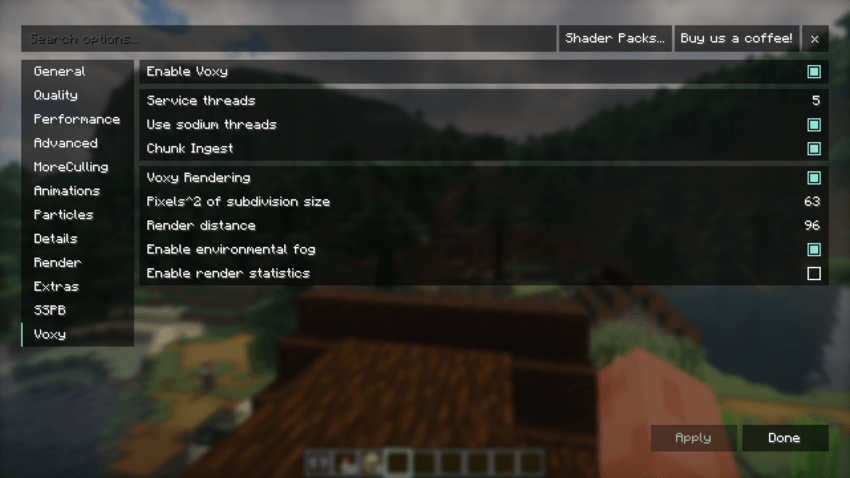
- Optimal Voxy Core Rendering Settings (Pre-Configured)
The core Voxy rendering settings in this pack are carefully balanced to maximize LOD distance while protecting your GPU VRAM and preventing micro-stutters during shader rendering.
⚙️ Setting Explanations & Tweaking Guide
Enable Voxy (On): Toggles the primary Voxy LOD rendering engine.
📈 On: Enables distant terrain rendering beyond vanilla limits.
📉 Off: Disables Voxy completely, reverting back to standard Minecraft rendering.
Service Threads (5): Sets the number of background CPU threads allocated for Voxy processing.
📈 Increase (e.g., 6-8): Speeds up background mesh building if you have a high-end processor.
📉 Decrease (e.g., 3-4): Frees up CPU threads for lower-tier processors to prevent system lag.
Use Sodium Threads (On): Synchronizes Voxy's threading pipeline with Sodium's chunk update threads.
📈 On: Recommended. Improves CPU efficiency and keeps chunk updates harmonious.
📉 Off: May cause uneven chunk updates or minor stuttering.
Chunk Ingest (On): Handles the active transfer of newly loaded chunk data into Voxy's LOD system.
📈 On: Essential for real-time LOD updates as you explore new areas.
📉 Off: Pauses LOD generation for new chunks.
Pixels^2 of Subdivision Size (63): Controls the geometric detail/density of distant Voxy chunks.
📈 Increase (e.g., 100+): Lowers visual detail, significantly reducing GPU/VRAM load and boosting FPS.
📉 Decrease (e.g., 32-16): Increases mesh detail for sharper landscapes, but heavily taxes VRAM and GPU power.
Render Distance (96): Sets the absolute boundary in chunks for Voxy's distant terrain rendering.
📈 Increase (e.g., 128+): Pushes horizons further out, requiring significantly more VRAM.
📉 Decrease (e.g., 64-32): Saves massive amounts of GPU memory and ensures stability on GPUs with 6GB or less VRAM.
Enable Environmental Fog (On): Blends the edge of Voxy LOD chunks smoothly into the atmosphere.
📈 On: Creates a seamless, immersive transition to the horizon.
📉 Off: Sharp cutoffs at distant edges, slightly lighter on GPU.
- Optimal Voxy World Gen Settings (Pre-Configured)
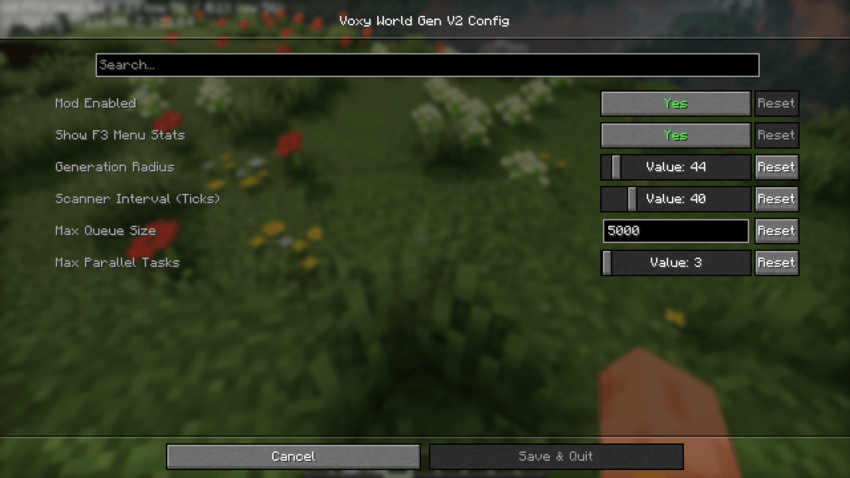
The Voxy World Gen V2 configuration in this pack comes pre-tuned with optimized, lower values out of the box. High generation settings cause heavy CPU spikes and severe micro-stutters when moving through new terrain. These presets ensure a 100% stutter-free and smooth experience across all hardware configurations.
⚙️ Setting Explanations & Tweaking Guide
Generation Radius (44): Determines how far away from the player new terrain chunks will be generated.
📈 Increase: Generates terrain further ahead so distant landscapes appear sooner, but increases CPU load.
📉 Decrease: Reduces load on your processor, ideal if you experience lag while flying or riding fast.
Scanner Interval in Ticks (40): Controls how frequently the mod checks for missing chunks that need generating (20 ticks = 1 second).
📈 Increase (e.g., 60-80): Makes checks less frequent, freeing up CPU resources for smoother FPS.
📉 Decrease (e.g., 10-20): Scans more rapidly for faster chunk loading, but can cause CPU lag spikes.
Max Queue Size (5000): Limits the number of chunks waiting in line to be generated.
📈 Increase: Keeps large generation tasks stacked during fast travel, but consumes more RAM/VRAM.
📉 Decrease: Prevents memory buildup on lower-tier systems.
Max Parallel Tasks (2): Sets the maximum number of CPU threads used simultaneously for world generation.
📈 Increase (e.g., 4 or 8): Dramatically speeds up world loading if you have a powerful multi-core CPU.
📉 Decrease (1 or 2): Prevents CPU overloading and eliminates lag spikes on mid-to-entry-level processors.
📊 Official Developer Performance & FPS Benchmark
The modpack has been thoroughly tested on the developer's official hardware configuration, delivering highly stable performance:
RTX 3050 6gb vram - i5 12450 h test Allocate 6 GB to Minecraft
🚀 Vanilla Mode (No Shaders): 350+ FPS (Ultra-smooth, zero-lag gameplay. Very lightweight on the GPU!)
🌌 Photon Shaders Enabled: 105+ FPS (Stunning cinematic visual quality while maintaining high fluid performance)
Compatibility
Mod Loaders
Game Versions
Recommended Gear
AffiliateHardware and extras that pair well with this modpack.

Mini PC for Self-Hosting
A low-power box that can sit in a cupboard and run a modded server around the clock.

Minecraft Enderman Character Plush
Enderman plush toys, and a reliable gift for a younger player.

LEGO Minecraft Set
Official sets that translate the building side of the game off-screen.
As an Amazon Associate I earn from qualifying purchases.
Screenshots
Similar Modpacks

Society: Sunlit Cobblemon
The farming of Stardew Valley experience, with Cobblemon at your side doing the farming! A fully integrated spinoff of...

Create Aeronautics - Skybound | Create Aeronautics & Create Addons with Quests
A modpack built around Create Aeronautics and its main addons, set in a world with floating islands terrain generation.

New Revolution - An Improved Vanilla Experience | 1.21 UPDATE!
An incredible modpack that expands all the features of the game. Try it, you won't regret it!

Horrorland - With Horror Quests!
A modpack only for the bravest! The most terrifying and beloved by the community mods, evil creatures, dark environments...

Ben 10 Survival
A Modpack based around a Ben 10 Lucraft Addon

EMC: To The Sky
A Skyblock modpack focusing on the mod ProjectE
Contained Mods (55)
![[EMF] Entity Model Features [Fabric & Forge]](https://media.forgecdn.net/avatars/983/284/638491564386011875.png)
[EMF] Entity Model Features [Fabric & Forge]
EMF is an, OptiFine format, Custom Entity Model replacement mod available for Fabric and Forge.
![[ETF] Entity Texture Features - [Fabric & Forge]](https://media.forgecdn.net/avatars/983/279/638491557830728907.png)
[ETF] Entity Texture Features - [Fabric & Forge]
Custom, Emissive and Varied mobs like Optifine and so much more.. +Player skin features!)

AmbientSounds 6
#listentonature

BadOptimizations
Optimization mod that focuses on things other than rendering

Better Block Entities
A Minecraft optimization mod for Fabric/Sodium that improves FPS / Block Entity Rendering by implementing a Hybrid Rende...

BSL Shaders
Shaderpack for Minecraft: Java Edition. It's bright, colorful, and distinct.

Cloth Config API (Fabric/Forge/NeoForge)
Config Screen API for Minecraft
Complementary Shaders - Reimagined
Preserving the elements of Minecraft with exceptional quality, detail, and performance.
Complementary Shaders - Unbound
Transforming the visuals of Minecraft with exceptional quality, detail, and performance.
Concurrent Chunk Management Engine
A Fabric mod designed to improve the chunk performance of Minecraft.

CreativeCore
a core mod
Dynamic FPS
Improve performance when Minecraft is in the background

e4mc
Open a LAN server to anyone, anywhere, anytime.
Entity Culling Fabric/Forge
Using async path-tracing to hide BlockEntities/Entities that are not visible

Fabric API
Core API library for the Fabric toolchain

Fabric Language Kotlin
Fabric language module for Kotlin

Fabrishot
Take large screenshots because why not
Fast Noise
This optimizes noise generation

FerriteCore (Fabric)
Memory usage optimizations

I Like Vanilla
A shader that improves minecraft's style instead of replacing it

ImmediatelyFast
Speed up immediate mode rendering in Minecraft

Iris Shaders
A modern shaders mod for Minecraft intended to be compatible with existing Optifine shaders

Ixeris
Buffered raw input and threaded event polling

Ksyxis
Speed up your world loading by removing unneeded chunks.

Lithium (Fabric/NeoForge)
An optimization mod for Minecraft which improves server performance significantly.

Mellow
Shaderpack with a painterly aesthetic made for people who want to actually play the game. It's easy on your eyes and on...

MLG with Meme Song
A fun Fabric mod that plays legendary, random meme music for 15 seconds when you make a successful clutch (Water, Boat,...

Mod Menu
Adds a mod menu to view the list of mods you have installed.

ModernFix-mVUS
A fork of ModernFix that adds minor version update support.

MoreCulling
A mod that changes how multiple types of culling are handled in order to improve performance

Mouse Tweaks
Enhances inventory management by adding various functions to the mouse buttons.

Noble Shaders
Using clever lighting techniques and powerful customization to create clean, immersive, and enjoyable visuals.
Not Enough Animations
Bringing first-person animations to the third-person
OptiGUI
Blazing fast custom GUI textures on Fabric and Quilt with built-in OptiFine custom GUI resource pack support

Packet Fixer
A simple mod to solve various problems with packets, NBTs and timeouts.

Photon Shader
A gameplay-focused shader pack with a semi-realistic style

Presence Footsteps
An overly complicated sound mod

Reese's Sodium Options
Alternative Options Menu for Sodium

Resourceful Config
Resourceful Config is a mod that allows for developers to make crossplatform configs

Resourceful Lib
Lib for Team Resourceful and more

Resourcify
In-game resource pack, data pack and shader browser and updater
ScalableLux
A Fabric mod based on Starlight that improves the performance of light updates in Minecraft.

ServerCore
A mod that aims to optimize the minecraft server.

Sodium
The fastest and most compatible rendering optimization mod for Minecraft. Now available for both NeoForge and Fabric!

Sodium Extra
Features that shouldn't be in Sodium

Sodium Shadowy Path Blocks
Reintroduces vanilla-like smooth lighting to non-full blocks (e.g. dirt paths and how they have dark shading when direct...

Solas Shader
A good performing fantasy stylized shaderpack with colored lighting and fancy visuals

spark
spark is a performance profiler for Minecraft clients, servers and proxies.

Structure Layout Optimizer
Attempts to optimize the generation of Jigsaw Structures and NBT pieces

Super Fast Math
A lightweight fabric mod that changes the sin and cos for better math.

Text Placeholder API
Placeholder and Text manipulation library for your Minecraft mods.
Xaero's World Map
Adds a fullscreen worldmap which shows you what you have explored in the world. Can work together with Xaero's Minimap.

YetAnotherConfigLib
A builder-based configuration library for Minecraft.

Your Options Shall Be Respected (YOSBR)
Your options shall be respected.

Zoomify
A zoom mod with infinite customizability.